
home → Guides → StoryboaRD
Film Storyboard Template

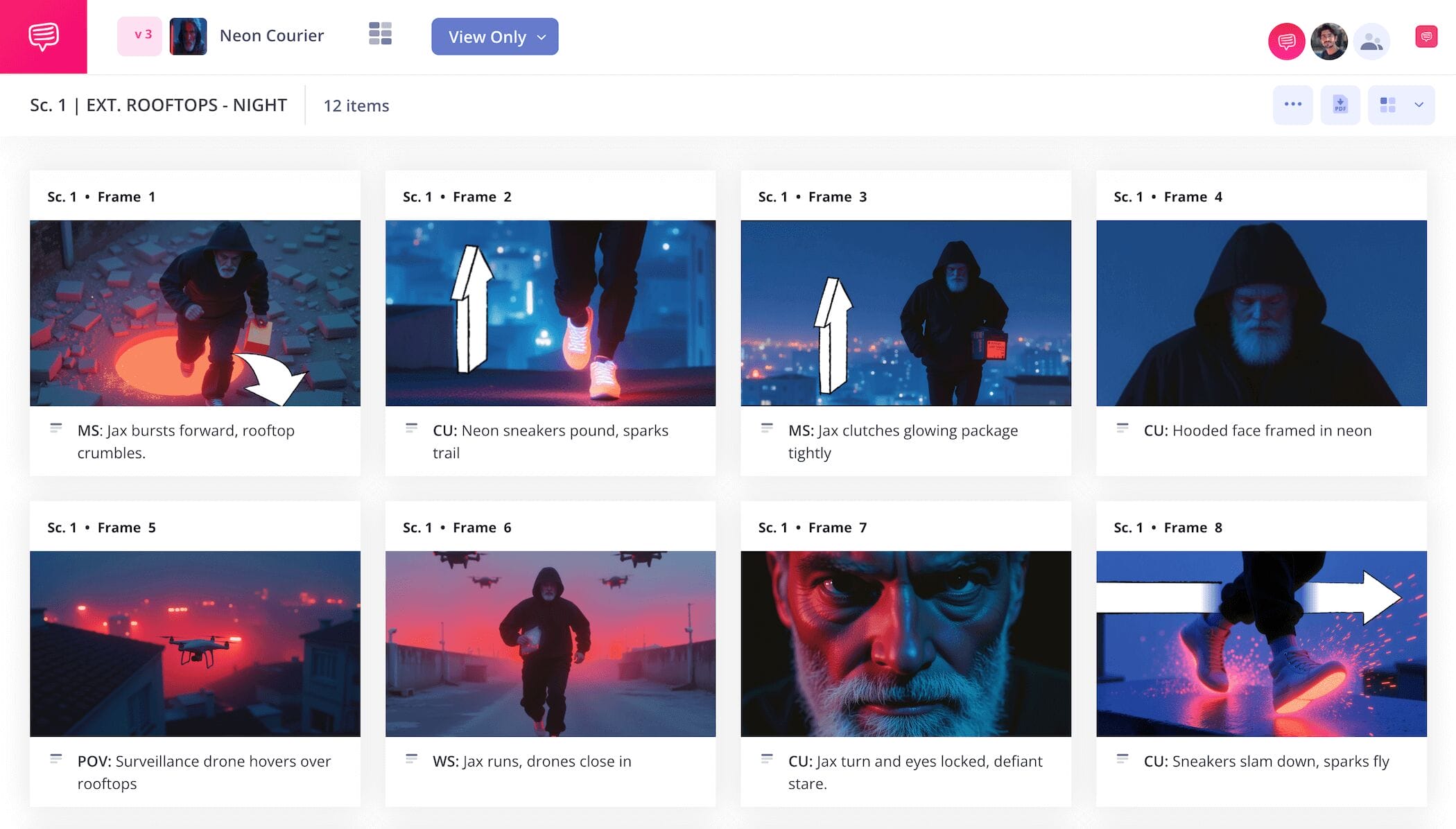
How to create a film storyboard template
Knowing that it’s important to create a storyboard in pre-production is one thing, but knowing how to create a film storyboard is another. This is the phase where your screenplay goes from ideas written on a page to a visual narrative with a much clearer sense of pacing and timing.
Whether you're figuring out how to create a storyboard for a short film or feature, you can ultimately save time and production cost when you nail this process down.
In this guide on how to create a storyboard for film, we’ll help you feel good and confident about how you’ll approach your film storyboarding by going through the most essential and universal storyboarding steps. We’ll be using StudioBinder’s Storyboard Creator to walk you through the entire process.
Step 1
1. Customize your template
The first step in ‘how to create a film storyboard’ is making sure you have a sturdy enough structure to build on, so let’s start there. The typical standard for film aspect ratio these days is 16:9, so naturally the filmmaking storyboard standard is the same with frame sizing.
3 to 6 frames per storyboard page is also a typical approach, and makes sense given that such vital visual information only gets harder to take in the more crowded it gets. If you anticipate having a lot of descriptive detail to write in next to each panel, you may want to consider a one-column approach. Either way, it’s also best not to exceed more than three columns per page.
If you’re working in StudioBinder, you’ll be prompted to answer these basic structural questions as you start a new project, which can also be reconfigured in the settings at any time while working on your ‘how to storyboard a movie’ project.
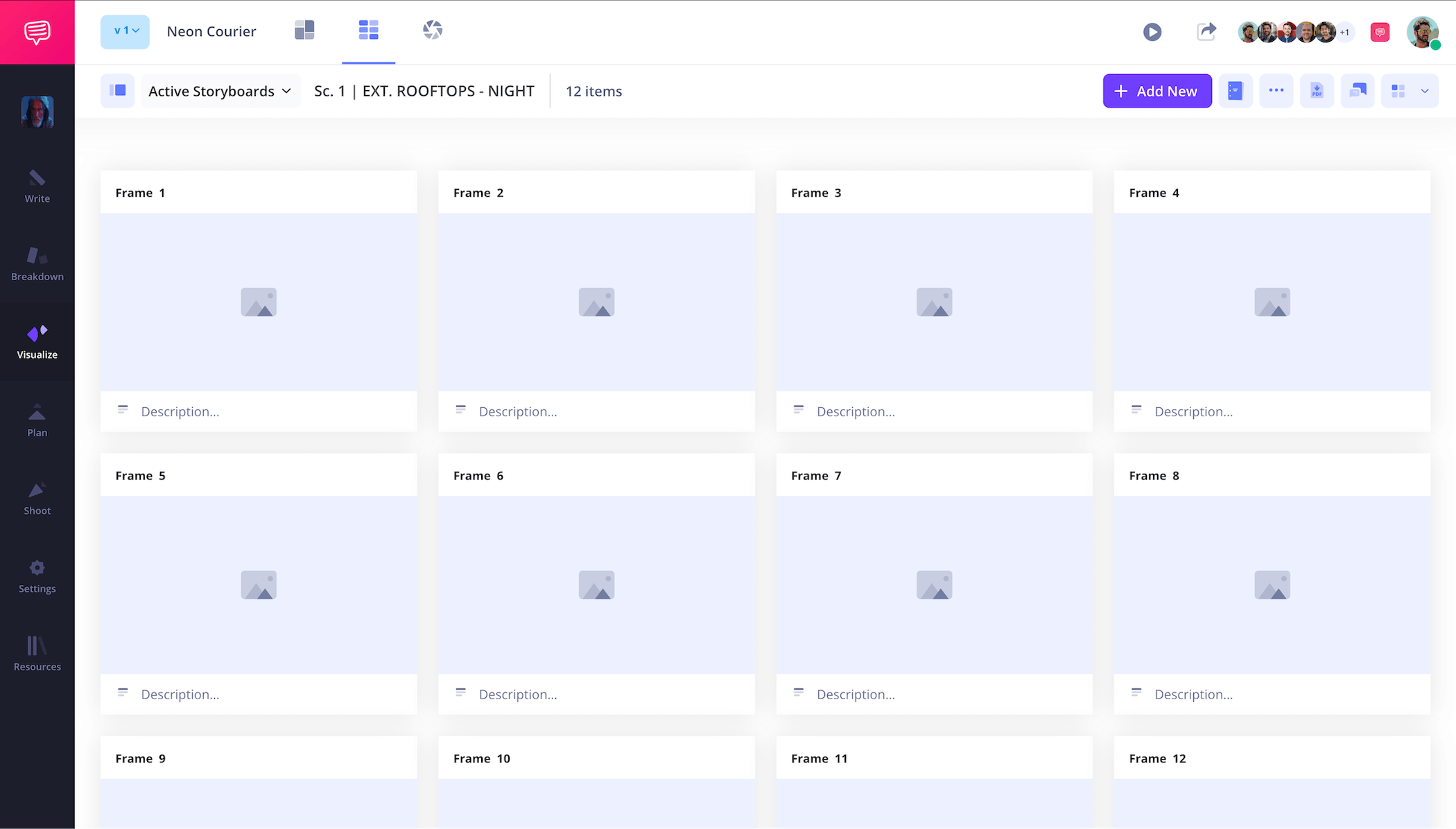
Now you can start feeling out the pacing of your screenplay as you write each story beat into the panel description field of your ‘how to create a storyboard for a film’ project. Many people make the mistake of simply copying and pasting each line from their script into the description, so make sure the amount of description space you’re using for each panel is intentional:
Do you want the dialogue and the visual information in this shot? What is the effect of combining two lines of information into one description? These are the questions worth asking yourself while building your ‘how to create a film storyboard’ project.
Step 2
2. Add images
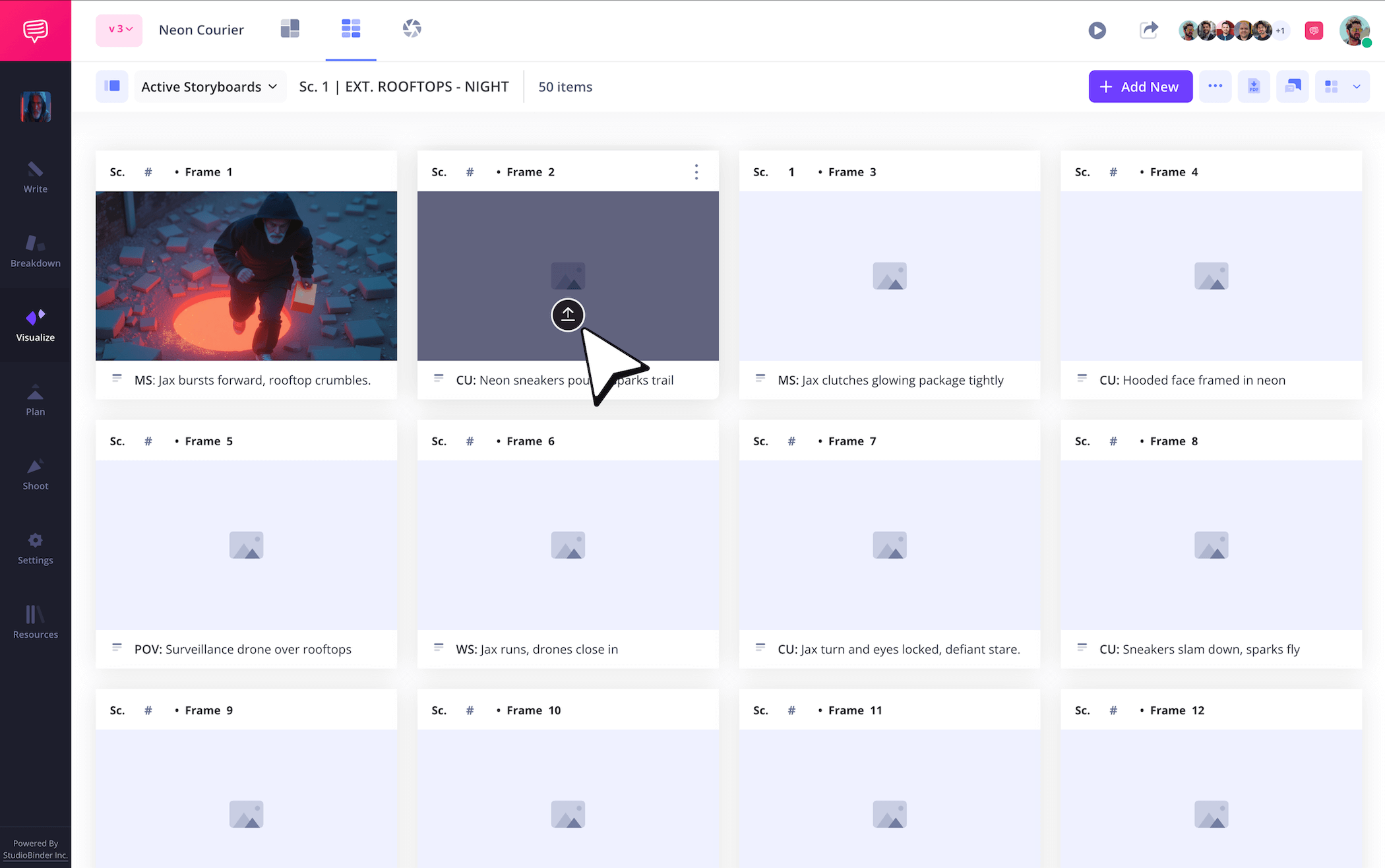
It’s not exactly controversial to say thinking up and adding images is both the most important and most exciting part of ‘how to create a film storyboard.’ Because you’ve done the hard work of pacing and structuring what you want to see in each frame with your descriptions, so now it’s just a matter of filling those frames up with all the imagination you can muster.
But don’t confuse imagination in film storyboarding with perfect artistry, because creating images (whether you’re illustrating them or pulling internet reference images) is all about communicating information. Use stick figures, heck use rock figures if that’s all you can draw, the importance lies in showing what angle the camera is set up and where the characters and environment will appear within the framing of that setup.
In StudioBinder, you just click Upload in any frame when you’re ready to add your images.
Step 3
3. Apply arrows
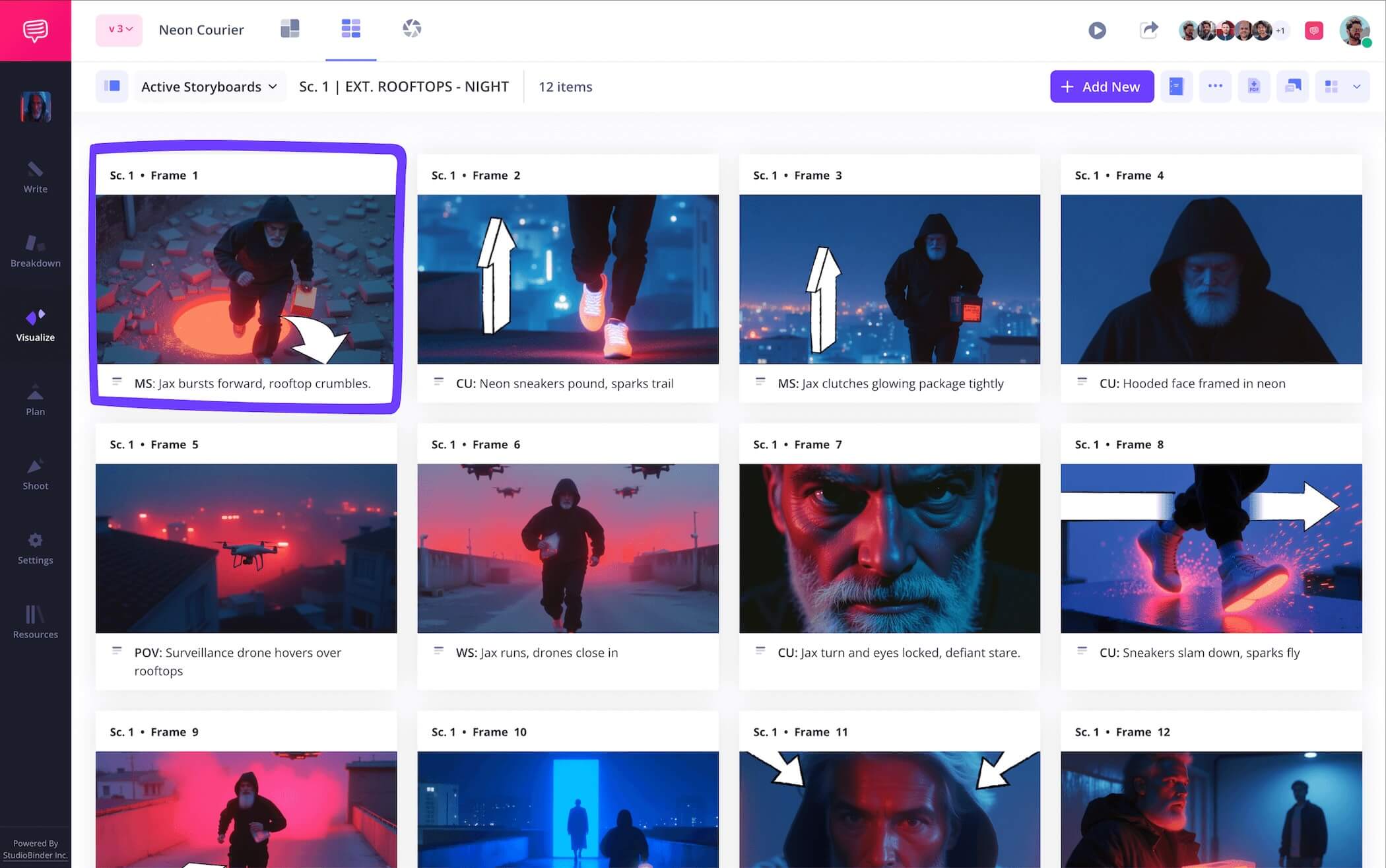
If your aim is to learn how to create a storyboard for a short film, then applying storyboard arrows to your images can be vital in saving the time and money it takes to go back to the drawing board. An image isn’t necessarily a lost cause if most people look at it and can’t tell what’s going on, you may just need to direct their attention to the action that’s supposed to be occurring.
For example, if two different shots keep reappearing in one panel after another on your ‘how to create a film storyboard’ template, the film director might look at it and think there’s a mistake and that the same two panel images shouldn’t be repeated. That is until you add arrows to each image indicating a swish pan. Now it’s clear that there will be a certain sense of energy captured by this back and forth and it’s definitely not a mistake.
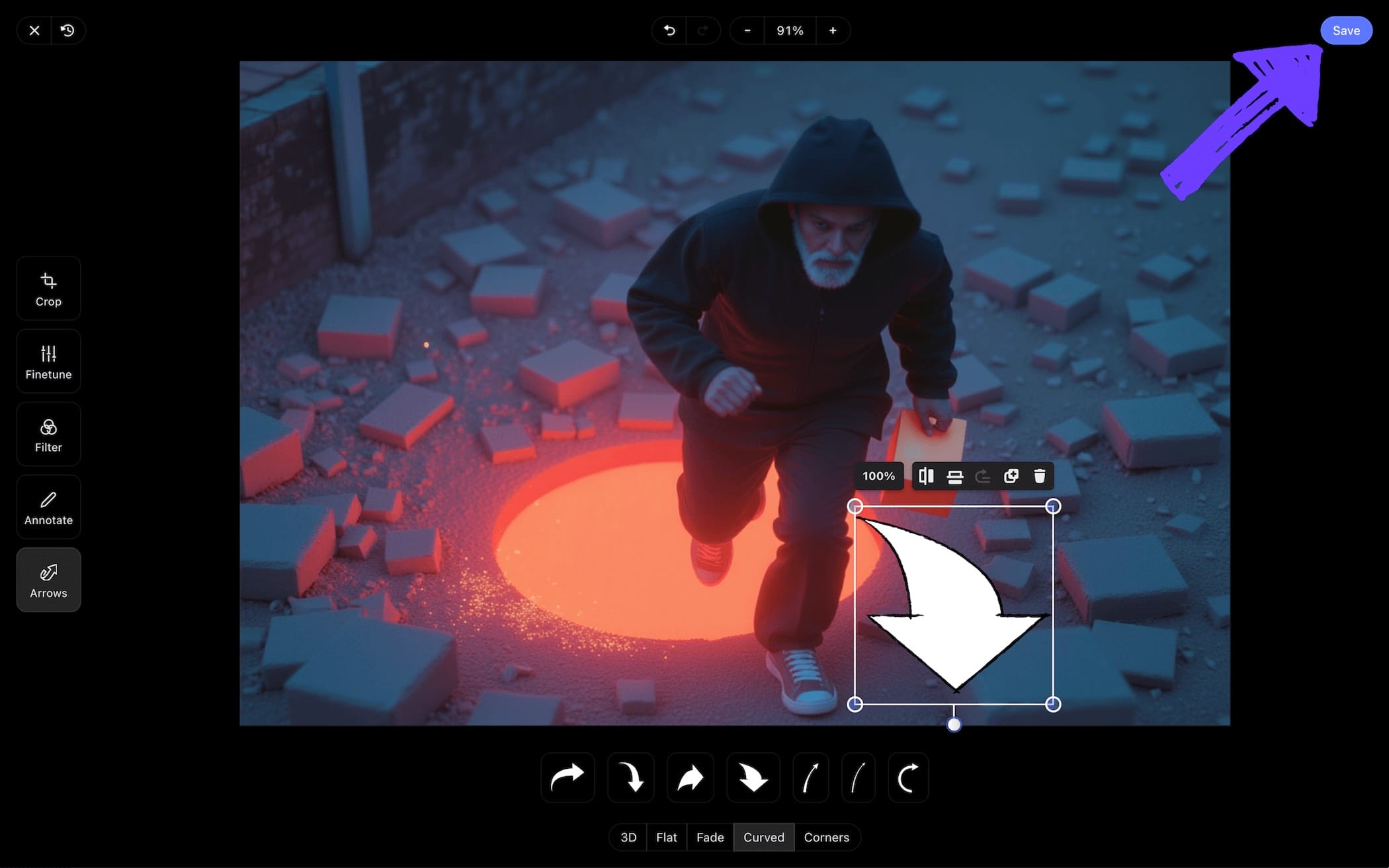
As you can see in our ‘how to create a storyboard for film’ example, we went into StudioBinder’s image editor and added a flat forward arrow to emphasize a zoom shot that wasn’t getting across in one of our images. Once we got the sizing and position of the arrow just right, we clicked Save and our edited image was immediately added into our ‘how to storyboard a movie’ project.
Step 4
4. Collaborate and get feedback
Big or small, short or feature, no matter the size of the film production you’re working on, you won’t truly know how to create a film storyboard until you’ve mastered collaborating with a team. This is because film storyboarding is like any other creative process, it’s prone to tunnel vision.
With a fresh perspective, you can see how others digest the visual language of your ‘how to create a storyboard for a film’ project, opening you up to new ways to improve it that you wouldn’t have considered before. Just as well, communication is key: how can you best articulate the kind of feedback you’re looking for? What kind of questions will get both you and your collaborators to discover the heart of the problem?
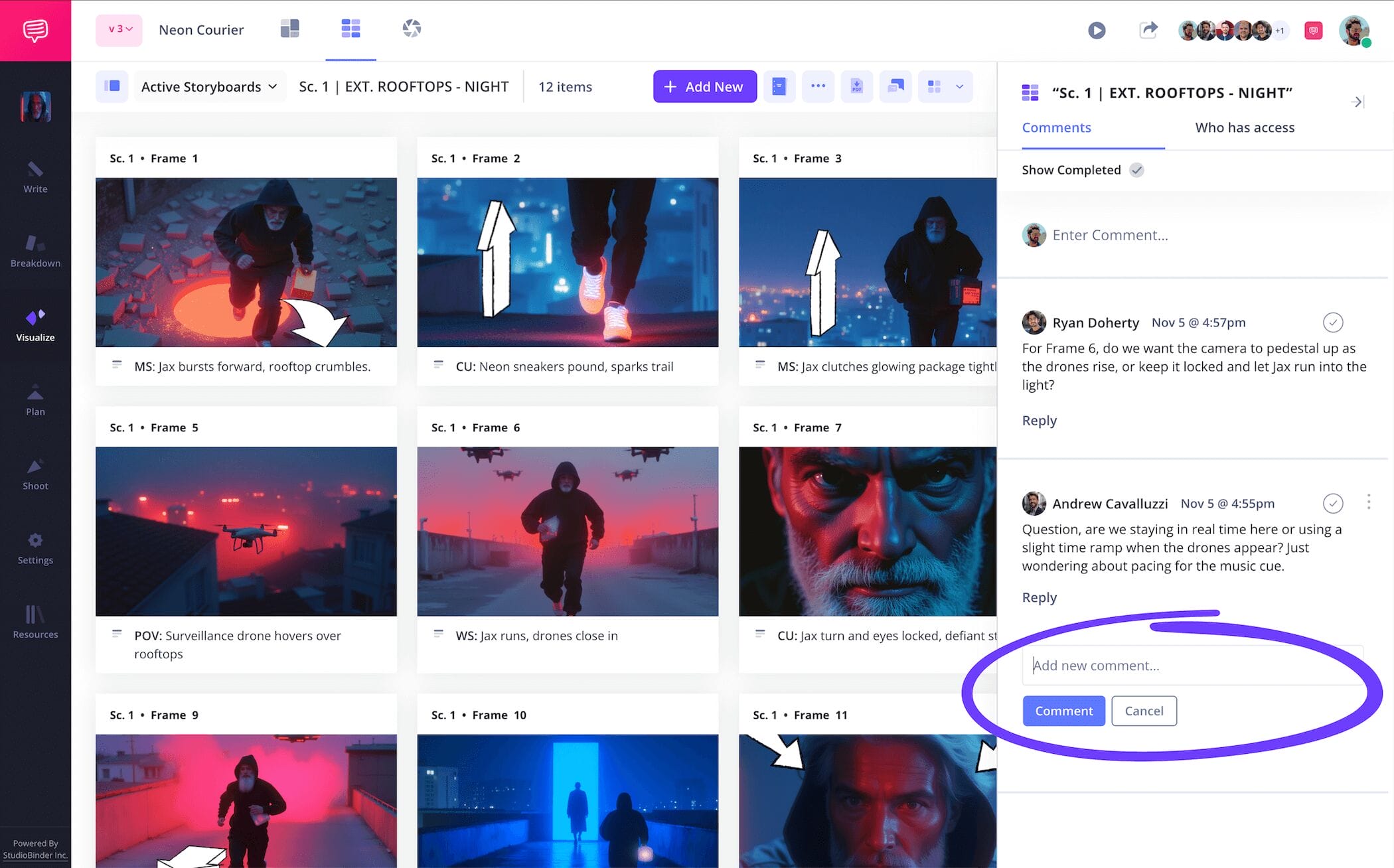
StudioBinder acts as a one-stop hub for all your filmmaking storyboard collaboration needs. You can send a view-only-link, or set individual invite permissions to commenter or editor. And with both these permissions enabled, your invitee can take to the comments section of your ‘how to storyboard a movie’ template to share and discuss their notes with you.
Step 5
5. Convert to storyboard PDF
Whether you’re here to learn how to create a film storyboard, or how to create a storyboard for a short film, constantly saving your work so you don’t accidentally change or lose any of it is possibly the most important step of all. This is why, as you edit and test out different approaches to your storyboard, you’ll want to save each draft as a PDF document.
This will ensure all your work locks in as is so you can return to it if the need ever arises. Trust us, we’ve made the mistake of not saving our storyboard as a PDF and we regretted it when we realized we wanted to go back to our original structure but couldn't because it was long since deleted.
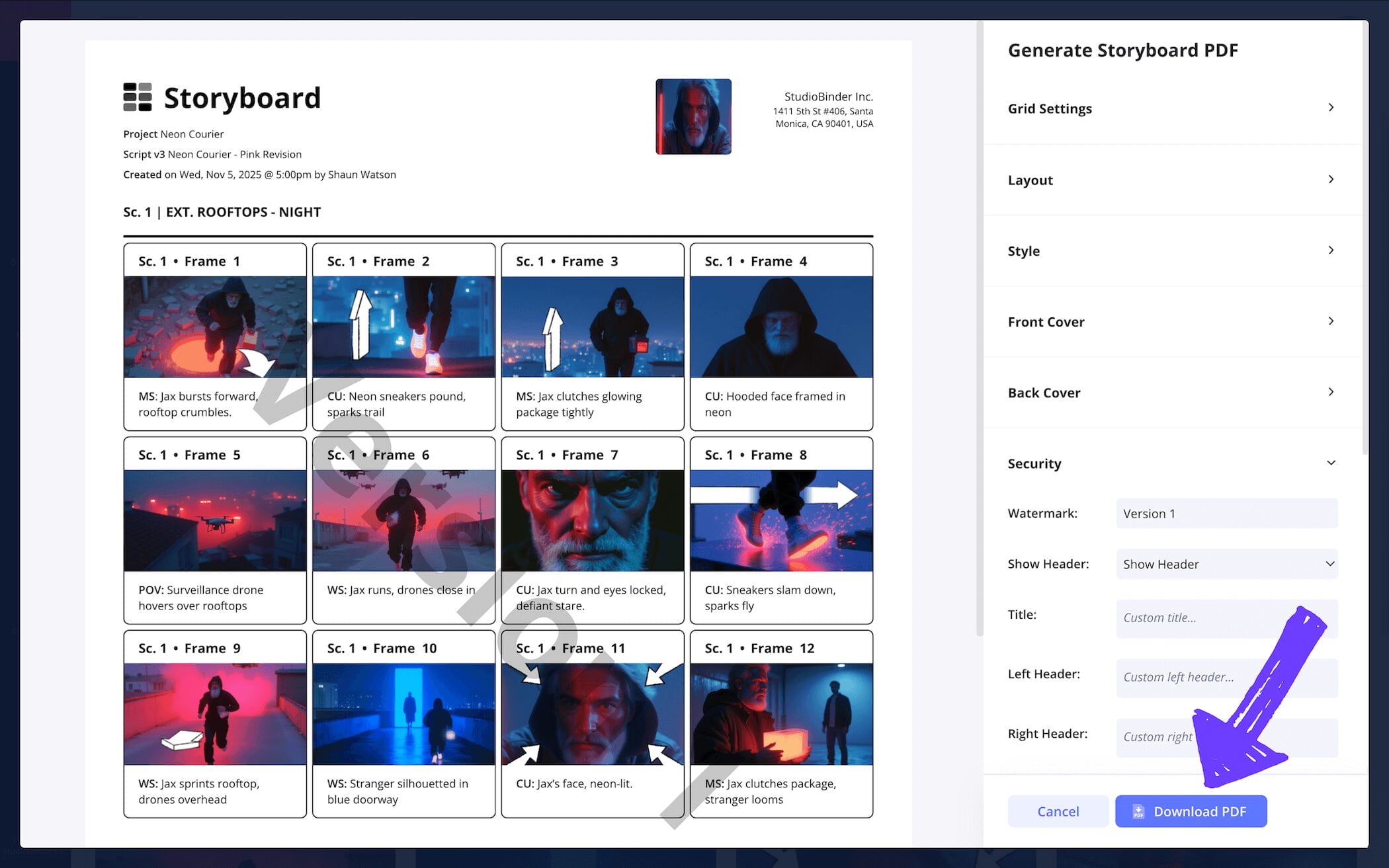
Just as well, you may find that in larger film productions you want to customize different PDF copies for the various individuals and departments that require your storyboard to work from. For our ‘how to create a film storyboard’ example, we went into StudioBinder’s PDF customizer and made all the right adjustments to meet all our department requests. Now we’re ready to save and print, but not before going into the security tab and adding a watermark. Better safe than sorry, right?
Conclusion
That's a wrap!
So, now you know how to create a film storyboard, huh? Well, we can’t deny this is one useful skill to have, but did you know there are quite a lot of different kinds of storyboards out there that can help expand your knowledge even further? Browse through all of StudioBinder’s free storyboard templates and see for yourself!
Frequently Asked Questions
Your questions, answered
When you decide to make a storyboard, you also have to decide if you’ll use a pre-made template found online, or if you’ll either physically or digitally create your own template. If you’re a first timer, we recommend using the endless amount of free templates you can find online. From there, start by writing your description into the description space below or near each of your storyboard panels. Then you can either draw each of the images into the panels (don’t worry, stick figures work just fine), or you can find reference images that speak to or match the mood you’re aiming for in each image. This is the broadest and most essential approach to making a storyboard.
The key difference between storyboarding a film trailer vs. storyboarding a film is that with a film trailer storyboard, you’re creating a feeling and an interest in seeing more, whereas with a film storyboard, you’re plotting and planning for a full narrative experience. Here’s a broad yet essential set of rules to keep in mind when creating a storyboard for a film trailer:
- Establish and show off the world of the story
- Use iconic images that say something profound without narrative context
- Since it’s a shorter storyboard, each panel can represent a shot
- Use description space for iconic trailer sound cues. Use storyboard arrows to indicate timing and intensity
- If it’s a movie that’s been shot, you can use actual footage stills instead of illustrating images.
There’s no sure way to success when storyboarding an animated short film, but there are essential steps and ideas you can apply as you delve into the creative process. Here are some of these tips, tricks, and rules of thumb to keep in mind as you go:
- Establish the core emotion that inspired your piece
- Divide the short story into a digestible three act structure
- Make sure each character expression can be felt, not just seen
- Make your main character’s intent clear, even if the dialogue was removed
- Prep for the animatics stage so you can see how it all flows together
- Don’t be afraid to make several storyboard drafts!
Film storyboarding is important because it helps you reach the heart of your narrative and cut it down to its most essential components. Think of creating a film storyboard like making a new screenplay draft in a visual dimension that exists between the script and the finished film. Before you put all the time, money and resources into crafting the visuals, you get to have a small, intimate experience of what watching those visuals will feel like. Then you can make all the proper adjustments and preparations you need to actually physically shoot your story.
Create your free storyboard
Visualize your film storyboard with our free template.
Get started for free
