home → Guides → StoryboaRD
How to Storyboard Action Scenes
Learn the process of storyboarding inside StudioBinder, a free platform for filmmakers, video agencies and more.

How to storyboard action scenes in 5 steps
One of the most complex sequences to plan and film is an action scene. So of course, learning how to storyboard action scenes is essential knowledge. A storyboard in film allows you to visually lay out and assess all the major frames or moments of a scene so you’re as prepared as can be when it comes time to shoot that bad boy. This endlessly helpful tool allows you to not only see sketched images of what each shot will look like, but also all the vital filmmaking information you’ll need to know in written descriptions next to each image. Talk about prepping before the big day, right?
But it’s one thing to plan out the key moments in a conversation between two characters, where do you even begin when it comes to a chase or fight scene that has more moving parts to it than a script, or even your own mind, can contain? Well, that’s what we’re here to explore and break down into more easy-to-understand terms. We’ll be using StudioBinder’s storyboard creator to take you through all the essential steps on how to storyboard an action scene, but these details are broad and can be applied with any storyboard of your choice, so use whatever works for you!
Step 1
1. Format your template
A good place to start our ‘how to storyboard action scene’ journey is to make sure we have a solid foundational storyboard structure. The go-to standard for a film storyboard action scene is to keep all your panels around a 16:9 aspect ratio. Unless you’re planning to film your action scene in a social media reel format, which would have a more vertical, 9:16 ratio. But even then, your storyboard panels can still sit at 16:9 for clarity while planning if you prefer. This is important when considering how to storyboard action scenes.
You can also have as many panels per storyboard page as you prefer, but we suggest the industry standard of 3 to 6 panels per page, since this leaves enough room for description and image space without making it visually overcrowded. In StudioBinder, you’ll choose from an array of aspect ratio and panels per page options as soon as you begin a new project, leaving your storyboard structure looking something like this:
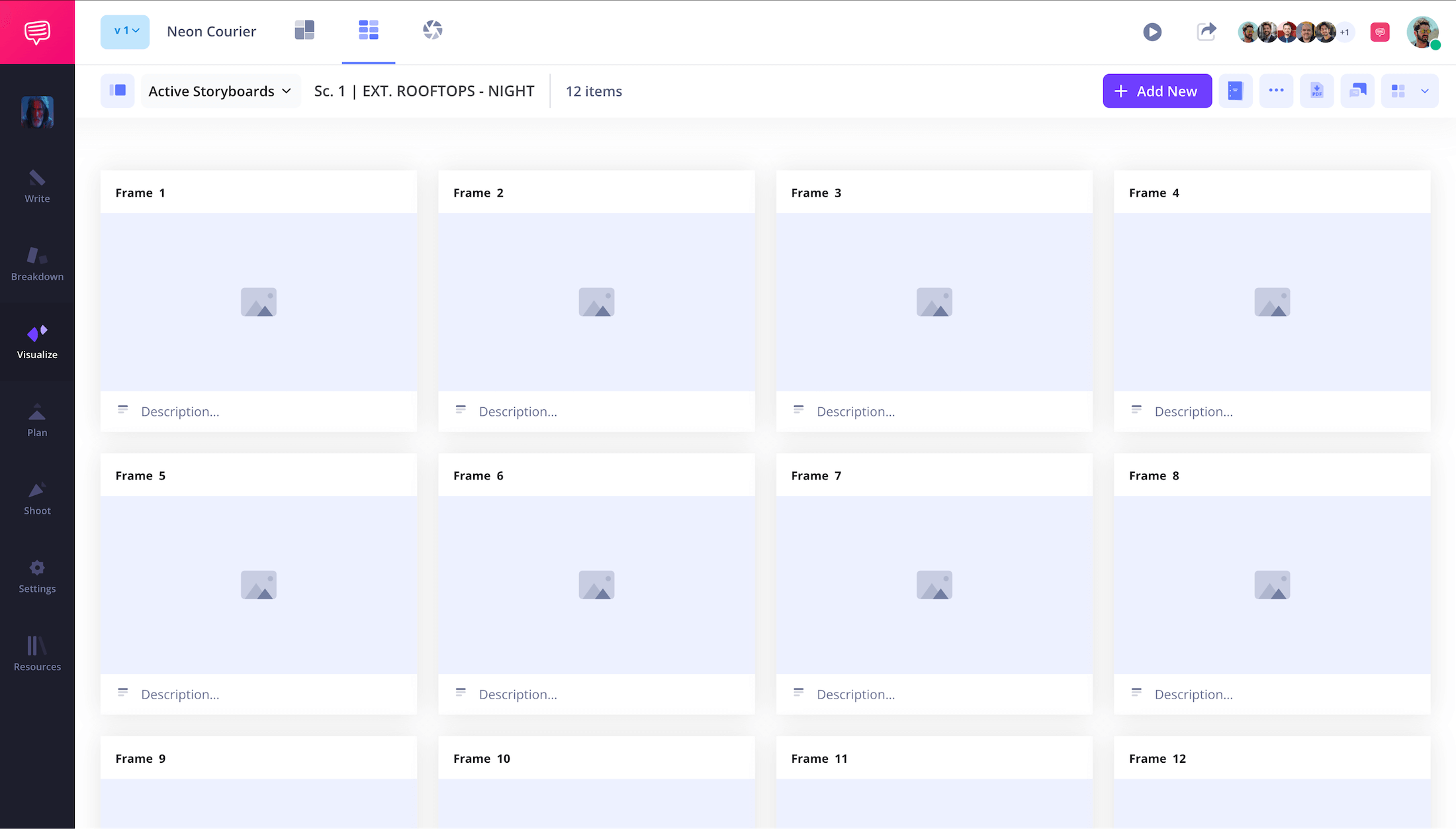
'How to storyboard action scenes’ is already getting much less daunting, right?
Step 2
2. Plot out all details
When it comes down to it, the answer to ‘how to storyboard action scenes’ isn’t entirely different from any other kind of storyboard scene’s answer. Because at the core, you’ll have to establish many of the same motivational questions:
- What is the scene’s tone? (funny, tragic, confusing, thrilling, etc.)
- Who’s scene is it? What does the main character(s) want?
- What changes for the character(s) between the start and end of the scene?
- Where should the audience’s attention be directed?
- How does this scene push the overarching plot forward?
We suggest writing down these core ideas and understanding them on a fundamental level. This will ensure that as you’re storyboarding your action scene, you keep everything as tight and intentional as possible.
Once these questions are well established, start breaking the scene down into its most important beats, just those moments that the scene wouldn’t make sense without. It’s also helpful to map out the geography of the scene - where your characters are at the start, where they go throughout the scene, and where they end up when it concludes. All important to consider for ‘how to storyboard action scenes.’
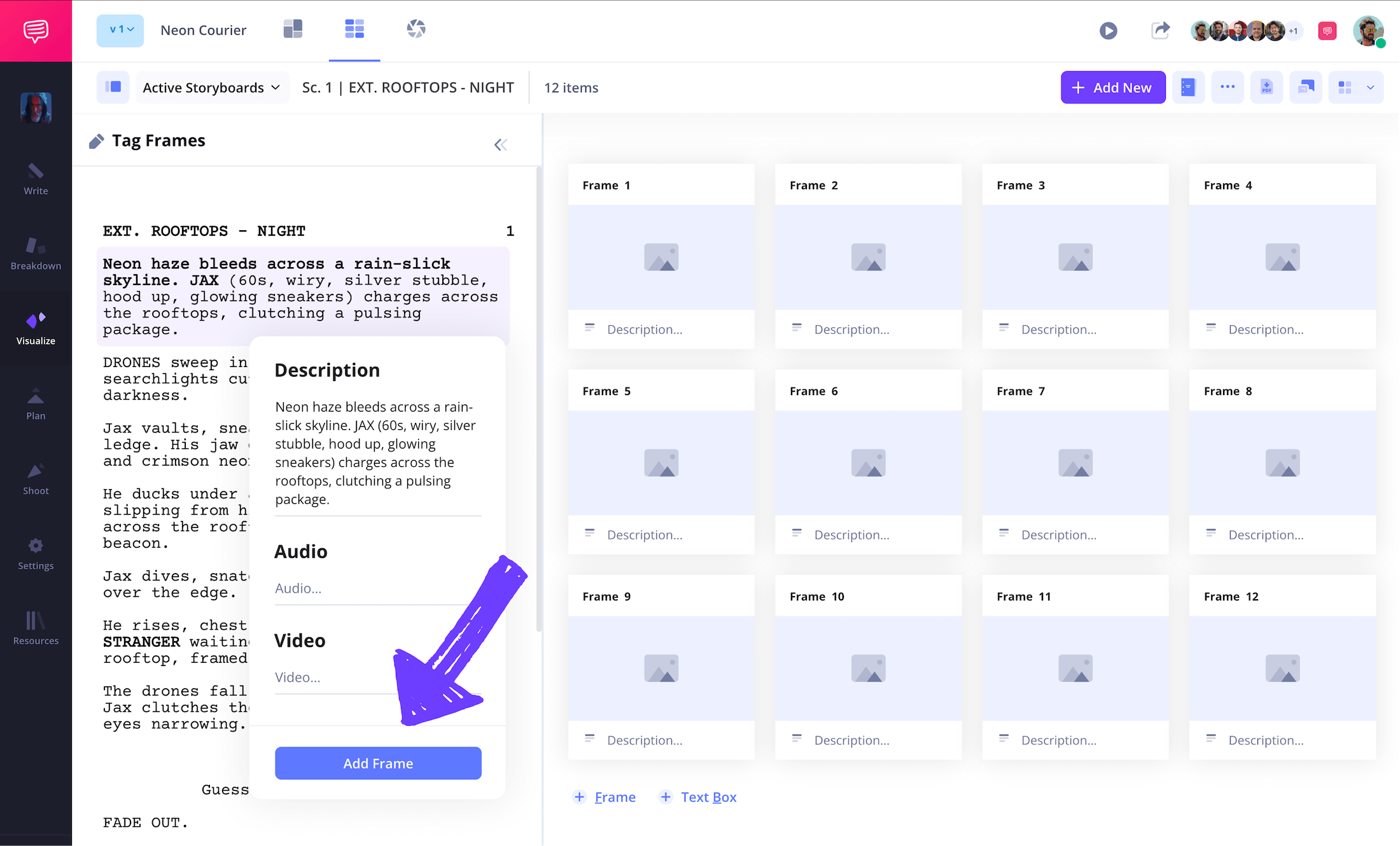
Once you have all this down and you put it all into a finished screenplay, or any written documentation of your scene’s ideas, you can import it directly into StudioBinder and immediately turn script lines into frame descriptions.
Step 3
3. Create and insert images
Now, you might be thinking how to storyboard action scenes when it comes to images? How you approach applying images to your action scene storyboard depends on the type of production you’re on. If you’re working alone or with a small production crew, maybe images pulled from the internet that reflect the ideas you’re aiming for suit your situation best.
Even if you’re not a professional storyboard artist though, the simplest stick figure and squiggly line sketches will do, as long as they contain and communicate all the vital information.
Whatever your situation, you’ll apply your understanding of the environment and important beats of the scene and turn them into images. This is all about finding the best character and camera staging for each of those action moments you know so well by now.
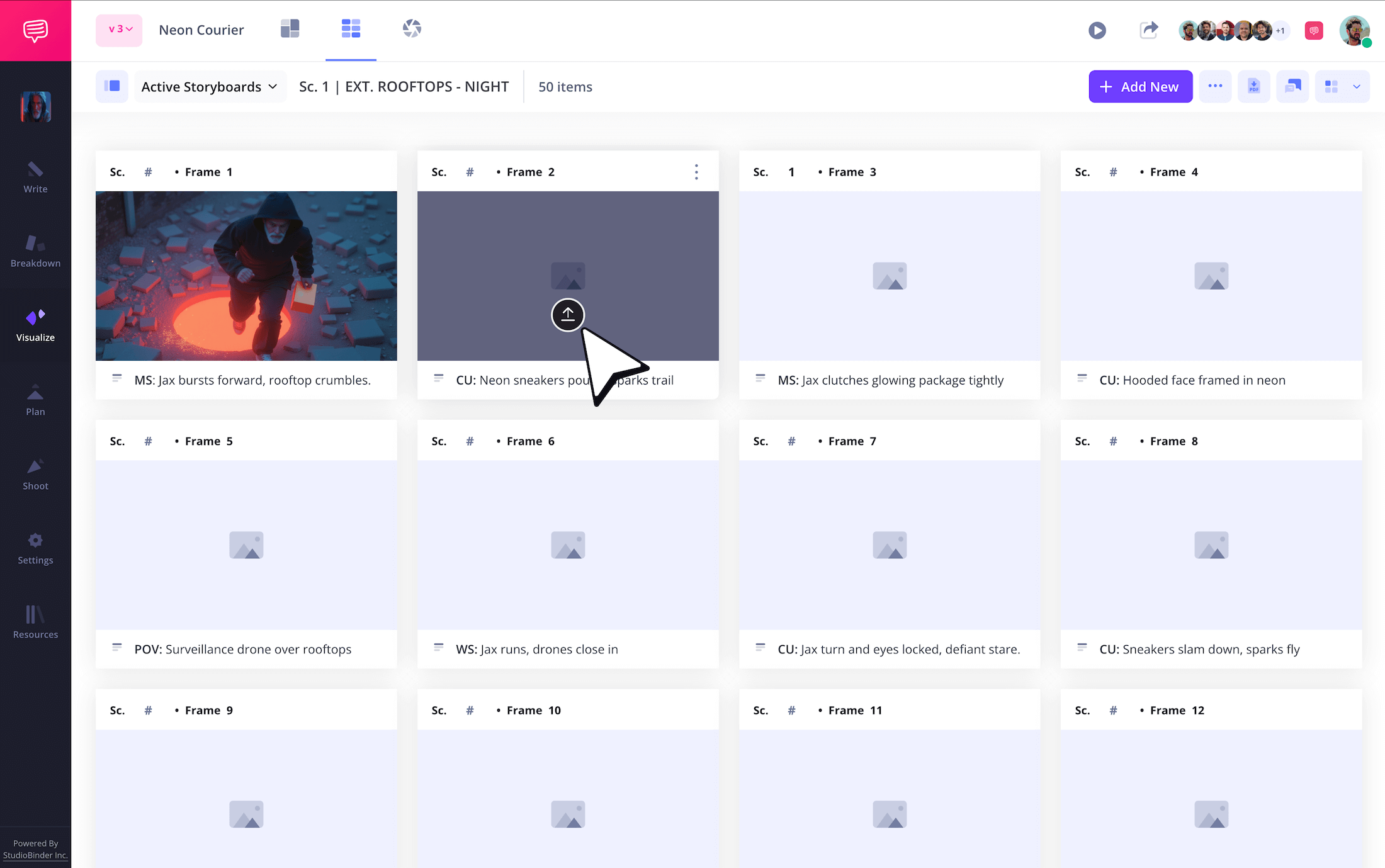
Just think, what captures the best style and communicates what’s happening at the same time? An essential question of ‘how to storyboard action scenes.’ If you’re working in StudioBinder, just click Upload on any panel to apply images.
Step 4
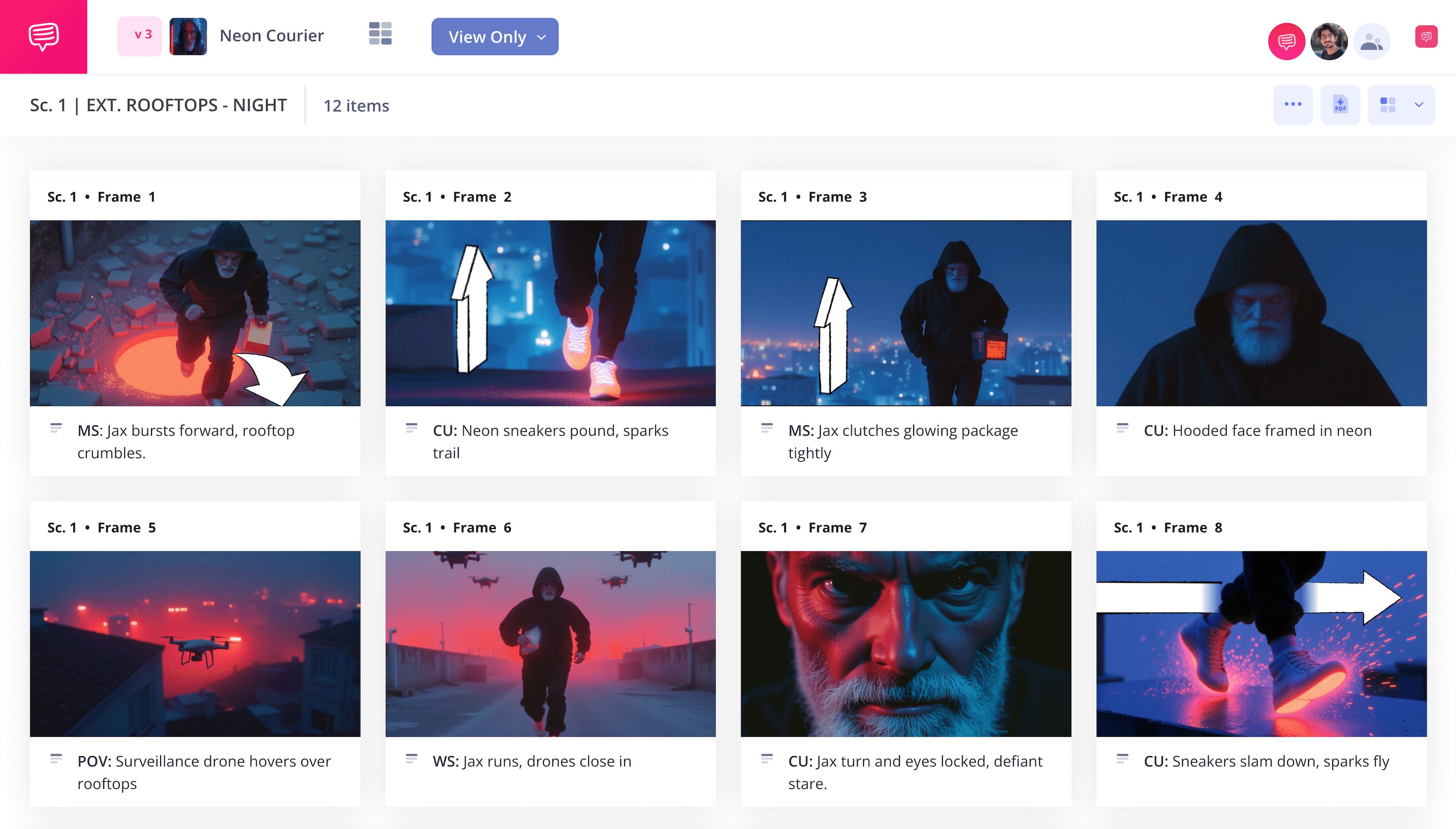
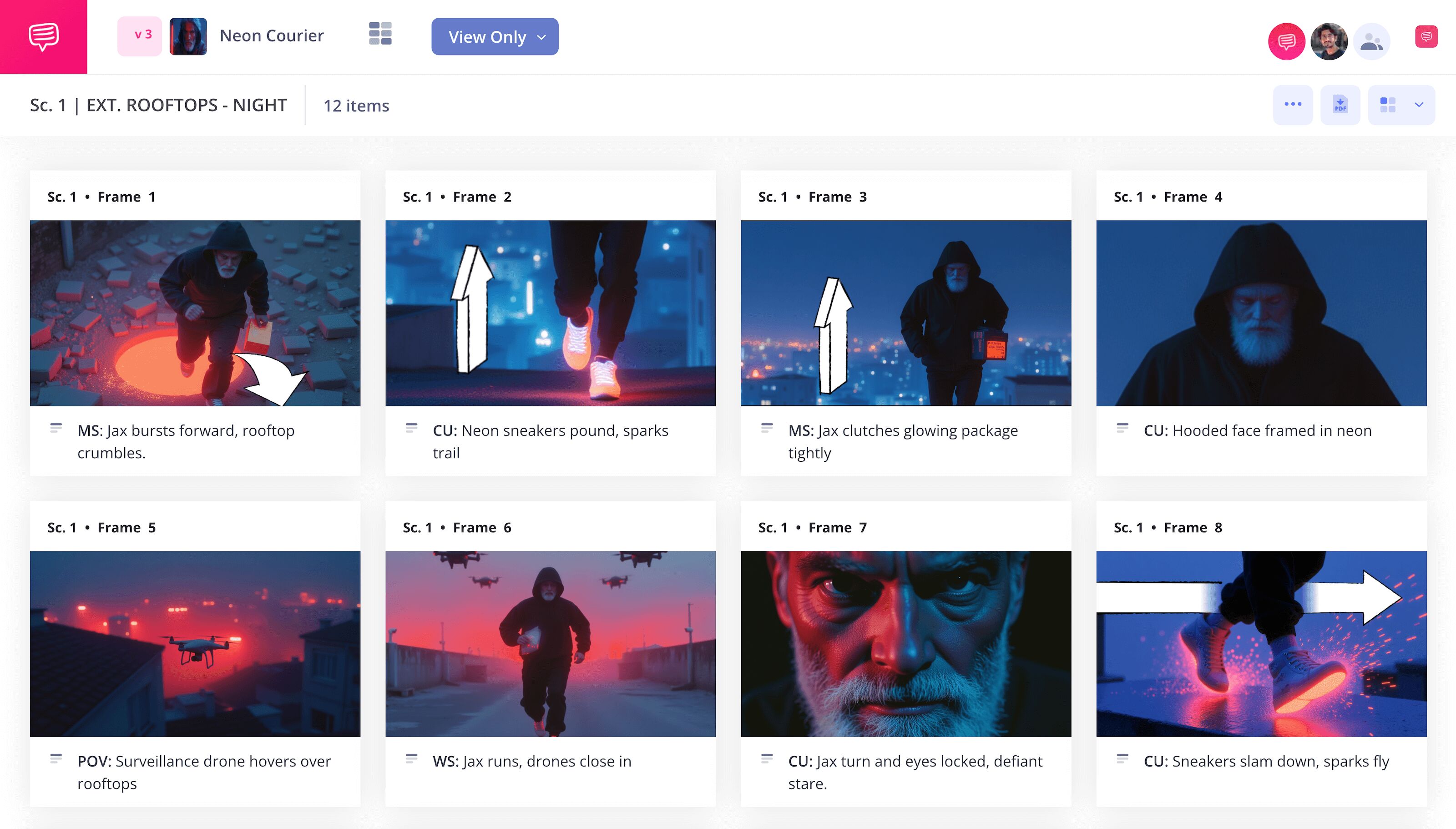
4. Use arrows for action
Sometimes just knowing how to storyboard action scenes isn’t enough. Having a certain intuition when something feels off while looking at a storyboard in film is also an important skill that comes with experience. Maybe your action scene is an intense fight between two characters, but the fourth shot’s sketch of the villain punching the protagonist isn’t communicating the intensity you hoped.
This is an over the shoulder shot and you want the audience to wince at this moment. Noticing disconnected moments like this on your film story board is a big reason why you’re making a storyboard in the first place. So, you get creative and add an arrow onto this image to communicate a whip pan shot that will disorient the audience as soon as the punch connects. Creative problems require creative solutions afterall.
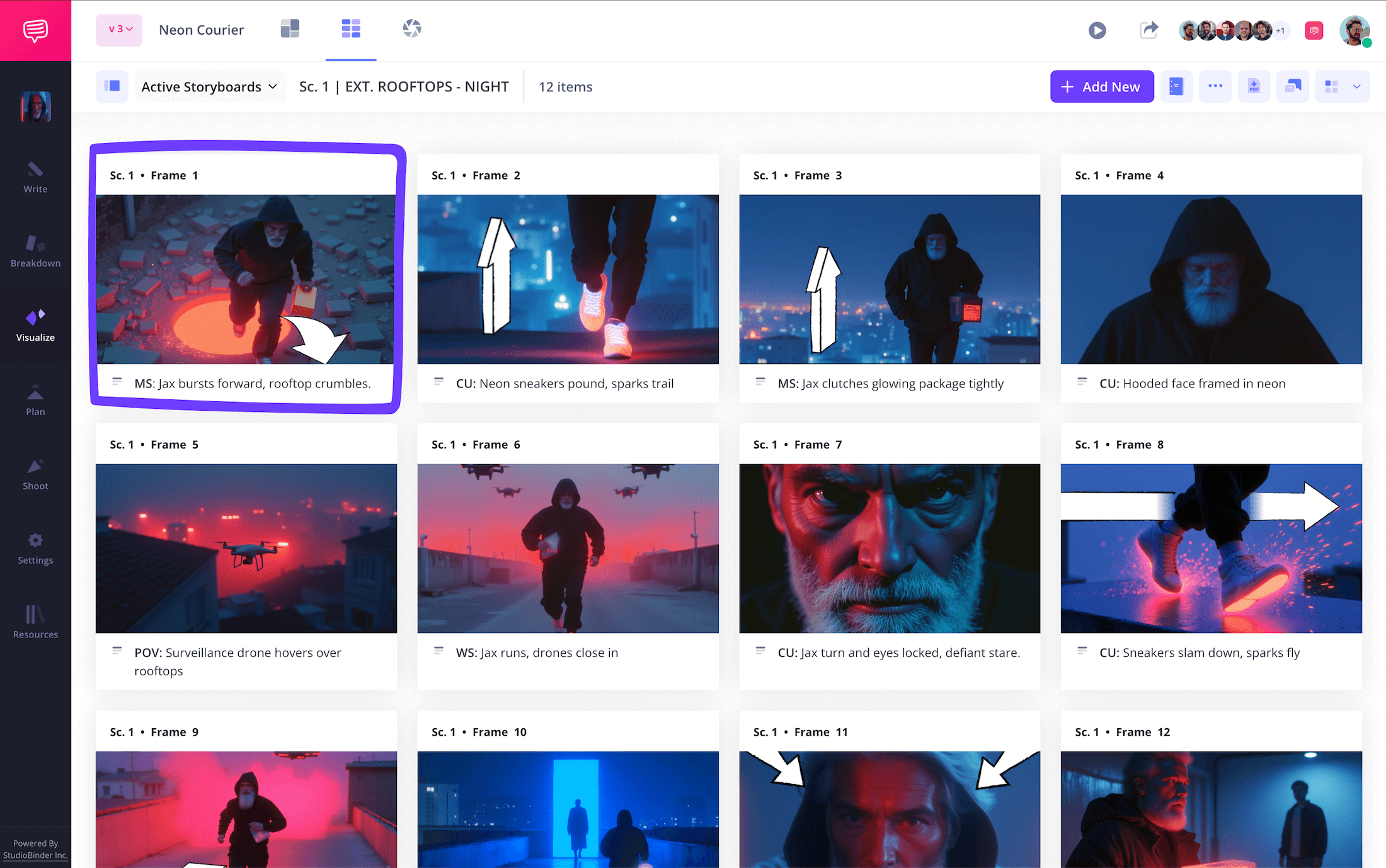
As you can see in our ‘how to storyboard action scene’ example, we added an arrow indicating a zoom shot into our action storyboard scene that helped emphasize a big moment that wasn’t quite connecting.
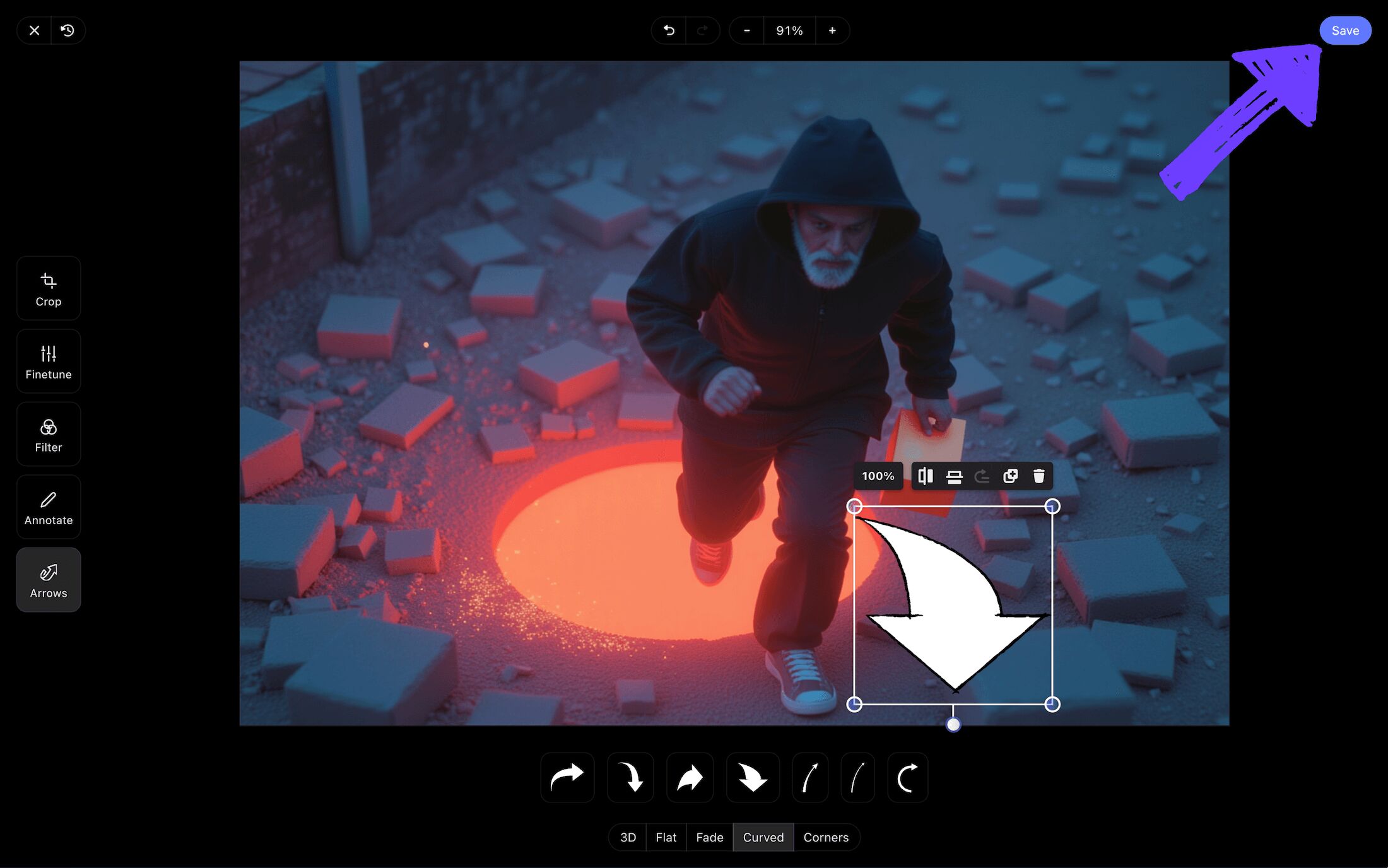
After testing out an array of storyboard arrow options in StudioBinder’s image editor, we found and customized the perfect arrow. After that, click Save and our edited image is added to the film storyboard.
Step 5
5. Collaborate and get feedback
There’s only so much use you’ll get out of answering the fundamentals of ‘how to storyboard action scenes.’ Because when it comes down to it, every creative storyboard project is unique, and therefore you can still run into all sorts of unique and unexpected problems.
Thankfully, filmmaking is a collaborative process. Several sets of eyes are better than one, so you’ll want a central hub where the entire pre-production crew can review and make edits to your storyboard.
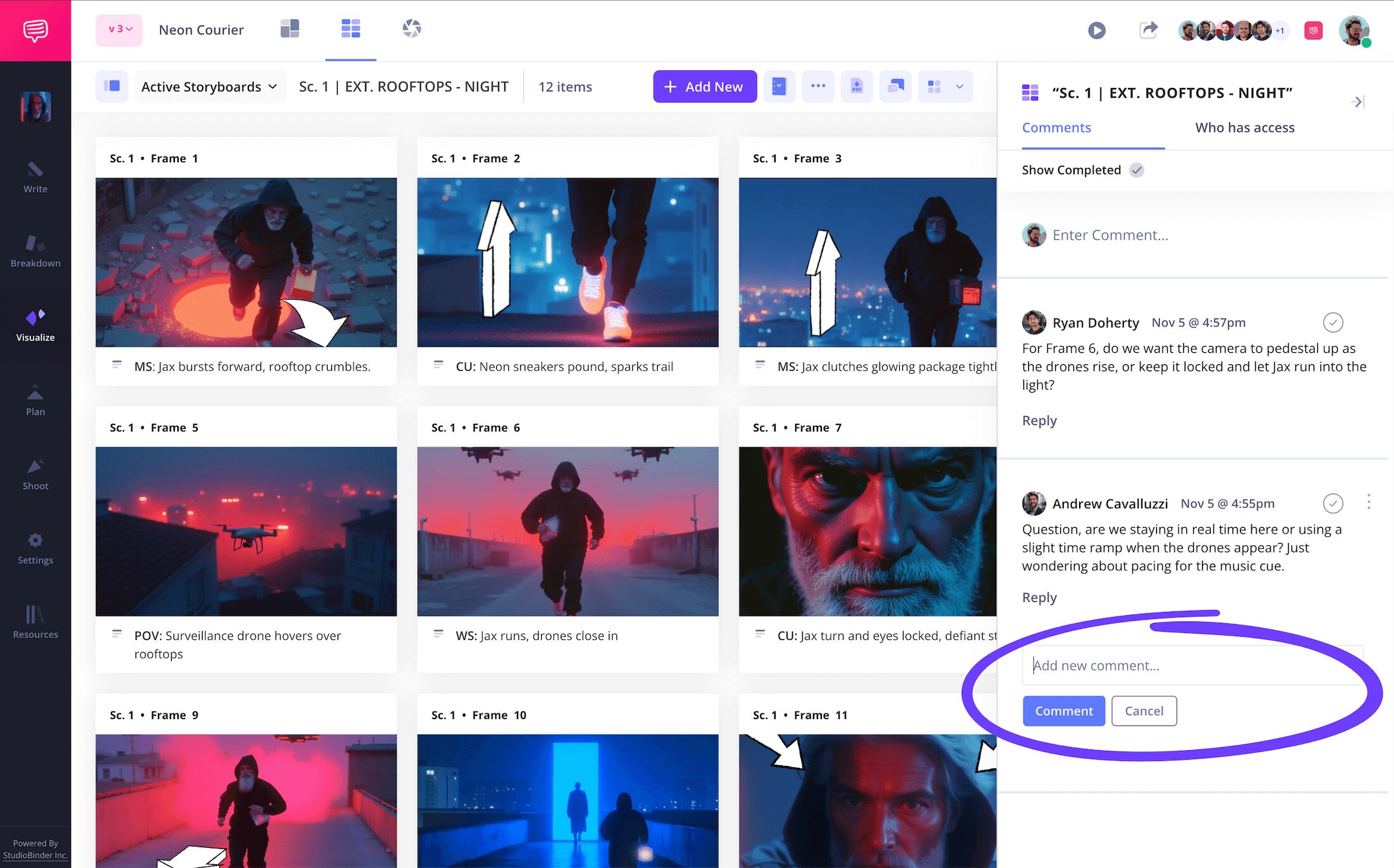
In StudioBinder, you can set individual invite permissions to either viewer, commenter, or editor.

With your entire team’s invite permissions set to their individual needs, you can now also review notes and start up discussions around edits all within the Comments tab to the right on your film story board. Those with commenter and editor permissions enabled will be able to take full advantage of the commenting feature.
Step 6
6. Convert to storyboard PDF
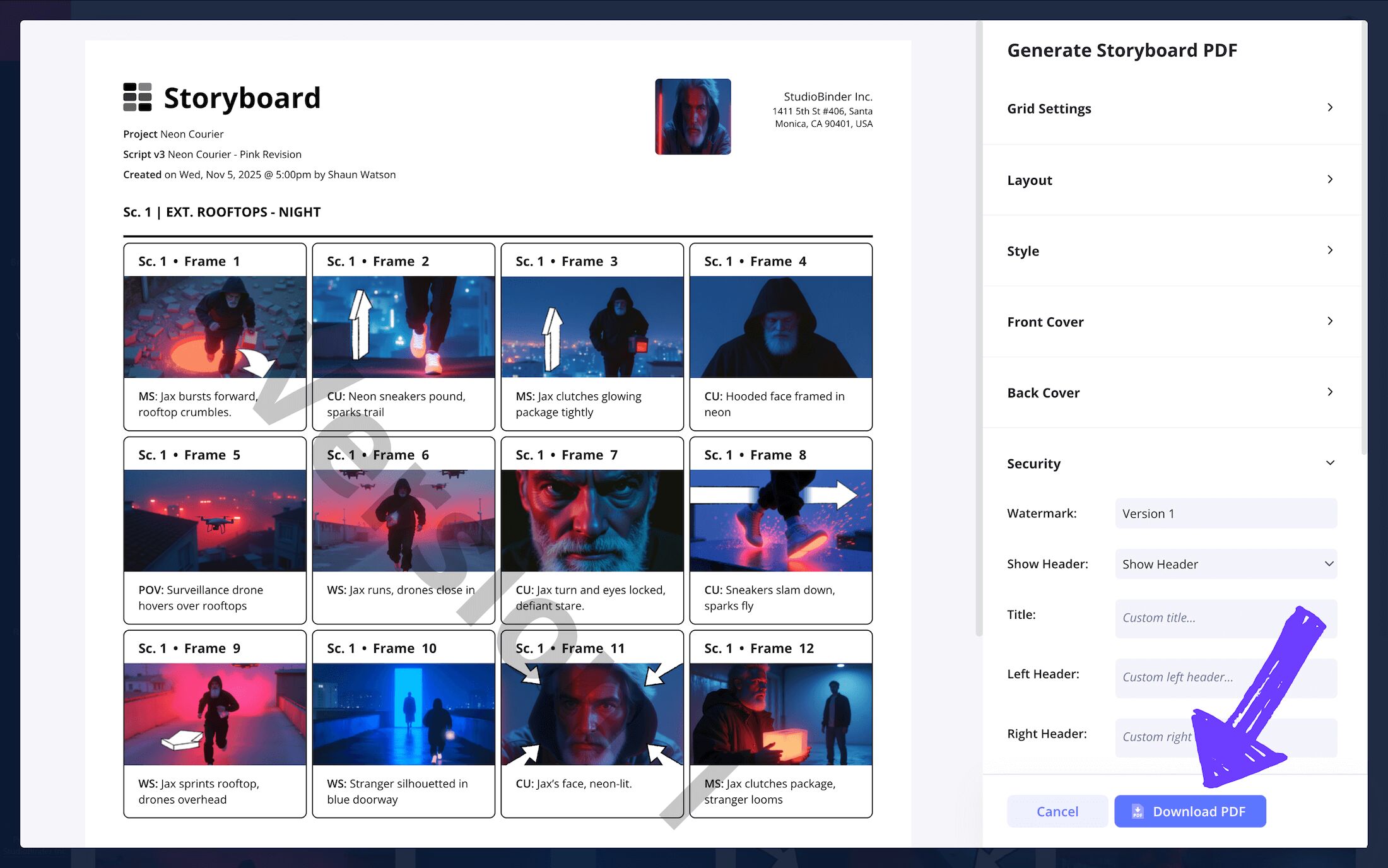
Now that you’ve learned how to storyboard an action scene, it’s time to learn how to make sure that storyboarded action scene doesn’t get accidentally lost or changed. Converting your storyboard to a PDF will take care of this problem and then some.
In addition to making your storyboard look professional and presentable, a PDF document can be easily shared and printed so you and your film crew can use it in whatever conditions you find yourself in, whether that’s during the filming of your action scene or during a staging meeting where all production departments are present.
Speaking of production departments, it’s not uncommon for different departments to request different formats for their copy of your storyboard in film. This is why StudioBinder has an exclusive PDF editor where you can edit everything from the font size to text color.
Our personal favorite feature is adding a watermark to your film storyboard, because our action scene is epic and we’d hate for it to get leaked and spoiled. Now we’ve finished ‘how to storyboard action scenes’ like pros.
Conclusion
That's a wrap!
Now that you know how to storyboard action scenes, you’re ready to take your camera and crew and make movie magic! Just remember, an action scene in a film is no different than any other scene, it needs to be grounded in character motivation and plot momentum. You got this!
Frequently Asked Questions
Your questions, answered
A film storyboard is essentially a physical or digital board with images that represent a specific frame or moment in a scene. The storyboard is read from left to right, much like a comic book, and is used to plan out and gain a unique perspective on a scene before shooting or animating it. When it comes to Hollywood films, storyboards are considered a vital step in the pre-production process for both time and budget management.
Making your own storyboard for film, animation or social media can be condensed into a handful of essential steps. First, take notes on what the most essential moments in your scene are. Ask yourself questions like, what specific beats are moving the story forward? What does the character or characters want? Once you know these answers like the back of your hand, write out each identifiable moment of the scene into the description field near your panels. Now you’ll think about how you want each of these monetary beats to look and sketch them into images. These are the essential steps to storyboarding.
Storyboarding an action scene is like storyboarding any scene for a film, only it takes a lot more logistical planning. It’s best to start by taking notes on all the important beats of the scene, just the moments that move the plot and character forward and can’t be left out. Then, make a geographical map of the scene’s environment, this way you know where and when the characters will move to a certain space and how long it will take. From here, you’ll write these descriptions next to the panels on your action sequence storyboard. Then you’ll sketch images of where the characters will be in each shot and place them into your storyboard’s panels.
Storyboarding an action scene isn’t required, particularly in this day and age of using your phone’s camera to film anything at any time. But if you’re making a short film or feature film, planning an action scene with a storyboard is essential. This is where you’re breaking the logistics of the scene into manageable beats, making it endlessly easier when you show up to actually shoot the scene.
Create your free storyboard
Learn how to storyboard actions scenes within StudioBinder.
Get started for free