
home → Guides → StoryboaRD
How to Create a Storyboard for a Documentary

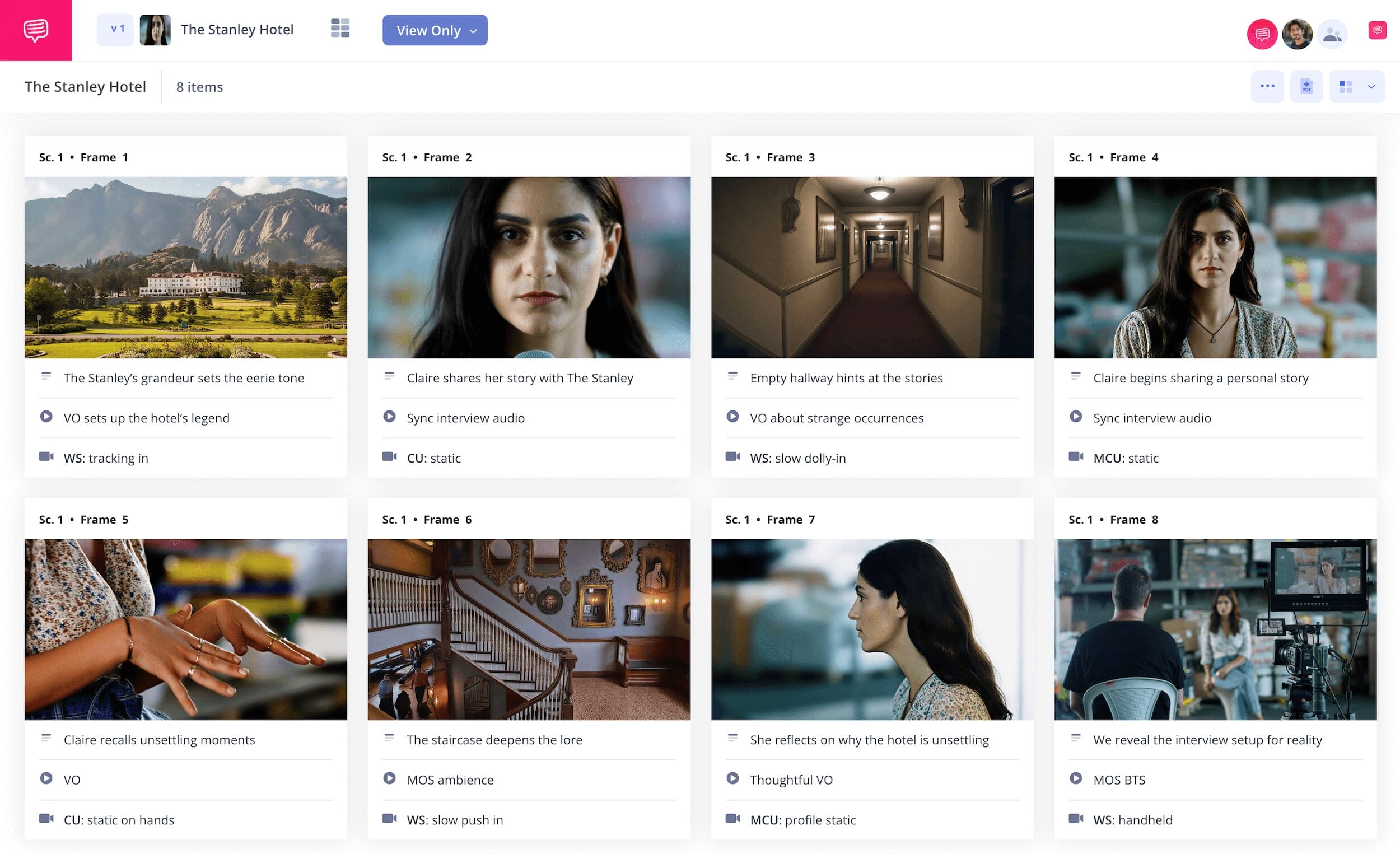
How to create a storyboard for a documentary
If you want to learn how to create a storyboard for a documentary, then you’re already on the right pre-planning track. Even though creating a documentary tends to rely on finding unexpected moments while filming, you can still use a documentary storyboard to help organize your footage, plan interview questions and camera angles, and find your connecting narrative throughline.
In a way, storyboarding a documentary is like connecting together all your ideas and footage like puzzle pieces to make the subsequent editing process run even smoother. In the following guide on how to create a storyboard for a documentary, we’ll take you through what we think are the five broadest and most essential steps to consider as you build your storyboard.
We’ll use StudioBinder’s storyboard creator for all our guiding documentary storyboard examples, but feel free to follow along with any kind of storyboard you prefer!
Step 1
1. Structure your template
After you’ve established what you hope to learn and discover through your documentary idea, start with structuring a template style you’ll be comfortable working in throughout the process. 16:9 panels is a typical standard for any widescreen documentary project, and it’s best not to exceed 8 panels per page.
But as you learn more and more about how to create a storyboard for a documentary on your own terms, you may notice storyboard dimension and layout details you want changed. In StudioBinder, any readjustments to your documentary storyboard template can be made in the settings at any point in the process.
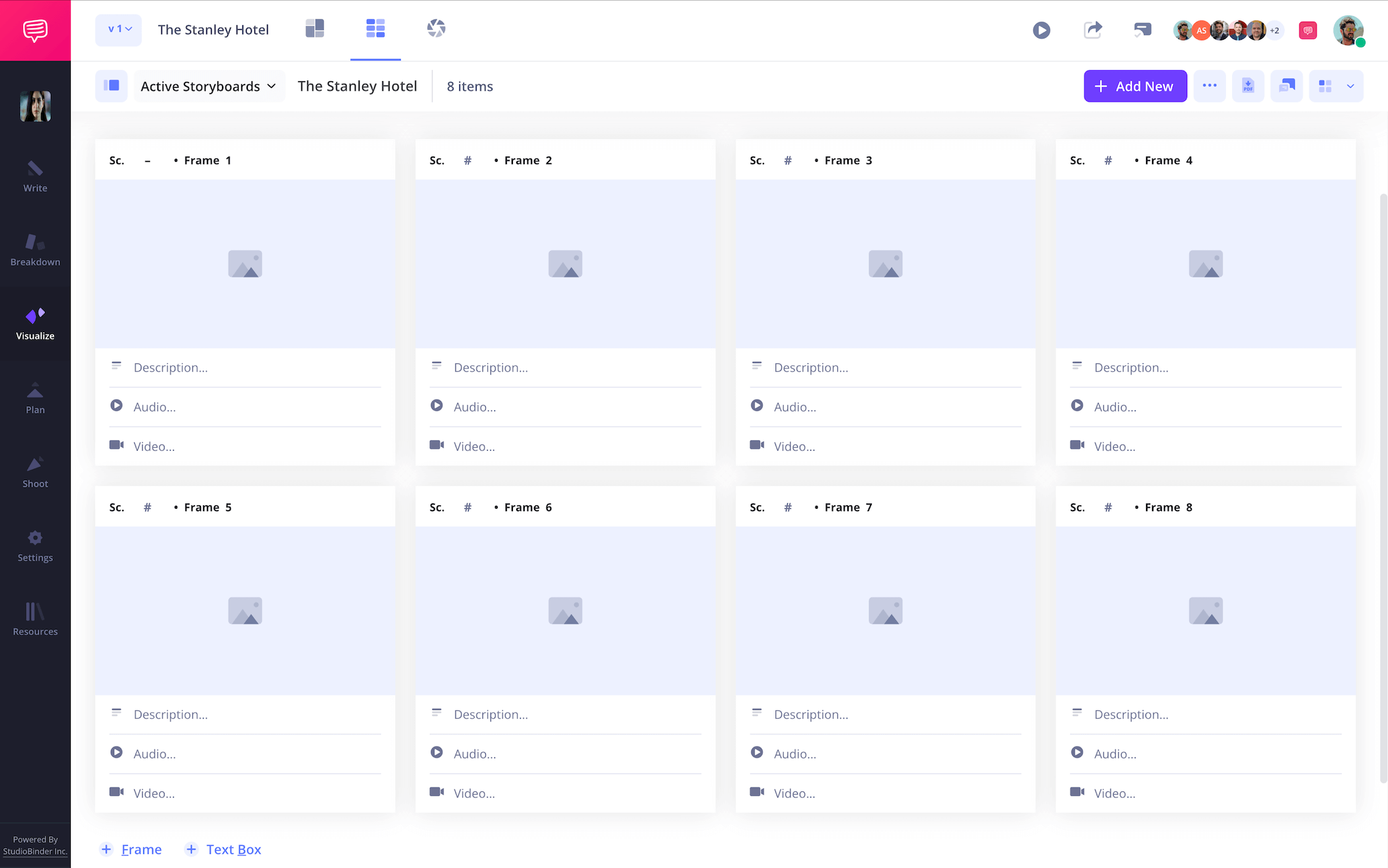
Depending on where you’re at with interviews and footage, you can write out some planned interview questions in your descriptions, along with the camera angles you think could work during the interview. Or you can even start finding where and when you’ll want to cut to b-roll footage throughout a scene. Either way, start forming a plan with some kind of structure by writing in your descriptions.
Step 2
2. Add images
“How to create a storyboard for a documentary” comes with many of its own unique answers compared to other kinds of storyboards. For example, you may have a good portion of your footage filmed as you continue working on your documentary storyboard and finding your connecting narrative.
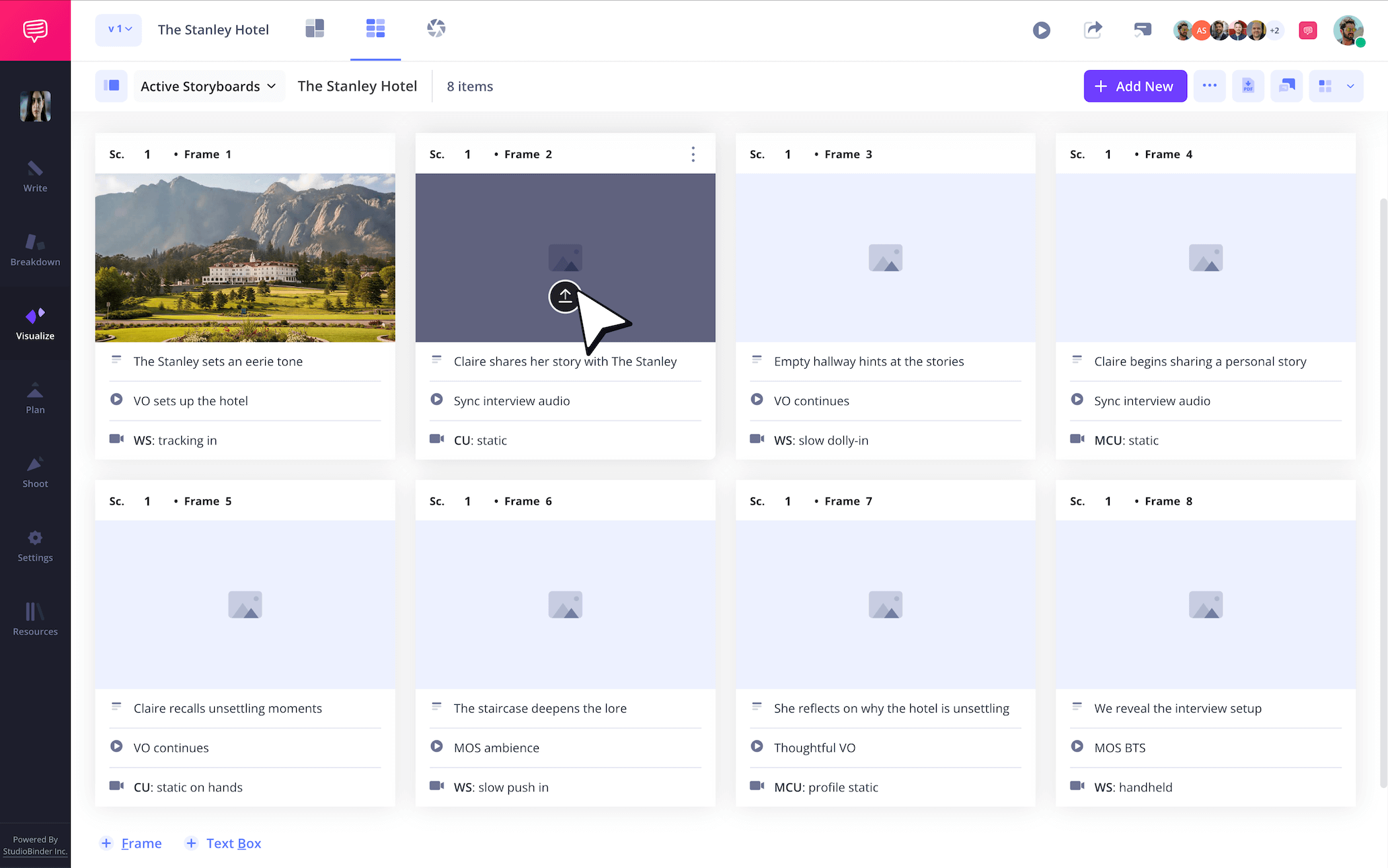
Because of this, you may start inserting screenshots from filmed footage, finding where it fits and what other footage you might plan and capture later to edit into that scene. For unfilmed footage, you can of course draw your ideas out, or even use temp images for locations you plan to grab some B-roll footage from.
It’s your documentary storyboard template, so fill it on your creative terms. If you’re working in StudioBinder, just click Upload on any frame to insert images.
Step 3
3. Plan with arrows
To know how to create a storyboard for a documentary, or any kind of storyboard for that matter, it’s helpful to learn when and how to incorporate storyboard arrows. You may not think there are many documentary storyboard examples when it comes to applying arrows to your images, but consider a situation where you shot an interview that became unexpectedly tense.
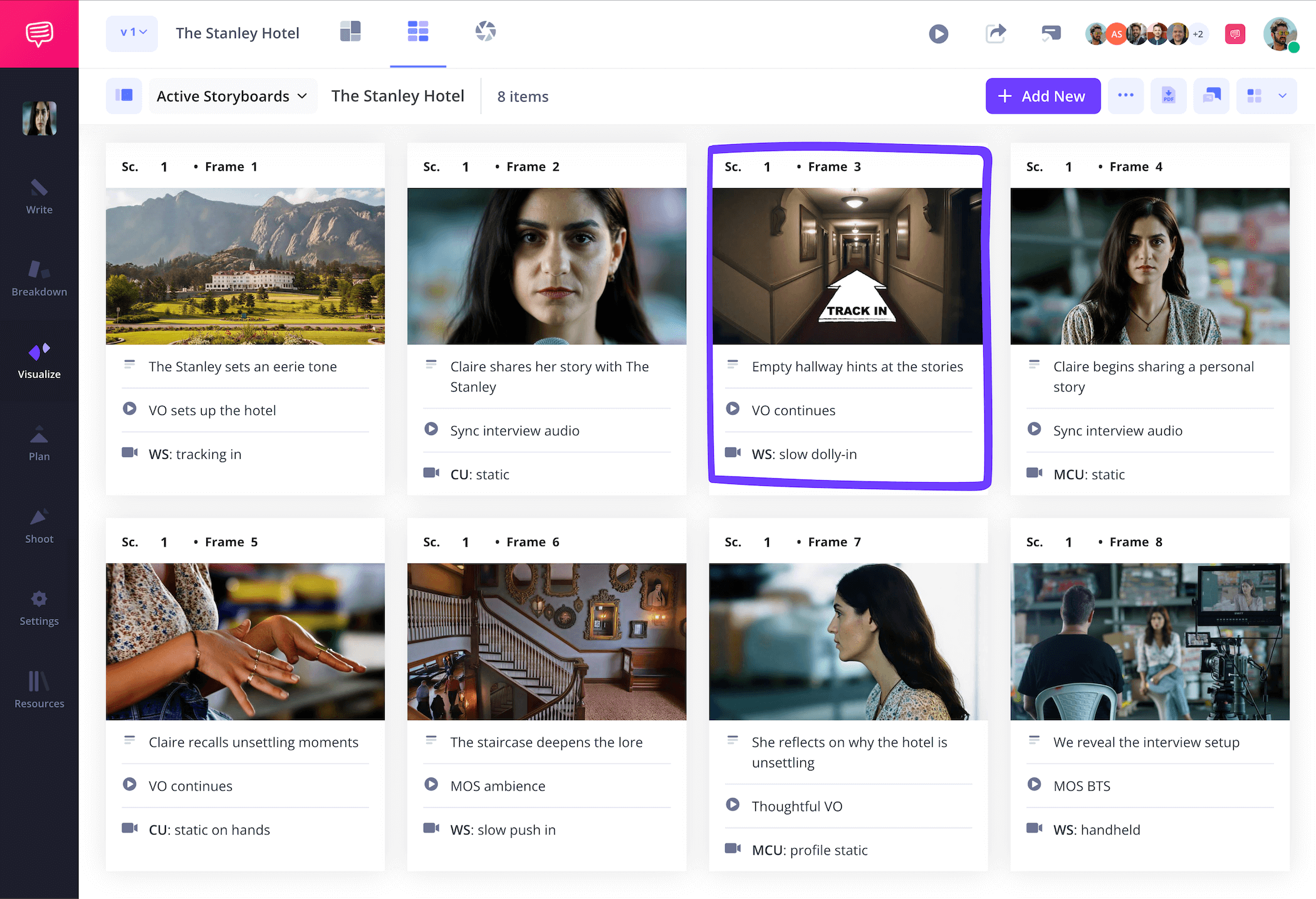
In order to capture that moment’s full effect, you might add a storyboard arrow to that panel’s screenshot to indicate a zoom edit in post that will really pronounce the moment’s intensity. In our documentary storyboard example, we captured some solid shots of the creepy house our documentary explores, but they feel a bit too static in retrospect.
So, we’ll jump into StudioBinder’s image editor to add an arrow to indicate a tracking shot for our pickup shoot.
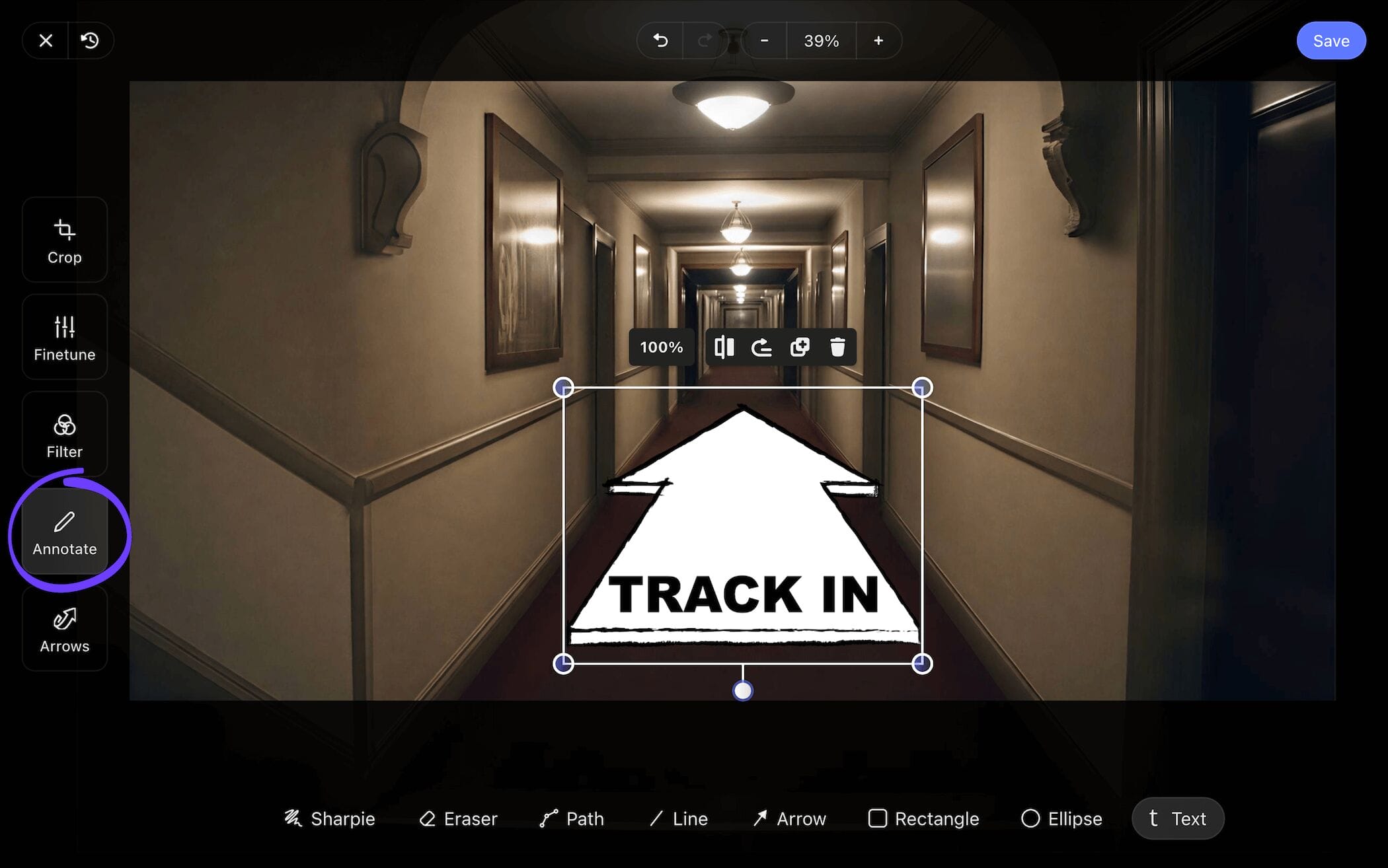
After using the cropping tool to make our chosen arrow a bit wider, we’ll also add some text to make sure the point is lost to no one. Now we’ll just click Save and our freshly edited image is added to our documentary storyboard.
Step 4
4. Collaborate and comment
You may have a film and production crew you need to keep close while building your documentary storyboard template, or maybe you even want to keep the real people your documentary is about in the loop so they can contribute creatively throughout the process. Either way, knowing how to communicate and collaborate goes hand in hand with knowing how to create a storyboard for a documentary.
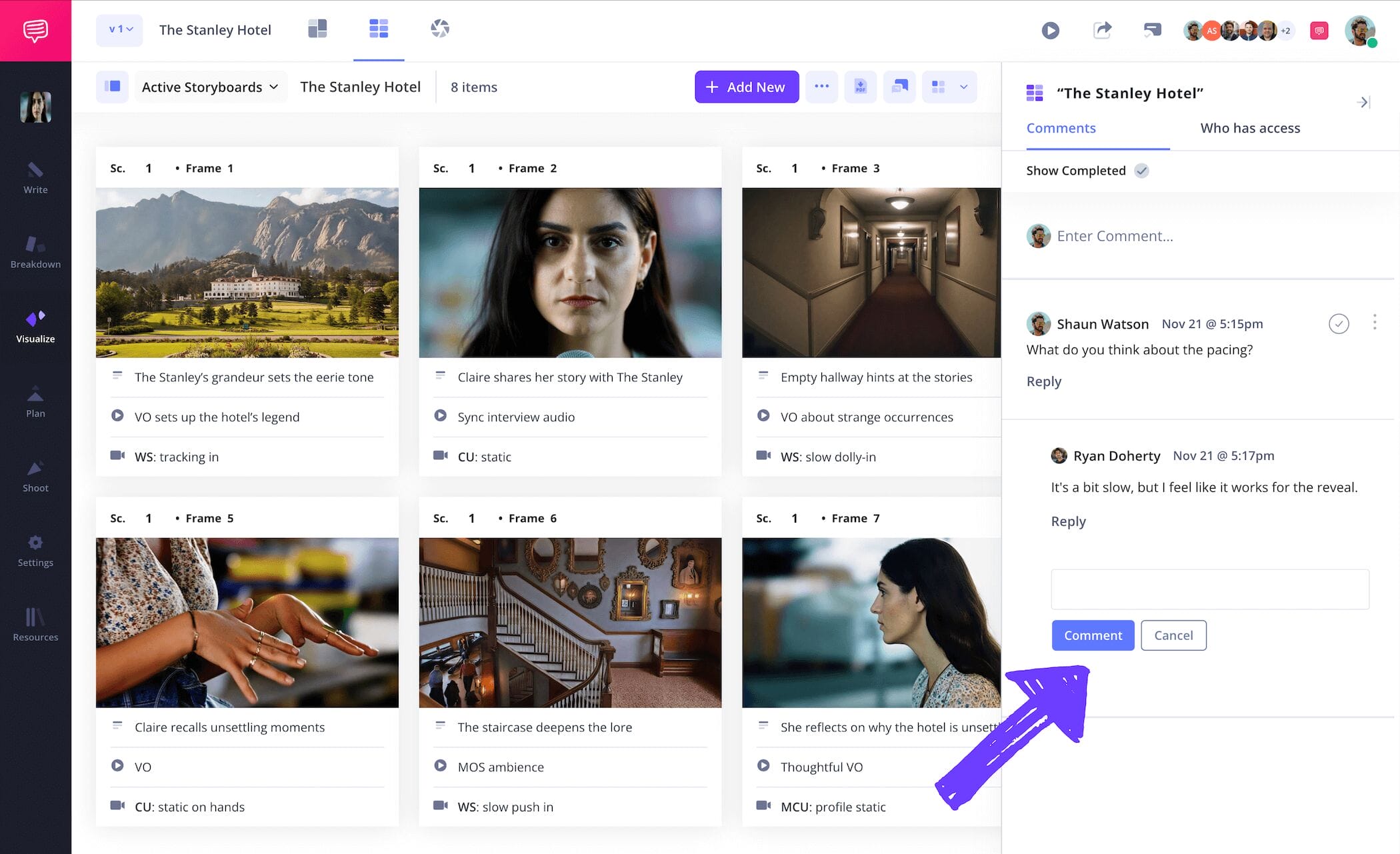
But constantly jumping around to different platforms of communication while storyboarding a documentary can also get exhausting, so be sure to establish one hub of communication for everybody’s feedback and contributions. Your documentary storyboard itself acts as a singular hub for communication if you’re working in StudioBinder.
Just set your collaborator’s invite permissions to either viewer, commenter, or editor. Then with commenter or editor permissions enabled, they can take to the comments tab on your storyboard to discuss all notes and feedback with you.
Step 5
5. Download your storyboard PDF
It’s one thing to know how to create a storyboard for a documentary, but it’s another to know how and when to save your project in the right way so it doesn’t get accidentally changed or deleted. Storyboarding a documentary comes with constant shifts in not just scenes, but in the entire direction of your narrative and the real-life characters you’re following as well.
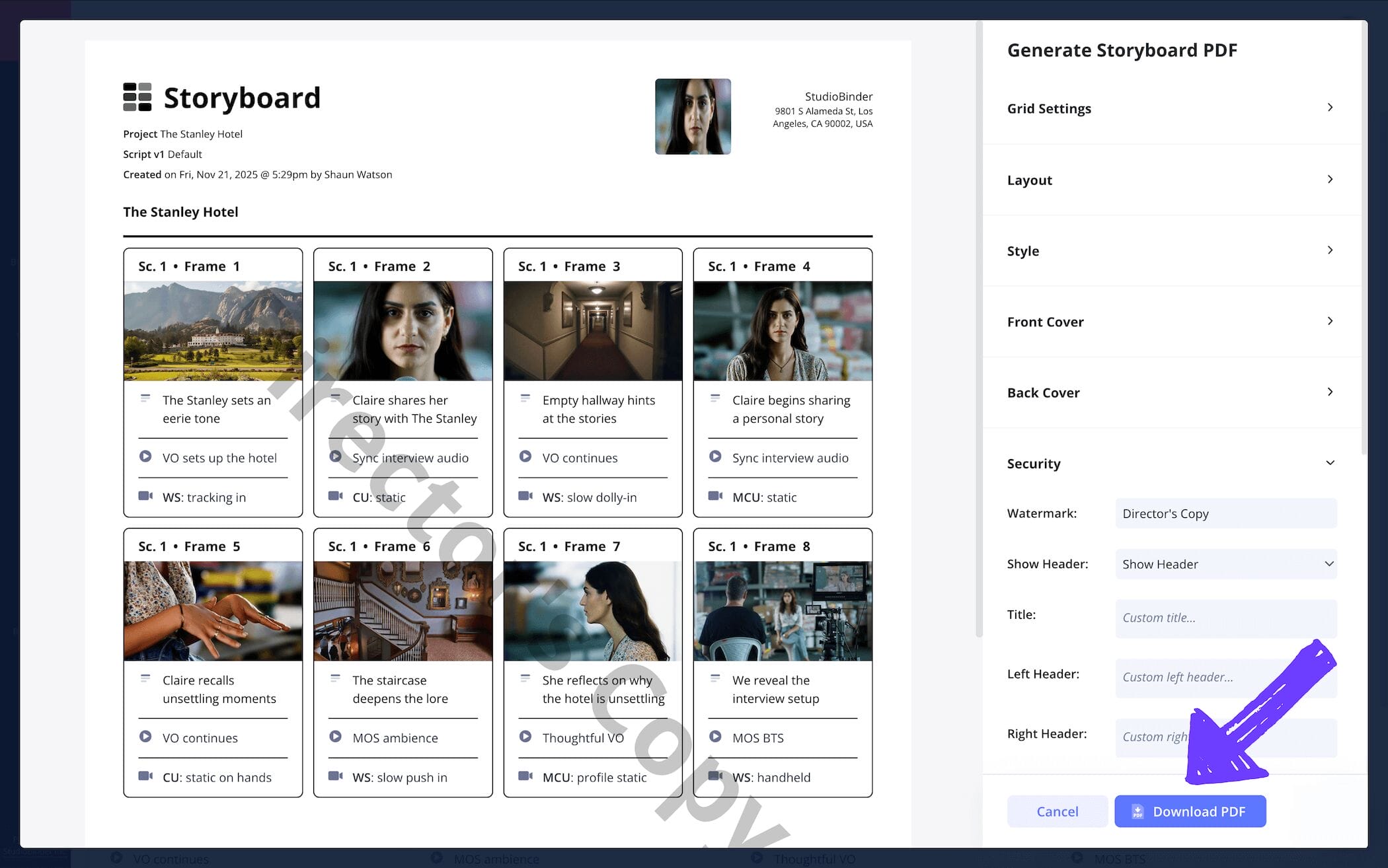
That’s why saving each version of your storyboard as a PDF document is like organizing and filing them in case you need to draw from them down the line. In our documentary storyboard example, we jumped into StudioBinder’s PDF editor to make some special request edits for our editing department’s copy.
Once we were done, our finishing touch was adding a watermark to the document, because our editing department has a knack for losing things!
Conclusion
You're finished!
Now that you know the most important aspects around how to create a storyboard documentary, get out there and put your new skills to use! But if these documentary storyboard examples weren’t quite enough for you, be sure to also check out all of StudioBinder’s free storyboard templates.
Frequently Asked Questions
Your questions, answered
A documentary storyboard is a tool for helping you plan out your documentary project. Unlike most storyboards, documentary storyboards can be used throughout both the pre-production and post-production process of creating a documentary. This is because making a documentary is rarely ever linear. You may have shot half your footage for a story about person A, before realizing the story should really be about person B. So, you’d use your storyboard to map out which footage you can still use and which kind of new footage you’ll want to incorporate, all while in the thick of shooting and editing the film project.
A documentary storyboard is unique in that it’s often not a linear process in the way most fiction-based storyboards are. This is because the actual core narrative and focus of the documentary is found not just throughout pre-production and filming, but also all the way up to the post-production editing process. So, to storyboard a documentary, add your panel descriptions into your template, then start adding images into the storyboard. As you gather more and more footage, you can even start using screenshots from what you’ve filmed in between panels you haven’t filmed yet. Just be prepared to keep many separate versions of your storyboard as the narrative evolves through the process.
While any kind of documentary storyboarding is a considerably long process, a short documentary storyboard will naturally have more anchoring focus. Given the length you’re aiming for, you will quickly have the driving dilemma, people, and connecting narrative pretty well locked during storyboarding, or at least by the early phases of filming. So, add those interview questions into your panel descriptions as a way of pacing your interview before it even happens. With images, you can use temp images for b-roll and even screenshots from footage you already shot. In a way, you can look at a short documentary storyboard as a rough editing draft your editing department will use as a sort of map.
The best documentary storyboard example is one that incorporates the storyboarding process throughout all phases of production, even filming. This is because the central focus and story documentaries follow are often found while shooting the people, places, and events involved. So, it’s best to accept that you’ll have several versions and iterations of your storyboard. You can even incorporate screenshots from footage you’ve already filmed so you can arrange them alongside panels you have yet to capture, making your vision much more tangible and organized.
Create your free storyboard
Visualize your storyboard with our free template.
Get started for free
