
home → Guides → StoryboaRD
How to Create a TV Commercial Storyboard

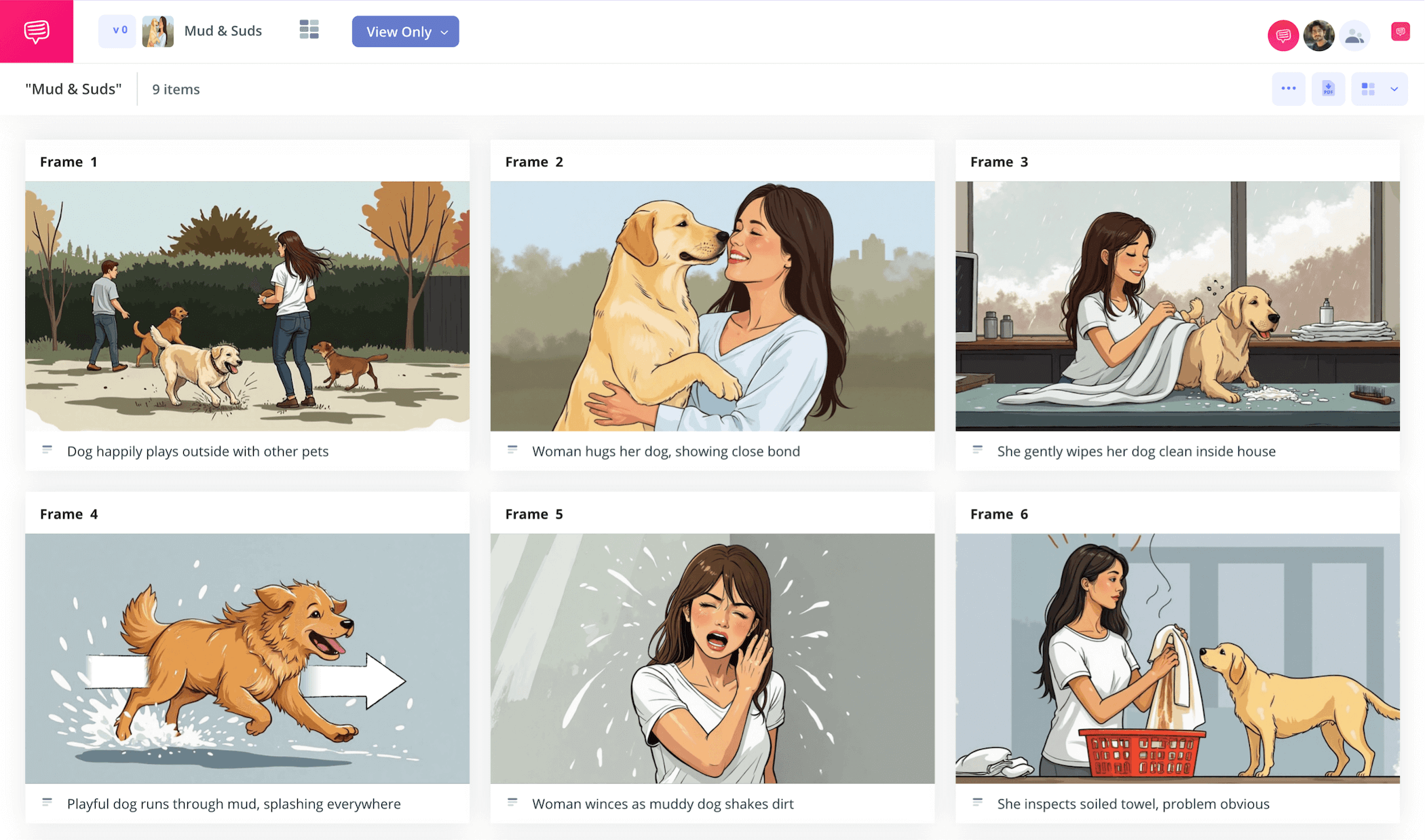
How to create a TV commercial storyboard
To capture the attention of potential customers in the most efficient way possible, you’ll want to plan your television commercial narrative with a tv commercial storyboard. A commercial storyboard visually lays out your tv spot storyline beat for beat, this way you can decide what should stay, what should go, and how the defining goal of your advertising campaign is being communicated, all before entering the filming or animating phase.
You may also need to pitch your commercial idea to a brand client, and in that case, a television commercial storyboard is the best tool for the job. In this guide on how to build your own tv commercial storyboard, we’ll take you through the most essential steps to apply this helpful production tool. We’ll use StudioBinder’s storyboard creator to showcase all our commercial storyboard examples, but feel free to use whichever kind of storyboard you have to follow along!
Step 1
1. Format your template
You’ve established your tv ad storyline through studying age demographics and all other relevant brand analytics, so now you’re ready to start building your tv commercial storyboard. But not so fast, because the first step is making sure your storyboard layout and dimensions fit your workflow. 16:9 storyboard panels will reflect most modern television screen aspect ratios, and be careful not to exceed more than 8 panels per page so your visual narrative doesn’t get too cluttered. If you’re in StudioBinder, you’ll be taken through a handful of setup prompts before arriving at your personalized commercial storyboard template:
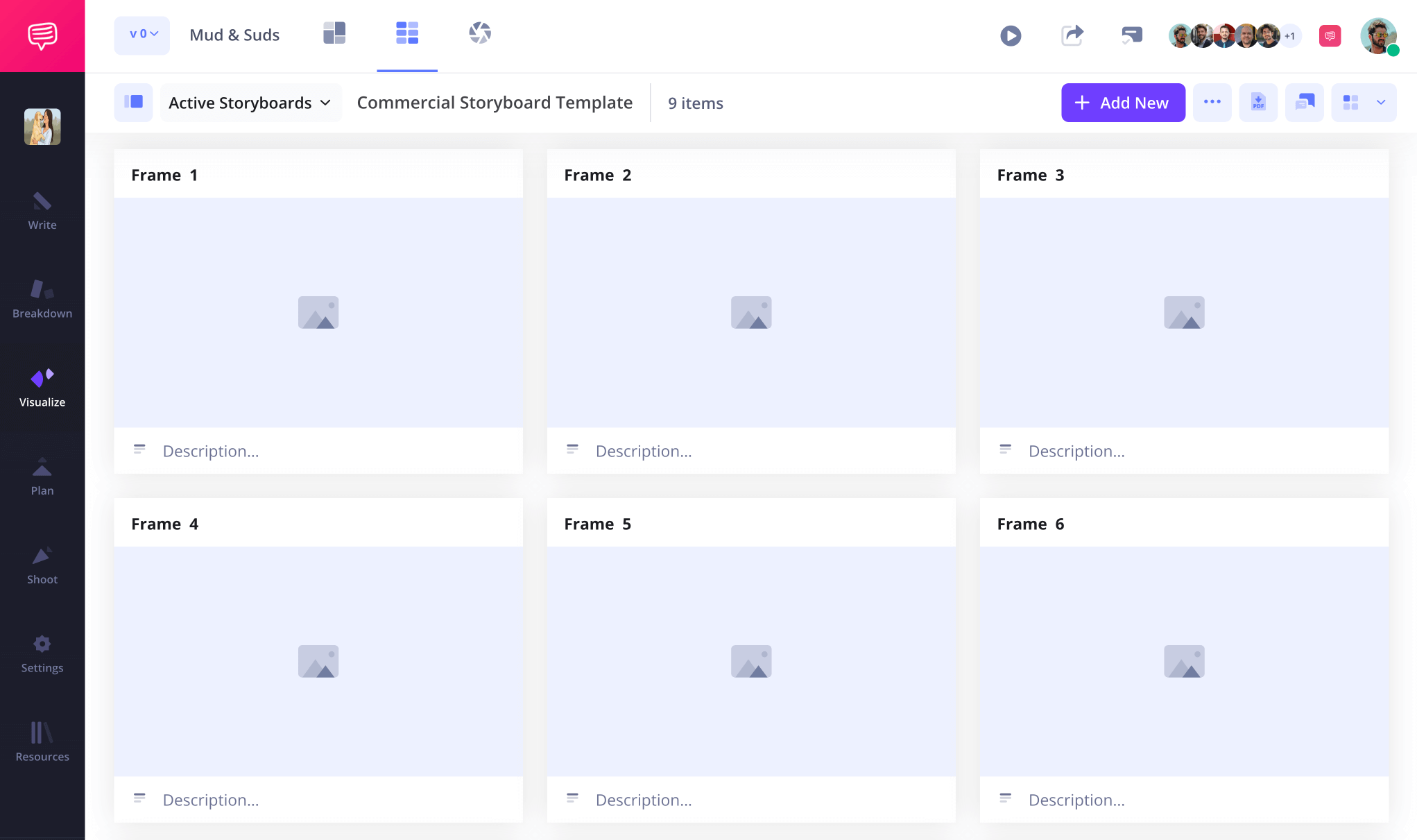
Now you’re ready to start filling out the panel descriptions on your television commercial storyboard. If you have a script, you can upload it into StudioBinder and quickly transfer script lines into descriptions. Here you’re thinking about narrative pacing and how quickly the setup is made apparent within your television spot’s timeframe, then also make note of what camera angles will best capture each moment.
Step 2
2. Upload images
Now that you’ve filtered your company marketing campaign into a well-paced narrative with the most visually appealing camera shot ideas written out, it’s time to bring some life to your tv commercial storyboard. You might be working hand in hand with storyboard artists, or even hand-drawing your commercial storyboard yourself. If none of the above are an option, don’t feel timid about using stock photos or AI images. As long as you can use it to help communicate your ad ideas to your client, it’s fair game.
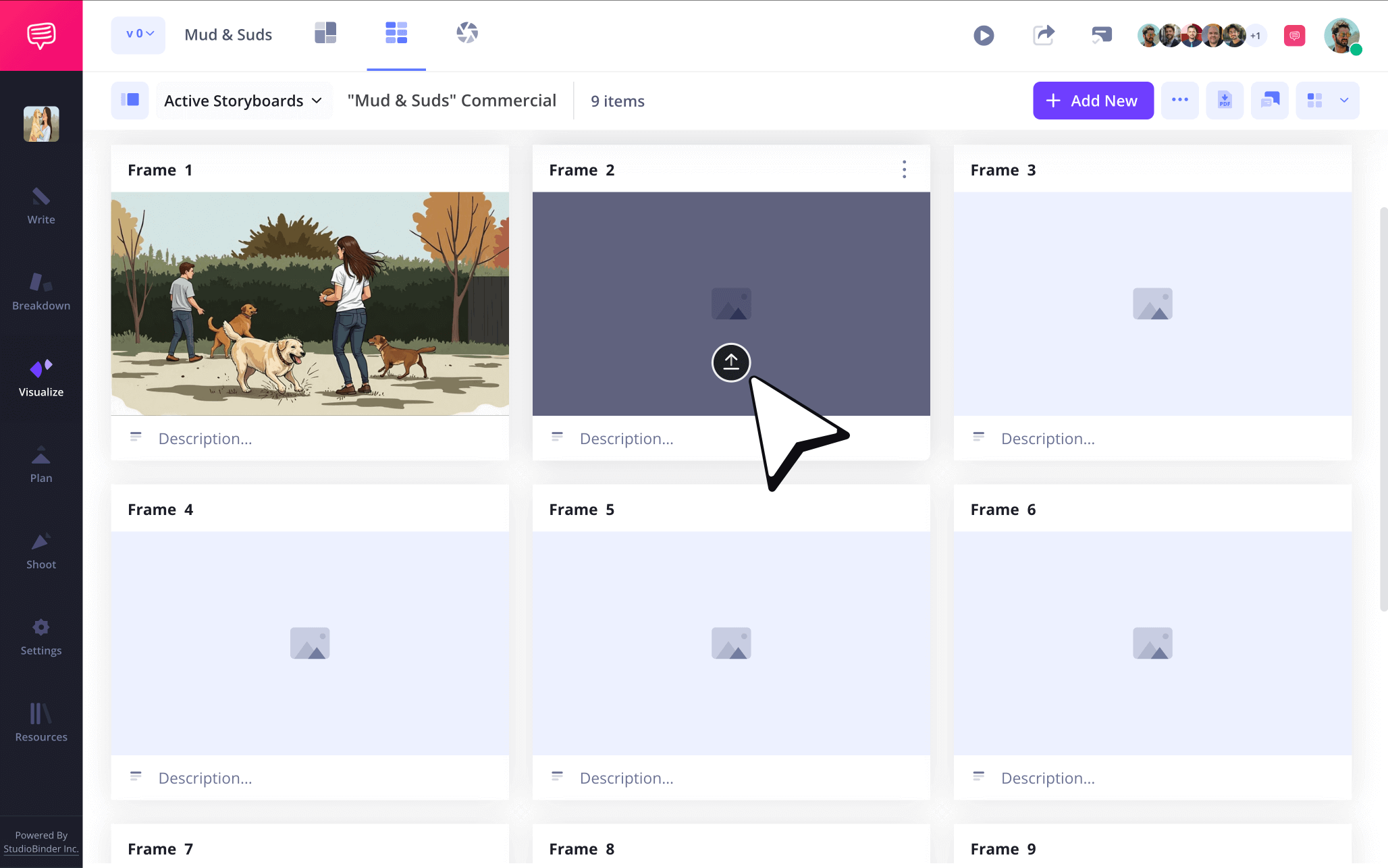
To upload images in StudioBinder, just click Upload in any blank panel.
Step 3
3. Use storyboard arrows
If an image on your television commercial storyboard isn’t quite capturing your attention in the right way, chances are it probably won’t capture your customer’s attention when it's transferred to screen either. This is where adding storyboard arrows to your tv commercial storyboard becomes helpful. For example, you might want to add an arrow to an image to indicate a zoom shot that captures the big product reveal, this way your client definitely can’t miss your intent during the pitch meeting.
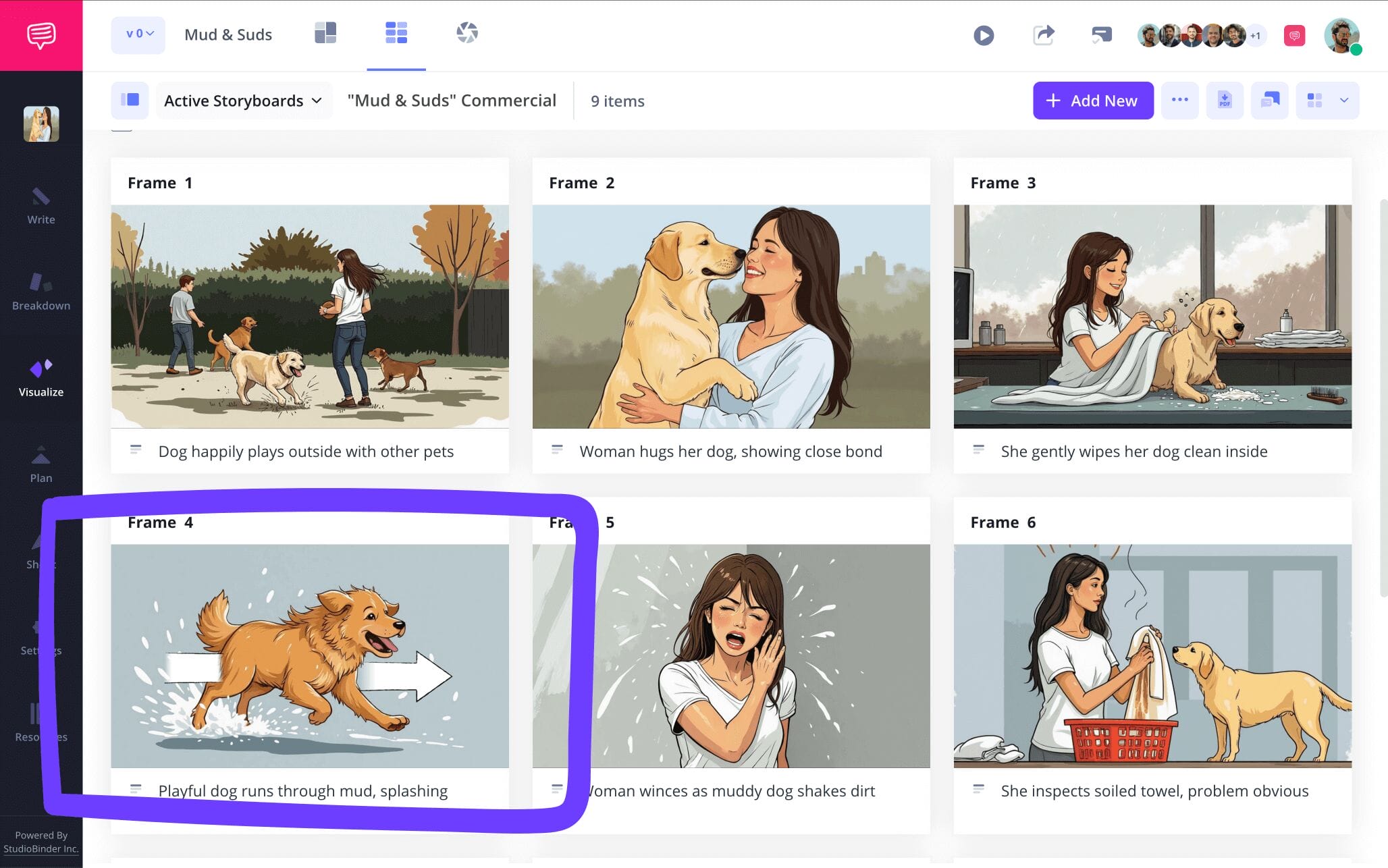
In our example of tv commercial storyboard arrows, we came up with the idea to add a swish pan transition in one of our shots that doesn’t quite have the energy we hoped for. So we’ll jump into StudioBinder’s image editor to find the right kind of arrow for the job.
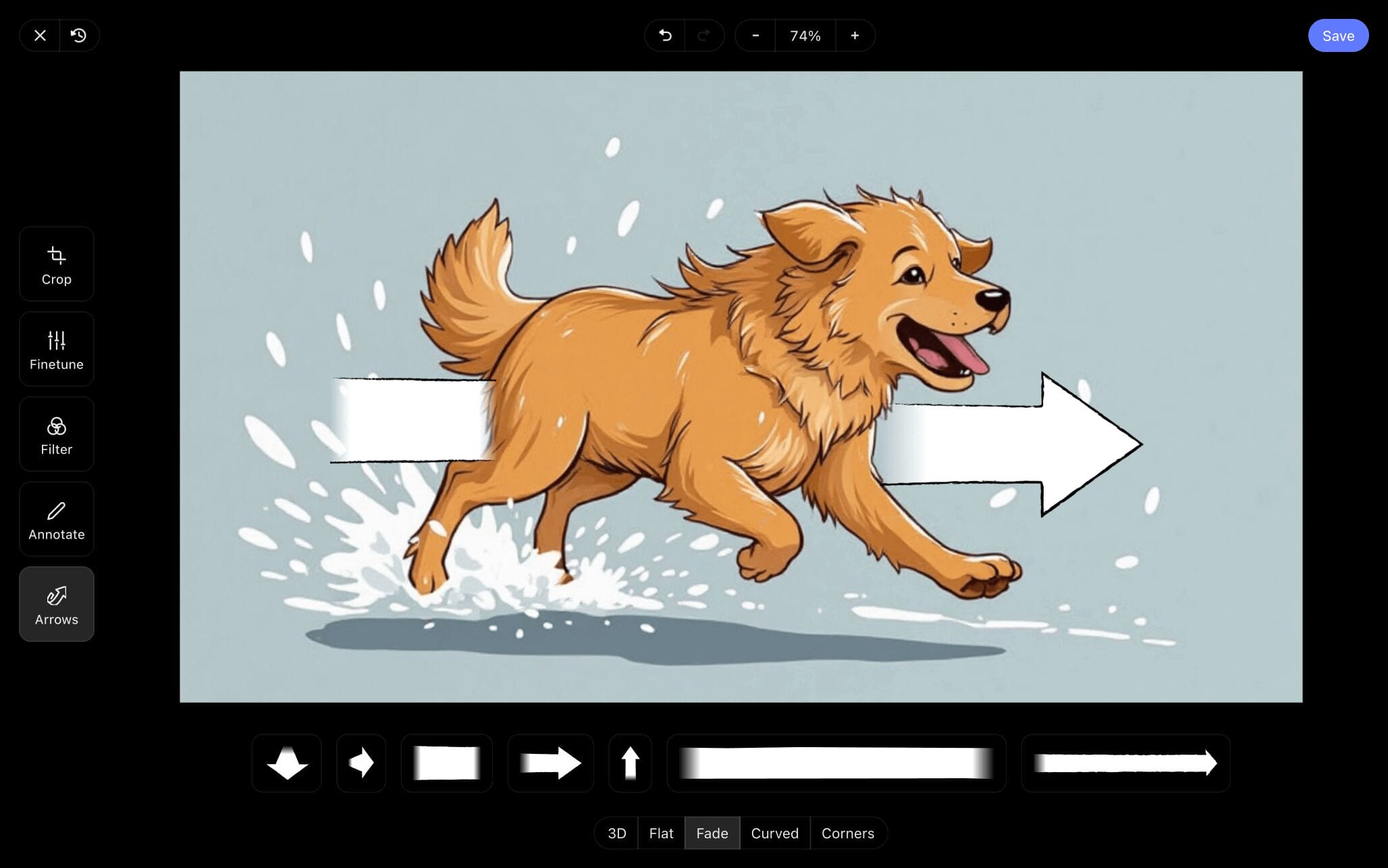
Perfect, we found an arrow that looks like it was made for our image. Now we’ll just adjust the size to fit our advertisement’s star good boy, then click Save, and our freshly edited image has now been added into our storyboard for tv commercial project.
Step 4
4. Collaborate for feedback
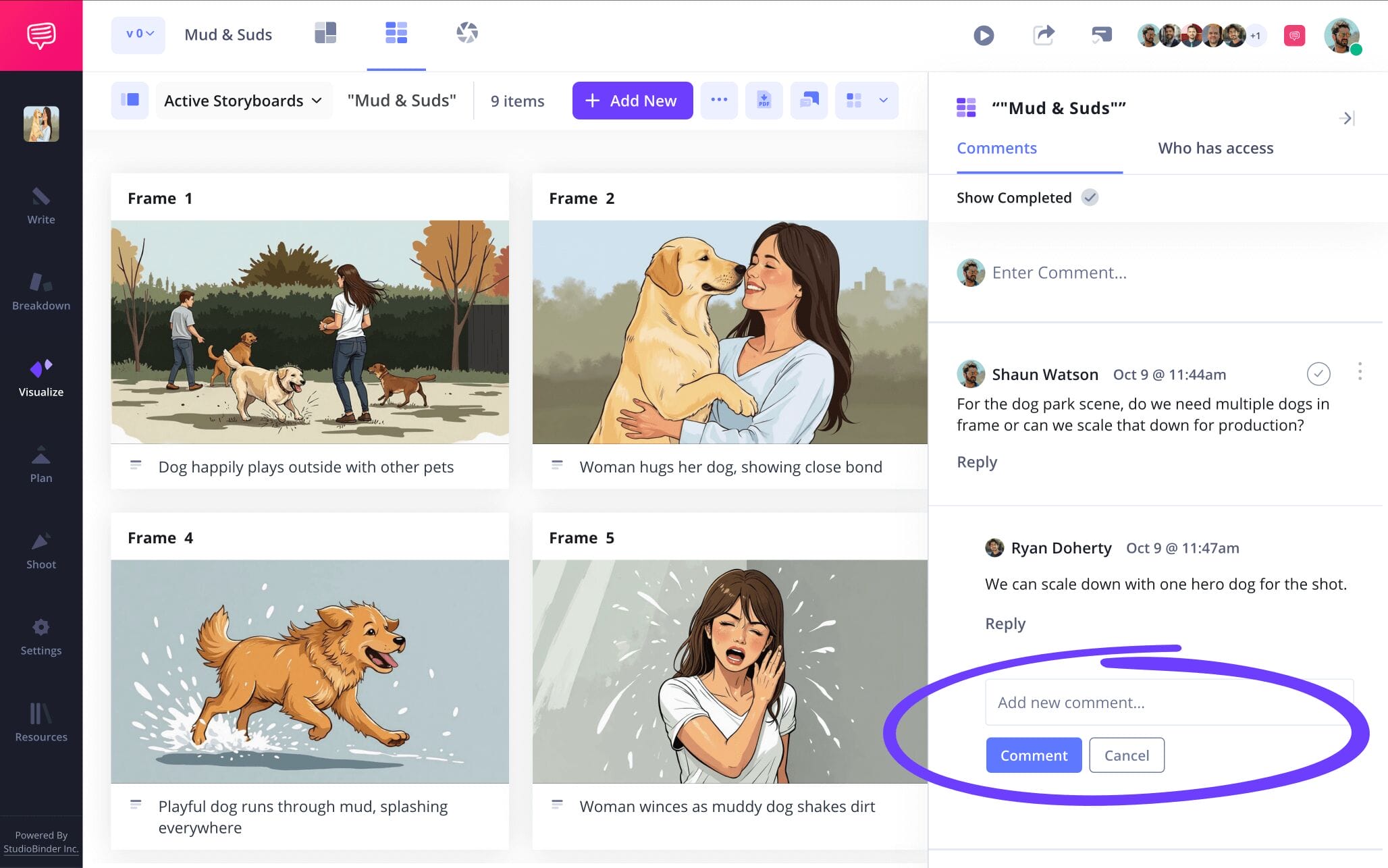
An ad campaign comes with a lot of moving parts, from coworkers to clients, you’ll want to keep a reliable hub for all collaboration and notes on your tv commercial storyboard. If you’re using StudioBinder, then you can use your commercial storyboard itself as the singular platform where you invite others to make edits or leave feedback.
Enabling either commenter or editor permissions on your invites allows your invitees to take advantage of the comments section on your storyboard. Here they can leave any notes, or even strike up a conversation about how they think your television commercial storyboard can be improved.
Step 5
5. Convert to PDF
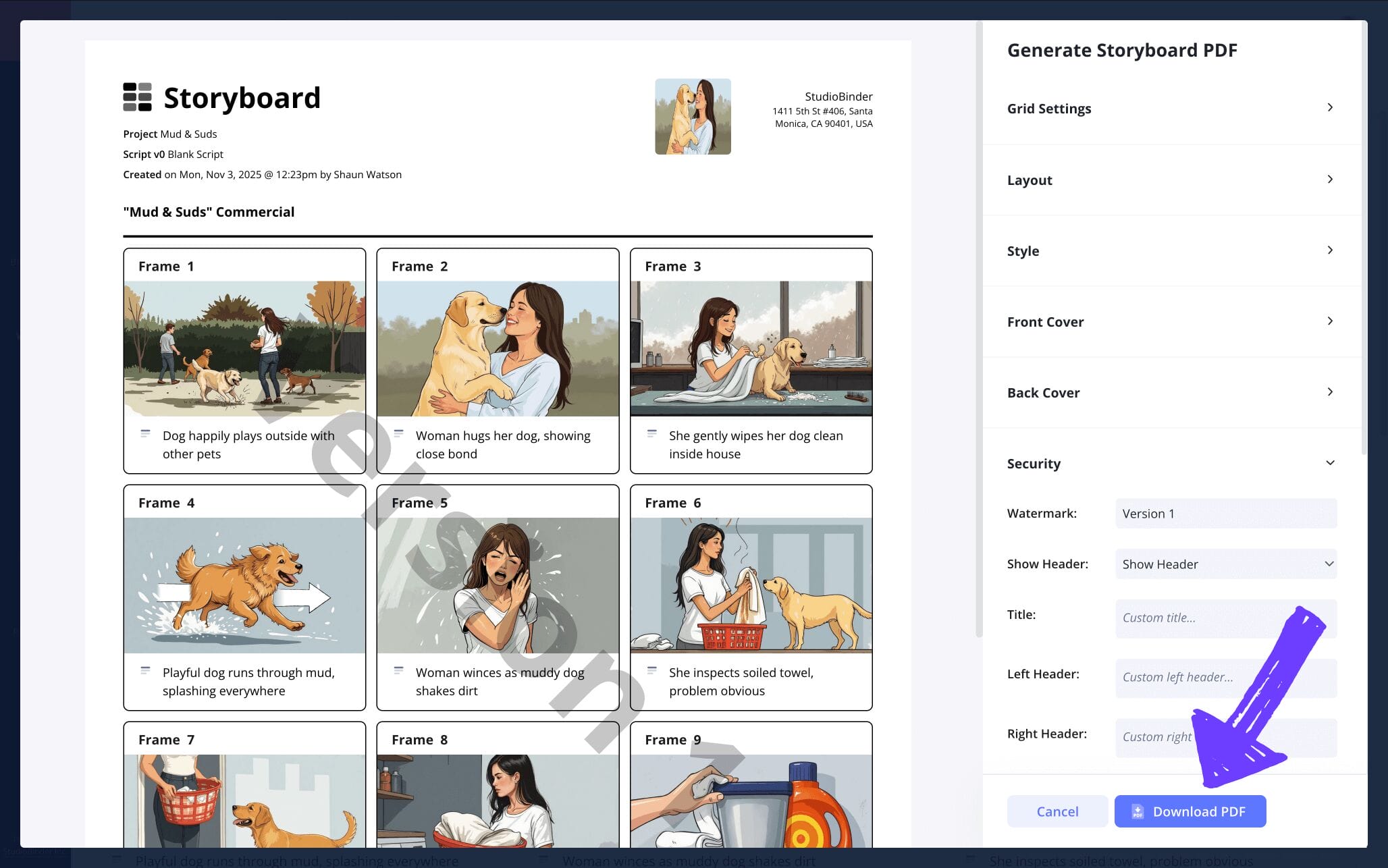
You’ve reached the end of your tv commercial storyboard journey, but there’s still one more vital step! If you’re creating a great television ad worthy of premiering during the Super Bowl, then losing your storyboard because you didn’t save it properly would be the most tragic outcome of all. Which is why saving every version of your commercial storyboard as a PDF while it continues to evolve is essential, this way you have an unchangeable document that you can share and customize.
You can also customize your storyboard based on any client requests. For our sample tv commercial storyboard, we’ll go into StudioBinder’s PDF editor and create a front and back cover so we look as professional as possible during our big client pitch meeting. Then we’ll add a watermark before printing because we’d hate to hear our competition stole all our ad campaign ideas!
Conclusion
You're done!
Thanks for taking the ride with us for this journey on how to create a tv commercial storyboard. If you find yourself curious about taking on any other kinds of storyboard challenges, be sure to check out all our free storyboard templates that are available. And best of luck winning over that client with that winning ad idea of yours (we know you won’t need it)!
Frequently Asked Questions
Your questions, answered
You can definitely storyboard without drawing skills! You might not be able to get a job as a professional storyboard artist, but you can still make your own storyboard ideas come to life with little to no illustration skills. You may not be a skilled artist, but you probably know how to draw stick figures and squiggly lines. Since storyboard images are more about communicating shot and character placement, this will do just fine. You also have the option to find images from stock image sites that communicate the mood, tone and style you’re aiming for. Not to mention that AI makes it incredibly easy to type a description of what you want and make it appear right before your eyes, ready to be inserted into your storyboard.
To create a tv commercial storyboard, start with setting up the dimensions and structural layout of your storyboard. Keep it at 8 panels or under per page, and your panels at a 16:9 aspect ratio. Now you’re ready to start pacing out your script onto the panel descriptions of your storyboard. Once you’ve got your action and camera shot ideas fully written into your descriptions, now you can make them into images on your panels by drawing them out or searching the internet for stock or AI images. From here you’re refining and accommodating any client requests around brand alignment and narrative enhancement.
With a business storyboard, you’re showcasing a visual narrative that functions to highlight a brand, product or process. So, after you establish your template, define your audience and purpose. Then start laying out your narrative in your panel descriptions, keeping in mind the time length you have, as well as the defining purpose. Now start visualizing those ideas, maybe through your own drawings or the company’s logo and brand imagery. Now just review, refine and make sure the idea is as tight and direct as possible.
If you’re charging for your work on a tv commercial storyboard, you have a couple options. You can charge per storyboard frame. If the art is fairly quick and requires low artistic skill, $10 to $20 is a typical rate. For the most professionally drawn frames (used by professional art directors for example), you can charge up to $120 per frame, or even more depending on your experience. The second most common charging practice would be to invoice per day. The general range for this would be about $300 to $800 per day, the lower end of the spectrum representing the least industry experience, and the higher end representing the most industry experience.
Create your free storyboard
Visualize your tv commercial storyboard with our free template.
Get started for free
