Listings with video get 403% more inquiries than those without. That’s according to the National Association of Realtors. That number is not a small difference. Real estate video production is now a standard part of marketing a home. It’s not a luxury for high-end listings only.
This guide covers the full process. It’ll go over the types of video that work, the gear you need, how to plan and shoot, how to edit, and what it costs.
real estate video production
Types of real estate videos
The right video format for real estate video production depends on the property, the budget, and the buyer.
These five formats are the foundation of real estate video marketing. Each one serves a different purpose. None is more important than the others. They work best as a set.
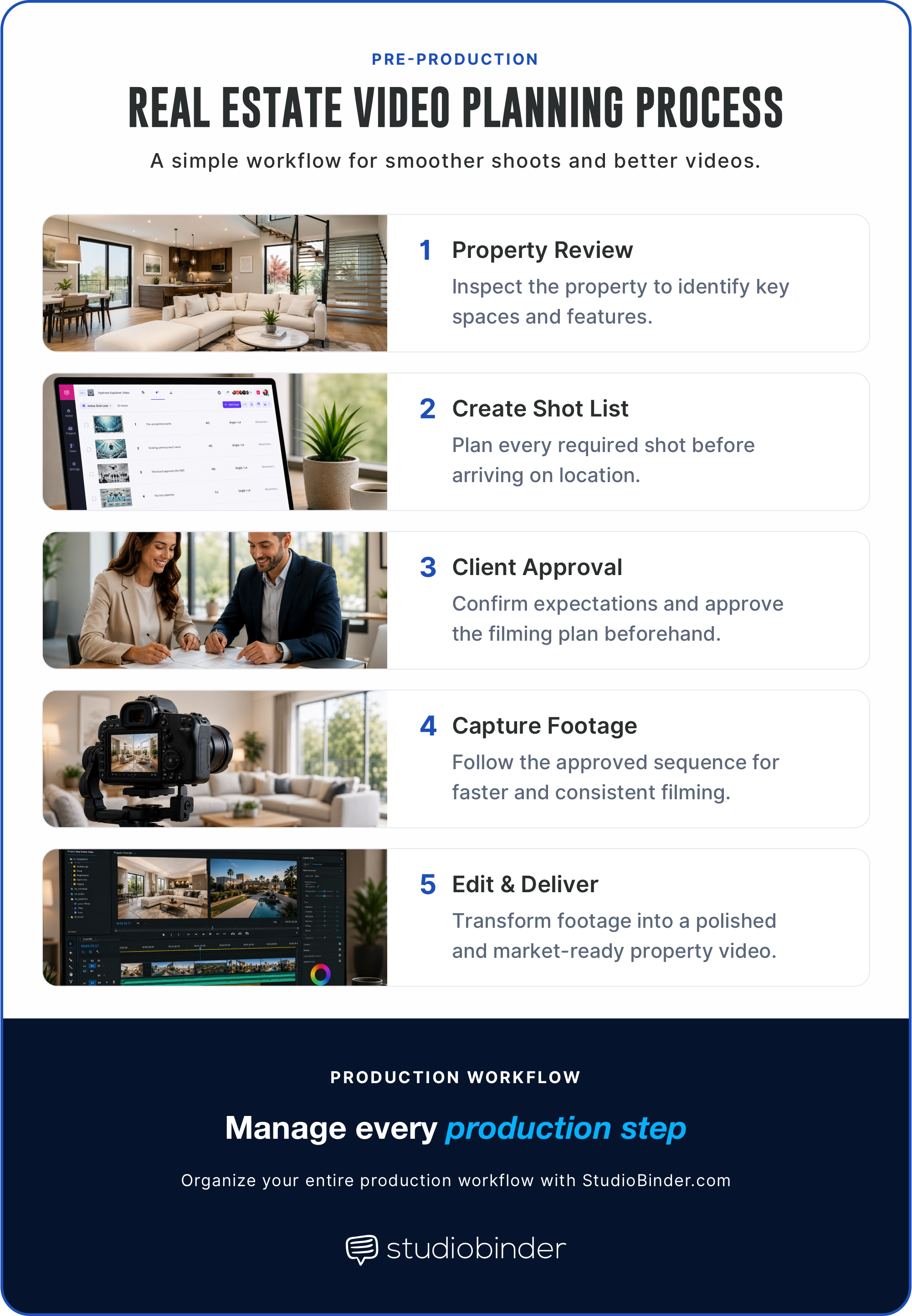
Real Estate Video Types Explained • Real estate video production
CAMERAS & GEAR
What real estate video equipment do you need?
You don't need a big budget to shoot professional real estate video production. The right gear depends on the type of listings you're shooting and how often. Here's what matters at each level - from a practical starting point to a full professional kit.
1. Camera and Lens
Mirrorless cameras are the standard for real estate video production. They're compact, have strong autofocus, and perform well in mixed light. Full-frame bodies handle bright windows and dark interiors best. Crop-sensor mirrorless cameras are a solid starting point.
For lenses, wide-angle is the norm for interior work. A focal range of 16–24mm captures full rooms without bending walls. Avoid fisheye lenses. They distort the space and make a listing look unprofessional.
2. Drones for Real Estate
Entry-level aerial work starts with the DJI Mini 4 Pro. It shoots 4K footage and is priced for agents adding drone to their workflow for the first time. For professional output, the DJI Air 3 and DJI Mavic 3 are the industry standard. Both deliver sharp, stable footage in most conditions.
Here’s a complete beginner’s guide on the DJI Mini 4 Pro:

DJI Mini 4 Pro • Real estate video production
And if the DJI Mavic 3 can shoot Everest, it can shoot real estate just fine:

29,000 Feet Up Mount Everest with DJI Mavic 3 Pro • Real estate video production
The pilot needs an FAA Part 107 license to charge for drone videos. No exceptions.
3. Gimbals for Stabilization
A 3-axis gimbal removes camera shake from walkthrough shots. Without one, your footage will look shaky and cheap. Even a steady hand cannot stop the camera bounce. The DJI RS series is the industry standard for mirrorless camera setups. It offers reliable stabilization, long battery life, and easy controls.
A camera slider adds smooth horizontal movement. It works better than a gimbal for slow reveals of a fireplace or kitchen island. Sliders are worth adding to a professional kit for high-end listings in real estate video production.

Introducing DJI RS 5 • Real estate video production
4. Lighting for Interior Shoots
Real estate interiors have a big challenge. Bright windows make the indoor rooms look dark. Use bi-color LED panels to solve this. They let you match the color of the natural window light. That keeps the image consistent from one end of the room to the other.
Schedule shoots to match the natural light in each key room. East-facing rooms look best in the morning. West-facing rooms with large windows are best in the late afternoon. Getting the light right on set saves a lot of time in post-production.

How to Light Real Estate & Interior Design Videos! • Real estate video production
Real estate video production
Pre-production planning
Pre-production is the most skipped phase of real estate video production. Skipping it is costly. It causes missed shots, messy sequences, and staging surprises.
These mistakes force expensive reshoot requests. A reshoot means paying a crew twice, delaying the listing, and frustrating the agent. Most reshoots are avoidable. They happen because nobody planned properly before arriving on location.
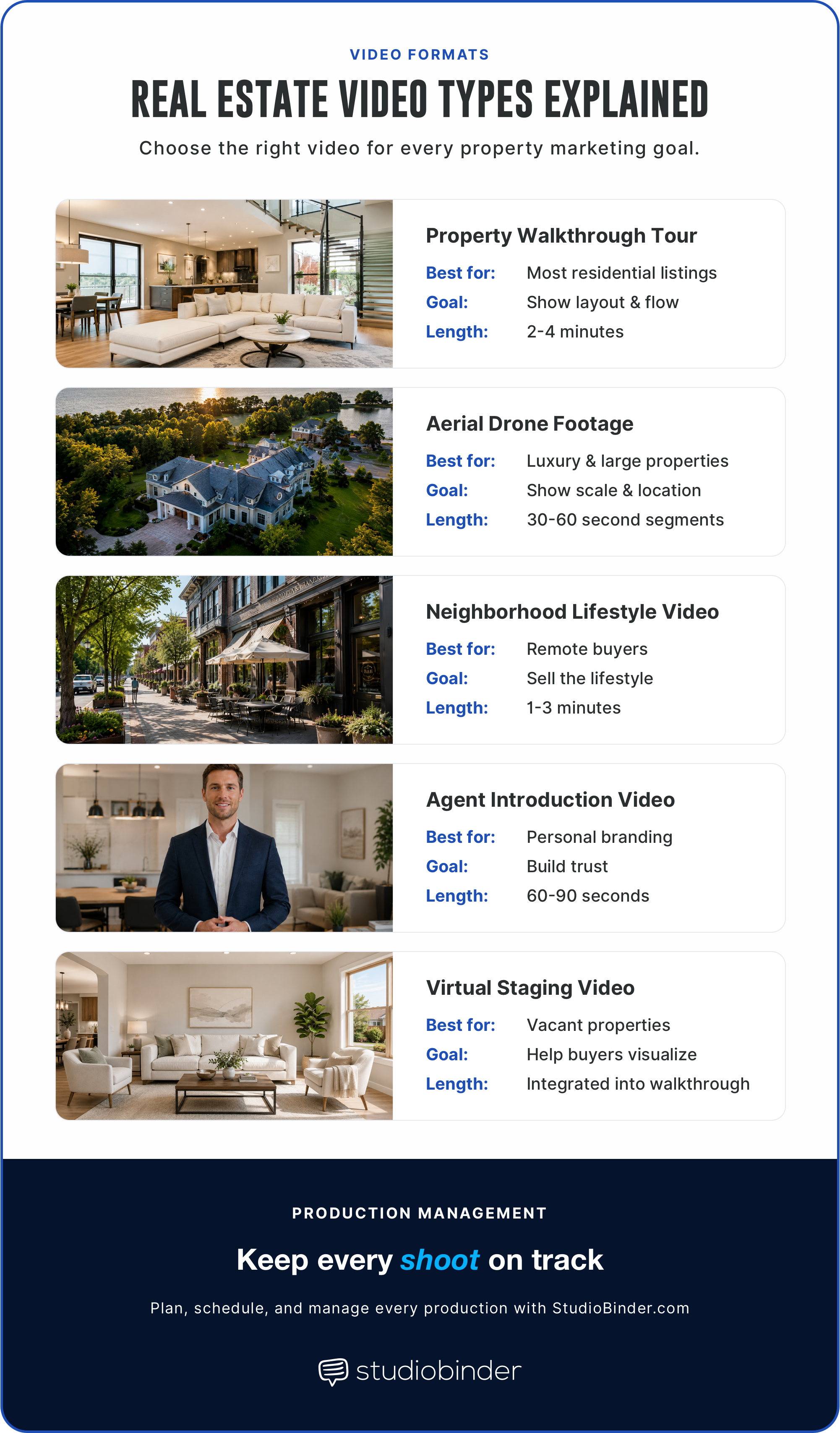
Real Estate Video Planning Process • Real estate video production
Creating a shot list
A shot list maps every required shot before you arrive on location. The list covers your exterior shots, drone loops, and each interior room. Group your list by rooms in the order you plan to shoot. Start outside and move through the entry. Next, shoot the living room, kitchen, bedrooms, and bathrooms. Finish with the backyard and the aerial views
For each room, note the angles, production lighting needs, and special shots. Write down when to use wide views, slider reveals, or close-ups. Without a list, you might miss a vital angle. You will only notice the mistake during editing. By then, the staging is gone, and the agent has moved on. A costly reshoot is your only choice.
A shot list also sets clear expectations with the agent upfront. When they approve it ahead of time, everyone agrees on what's in the final video. This list prevents sudden feature requests. It stops agents from asking for extra shots when your crew runs late
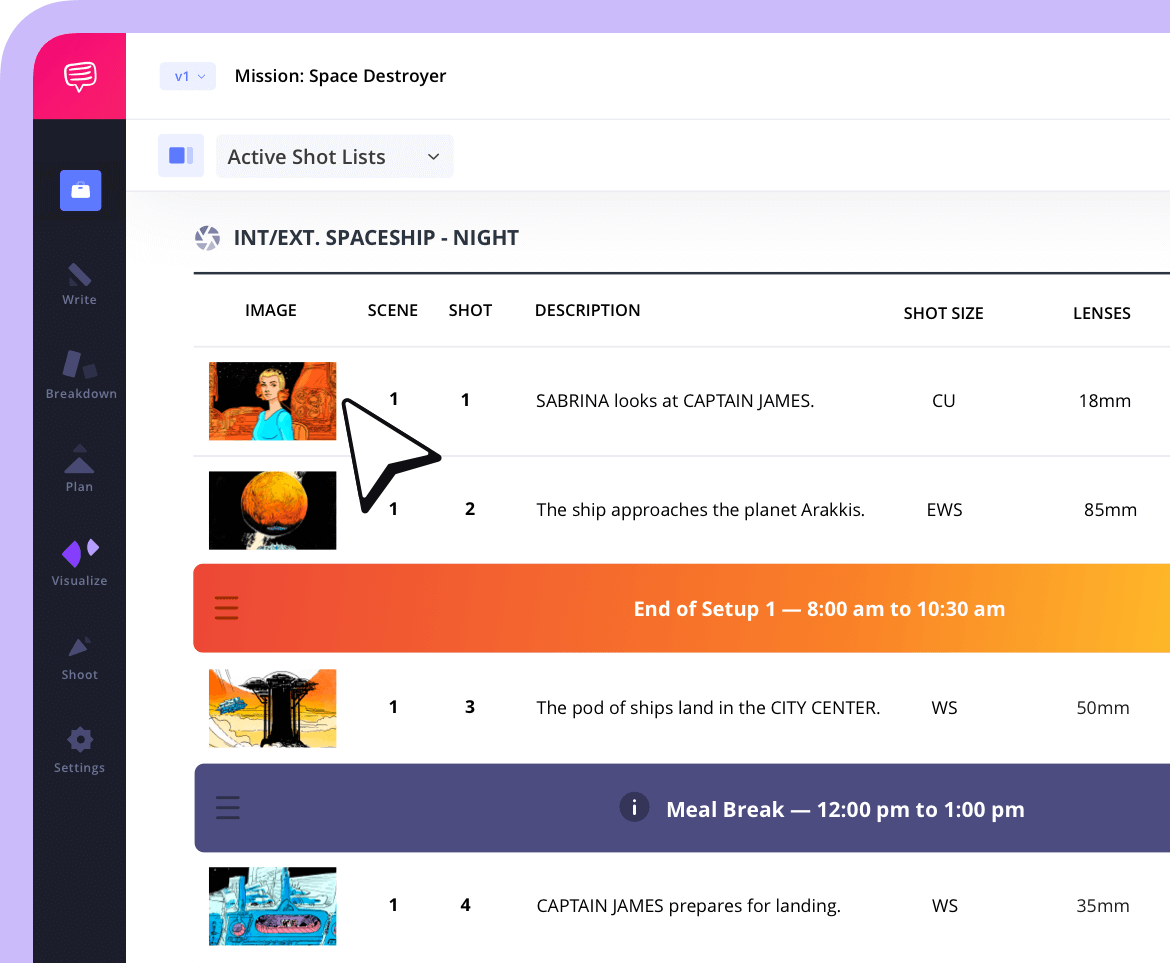
StudioBinder's shot list template is built for this kind of room-by-room planning. It keeps everything in one shareable document the whole team can review before shoot day.
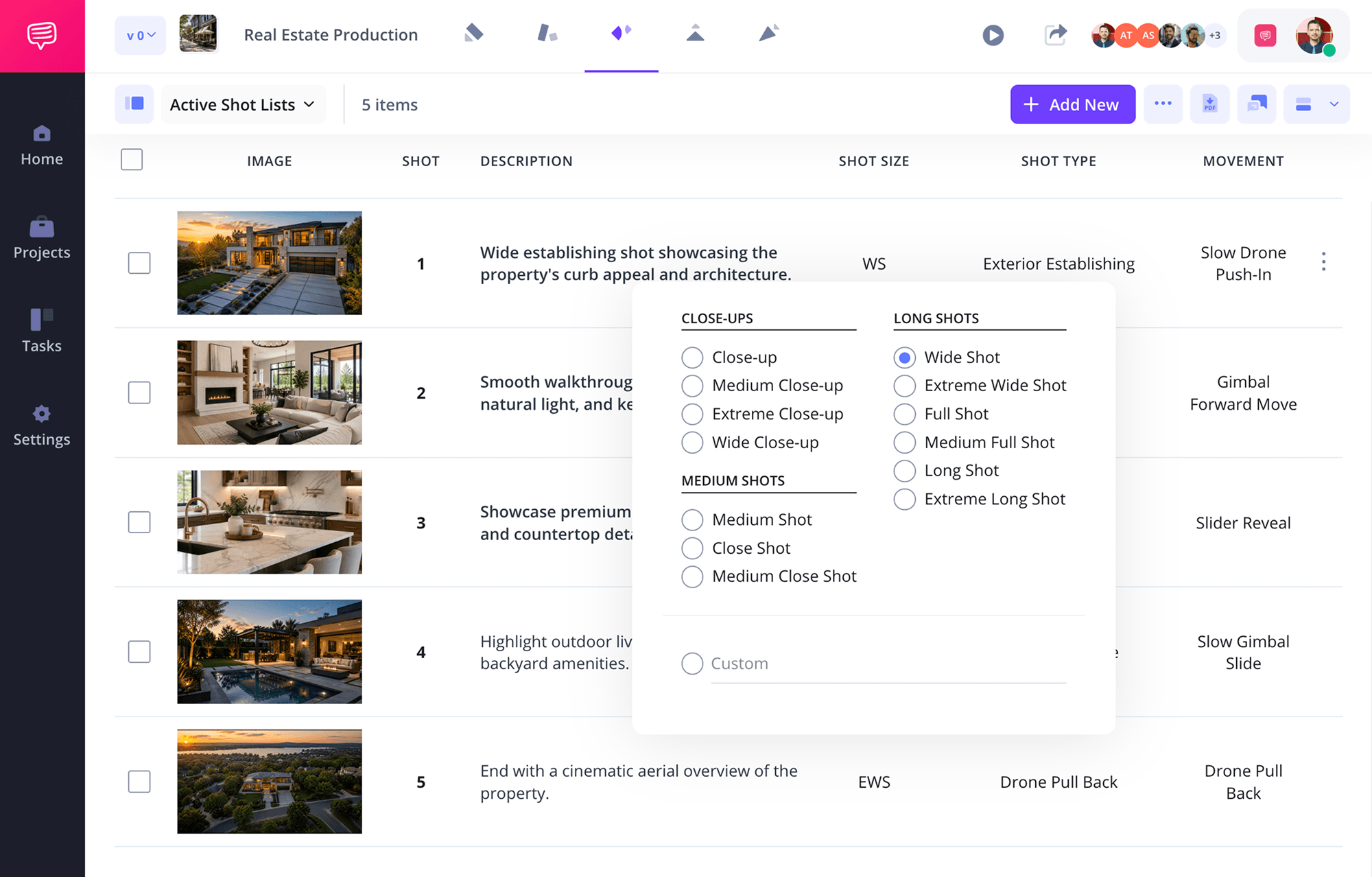
Create your free shot list in StudioBinder • Real estate video production
With your shot list in order and your team kept up to speed, you'll arrive with a pre-prepared manual on what to shoot and how to shoot it. It makes real estate video production a breeze.
Trusted by over 1M creatives
Shot lists that turn vision into action
From first draft to final take, plan, organize, and execute every shot with confidence.
Staging and Timing the Shoot
Work with the listing agent on staging before the shoot. Clear personal items — family photos, pet beds, counter clutter. Furniture should feel open and guide the eye through the space, not block sight lines. Check with the agent on which rooms need the most work and whether a professional stager is involved.
Small details stand out on camera. The lens catches messy power cords, crooked frames, and counter clutter. Do a quick walkthrough on the morning of the shoot. Check the rooms against your shot list to find these easy mistakes
Timing matters more than most videographers plan for. Book morning slots for east-facing rooms and afternoon slots for west-facing spaces. For homes with decks, pools, or gardens, schedule exterior shooting at golden hour.
Working with Real Estate Agents
Set out deliverables and turnaround times in writing before the shoot. Confirm property access, parking, and site limits upfront. Check for gated communities and tight HOA rules. You must also review local noise rules for drone work. Get the shot list approved before you arrive.
Most agents don't know what a video shoot involves. You must teach them three things. Staging must happen before the crew arrives. Light timing matters for the shoot. Finally, last-minute room additions will ruin the video edit. An agent who shows up expecting a two-hour shoot and gets a four-hour one becomes a difficult client fast.
Clear communication before shoot day prevents most of those problems. Send a simple prep checklist to the agent a few days in advance. Cover staging basics, parking logistics, and what to expect on the day. It takes ten minutes and saves hours.
Related Posts
POST-PRODUCTION
Post-Production
Editing turns raw footage into a listing video. The goal is a clean, well-paced video that shows the property at its best. Keep the workflow simple and the effects minimal.
Editing Real Estate Footage
Start with a rough assembly cut. Pull the best takes, cut the bad ones, and arrange the sequence in shot list order. Once the flow works, tighten the edit and color grade.
Color grades in real estate should look true to life. Warm tones work well for family homes and traditional properties. Modern homes with clean lines look better with a cooler, cleaner grade. The goal is to make the home look its best — not to make it look like something it isn't. Heavy filtering sets expectations the property can't meet in person. That leads to disappointed buyers and fewer offers.
Window exposure is the most common grading challenge in real estate video. Interior rooms are much darker than the view outside. Expose for the interior room. Use HDR blending to recover window detail. Blowing out the windows looks unprofessional. It can remove the best view the property has to offer. If the window frames a great backyard or a city view, that detail is a selling point. Protect it in the grade.
Here’s a video that goes over the process. From the shoot to color grading:

How To Edit a Luxury Real Estate Video • Real estate video production
Music, Pacing, and Captions
Pick background music before making final cuts. Match transitions to the beat — cuts that land on a downbeat feel deliberate. Cuts that don't feel sloppy. Music sets the emotional tone of the video, so choose something that fits the property. A modern condo and a family home in the suburbs don't need the same track.
Keep walkthrough tours under three minutes for social media. Shorter videos hold attention better when buyers are scrolling. For listing pages and MLS embeds, up to five minutes is fine and gives room to show more detail.
Use royalty-free music from Artlist or Epidemic Sound. Both have large commercial libraries built for exactly this use case. Using commercial tracks without a license? That's a copyright violation and can get your video pulled from the platform.
Titles and Lower Thirds
Put the address, asking price, and agent name in lower-third graphics. Include the brokerage logo. You must also add key specs like beds, baths, and square footage. Keep the typography clean. No script fonts, no drop shadows, no heavy animations.
Place lower thirds at the top or bottom of frame. Never centered. Centered text competes with the room. A clean lower third adds information without pulling focus from the property.
Related Posts
PRICING GUIDE
Real estate video production costs
Knowing videography costs helps agents plan their budget. It also helps them set clear expectations with clients.
Pricing by Video Type
Costs vary by market, videographer experience, and shoot complexity. These are typical ranges across US markets:
Property walkthrough tour: $300–$1,500
Drone footage add-on: $150–$500
Neighborhood and lifestyle video: $500–$2,000
Agent introduction video: $500–$1,500
Drone pricing reflects the cost of hiring a licensed pilot. It also covers the extra editing that aerial footage needs
DIY vs. Hiring a Videographer
DIY works for agents shooting volume listings at lower price points. A mirrorless camera, gimbal, and basic editing skills. Those are enough for good walkthrough tours. The gear pays for itself quickly with high volume. Many agents start here. They move to pro production as their budgets grow
For luxury listings and agent branding videos, hire a professional. High-end buyers expect polished production — precise color grading, smooth movement, clean audio. A bad video on a high-value listing does more damage than no video at all. A pro crew brings the gear and experience. They deliver steady results for any home layout or lighting challenge
Return on Investment
The ROI case for real estate video is strong. Listings with video receive 403% more inquiries than listings without. That's per the National Association of Realtors. More than 50% of home buyers now find their homes online. Video is one of the main ways they discover listings.
Homes marketed with video also sell faster. Shorter time on market cuts carrying costs for sellers. It also helps agents move listings more efficiently. In the luxury market, professional drone footage is tied to higher sale prices. Buyers pay more when a property is shown at its best.
The real estate video production market is growing at around 8% CAGR. Video has become the baseline expectation for serious buyers, not a bonus feature. Agents who use it consistently across their listings build a stronger portfolio. Also a more recognizable brand over time.
KEY TAKEAWAYS
How to improve your real estate video production process
Real estate video production increases inquiries, speeds up sales, and builds agent brand. Use walkthrough tours, drone footage, and agent intros. These formats cover most of your listing strategy. Add neighborhood videos and virtual staging. If property and budget call for it of course.
The most important step in real estate video production is the planning. A solid shot list prevents missed angles. It keeps your crew on schedule and avoids costly reshoots.
Use StudioBinder's shot list template to map every room before you arrive on location. It's the fastest way to make sure a good shoot day turns into a great listing video.
How to create a shot list inside StudioBinder • Real estate video production
Related Posts
Frequently Asked Questions
Real Estate Video Production FAQs
Real estate video production is the process of planning, filming, and editing videos that showcase a property. It can include walkthrough tours, drone footage, neighborhood highlights, and agent introduction videos.
Costs vary by property size, location, and video type. Most walkthrough videos range from $300 to $1,500, while drone footage and additional marketing videos increase the total budget.
Yes. Drone footage helps buyers understand the property's size, layout, and surroundings. It is especially effective for luxury homes, large lots, waterfront properties, and homes with unique locations.
Most real estate videos perform best between two and five minutes. Shorter versions work well on social media, while longer videos are better suited for listing websites and property pages.
A typical setup includes a mirrorless camera, wide-angle lens, gimbal, drone, and basic lighting equipment. The exact gear depends on the property type and production quality required.
UP NEXT
Real Estate Photography
Now that we're done going over real estate video production, let's jump more into the photography angle. Learn how professional real estate photography captures attention, highlights property features, and helps listings stand out online before buyers ever schedule a viewing.

Project management for video creatives. Tasks, file sharing, calendars and more.
Manage video production timelines, tasks, storyboards, shot lists, breakdowns, call sheets. Made for video creatives, new media and film.