AI is no longer just a weird trick for special effects. It is now a core part of how films get made, from the first script draft through the final color grade. New tools launch every week, but most lists are a jumble of links that mix video generators with editing apps and never tell you when to use any of them.
This guide changes that. We sorted the best ai filmmaking tools into three phases: pre-production, production, and post-production. We found the best gear for your specific workflow so you can stop hunting and start making. You need to know which tool fits your project before you waste any time or money.
Here are some AI filmmaking tools, organized by production phase, to help you work better.

Watch: How to Use AI for Huge Crowds


Subscribe for more filmmaking videos like this.
AI Filmmaking tools
AI filmmaking tools definition
Before we get into the weeds, let's establish exactly what AI filmmaking tools are. Check out our description below.
AI Filmmaking ToolsWhat are AI filmmaking tools?AI filmmaking tools are software apps that use smart tech to help you build your movie. These tools assist you with tasks from the first script to the final edit. They handle the busy work so you can work faster and stay on track. These apps do not take your place as the creator. Instead, they give you more power to make your own creative choices. Use them to save time and make your best work yet. |
AI filmmaking tools by phase:
- Pre-production: AI script analysis, storyboard generators, automated script breakdowns
- Production: AI-powered autofocus, on-set continuity tracking, virtual production environments
- Post-production: AI video editing, automated color matching, speech cleanup, subtitle generation, VFX compositing
AI Impact on Filmmaking
How AI is changing filmmaking
AI filmmaking tools have cut the time you spend on the hard parts of film work. Tasks that used to need a whole team of people can now be done by one person with the right tool. This means you can try out new ideas in minutes instead of weeks. You can see a "rough draft" of your visual ideas almost instantly. This speed lets you focus on telling your story instead of getting stuck on technical chores.
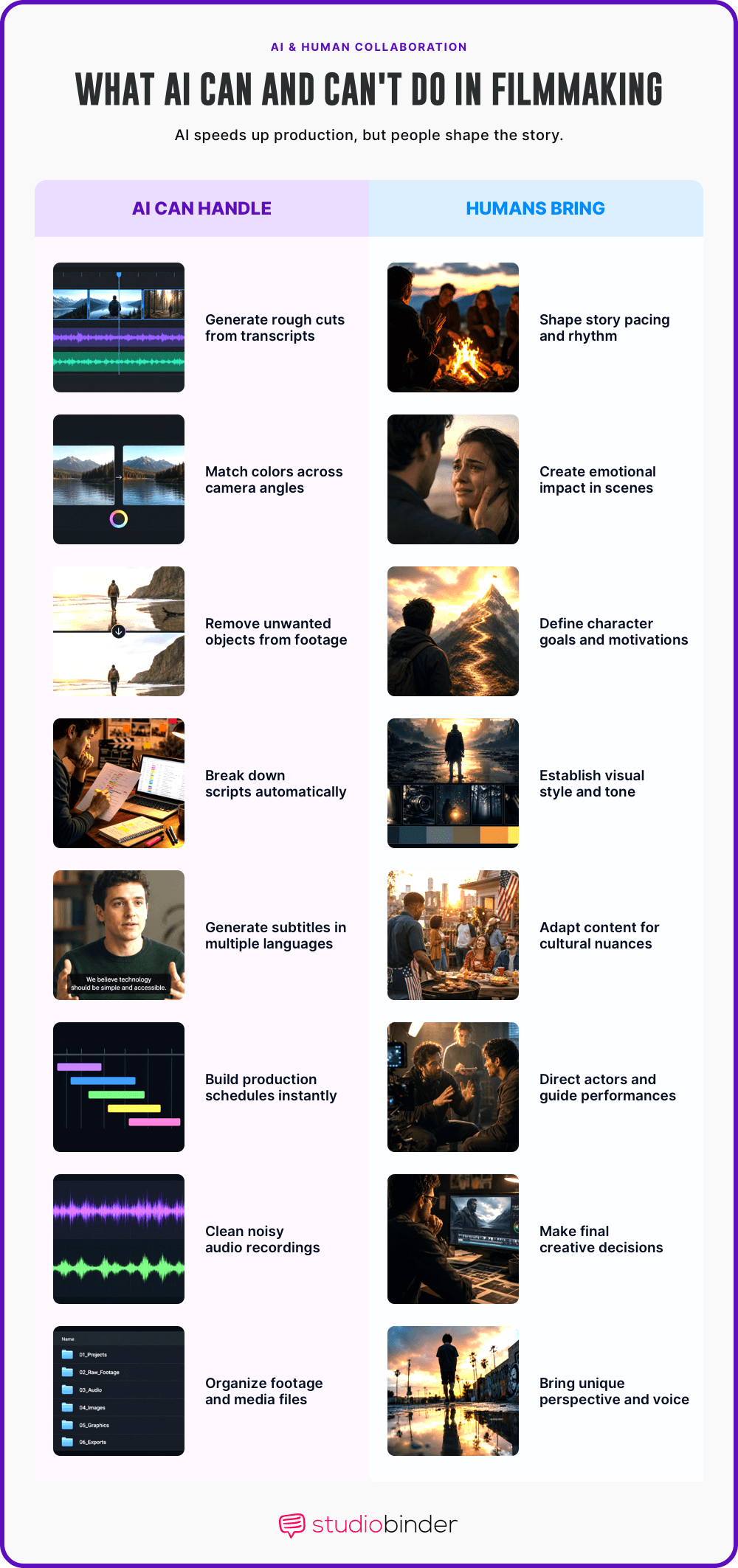
There is a real tension here, though. AI is great at the mechanical work, but it is not creative. It can fix a shot, but it does not know the "why" behind your choices. It does not understand feelings or the heart of a scene. If you let the AI do everything, the movie can feel empty. The human choices are still what make a film worth watching.
Use AI tools for filmmakers to speed up your work, not to replace your judgment. Clear away the mechanical tasks so you can focus on the choices that matter. The best AI filmmaking tools cut the time between your first idea and a finished cut. The vision still has to come from you.
AI Filmmaking Guide
AI tools in the filmmaking process
This list follows the three production stages of your project. You can find AI tools for filmmakers for pre-production, production, and post-production. Each section shows you exactly where an app fits into your workflow.
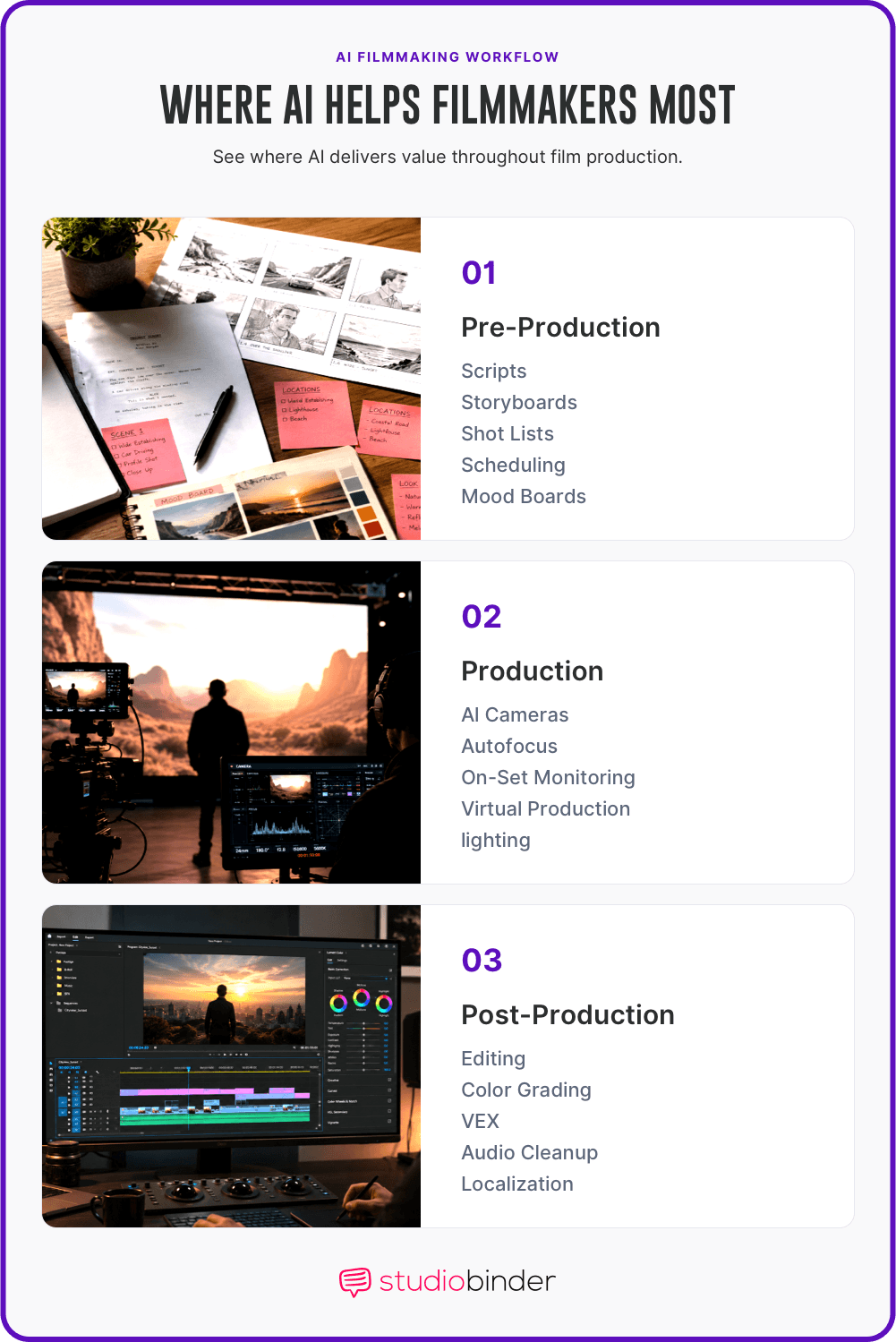
Areas Where Technology Assists Production Phases • AI filmmaking tools
Do not feel like you have to read every word. Jump straight to the phase that matches where you are right now. These AI tools for filmmakers are organized to help you find the right one fast so you can get back to your film.
AI Pre-Production Tools
Pre-production AI Tools
Pre-production is when you plan your film before the cameras roll. You can use AI tools here to save time on your scripts, schedules, and visual ideas. These apps help you organize your thoughts so you are ready for your shoot day.
Related Posts
AI Pre-Production Tools
AI storyboarding tools
AI image generators like Midjourney, DALL-E, and Flux can turn a text description into a visual reference frame in seconds. That's faster than sketching by hand or hunting through stock libraries.
For early-stage concepting — testing a color palette, framing idea, or lighting mood — AI-generated images save hours. But generated frames aren't a storyboard. A storyboard needs sequence, scene context, annotations, and links to your shot list.
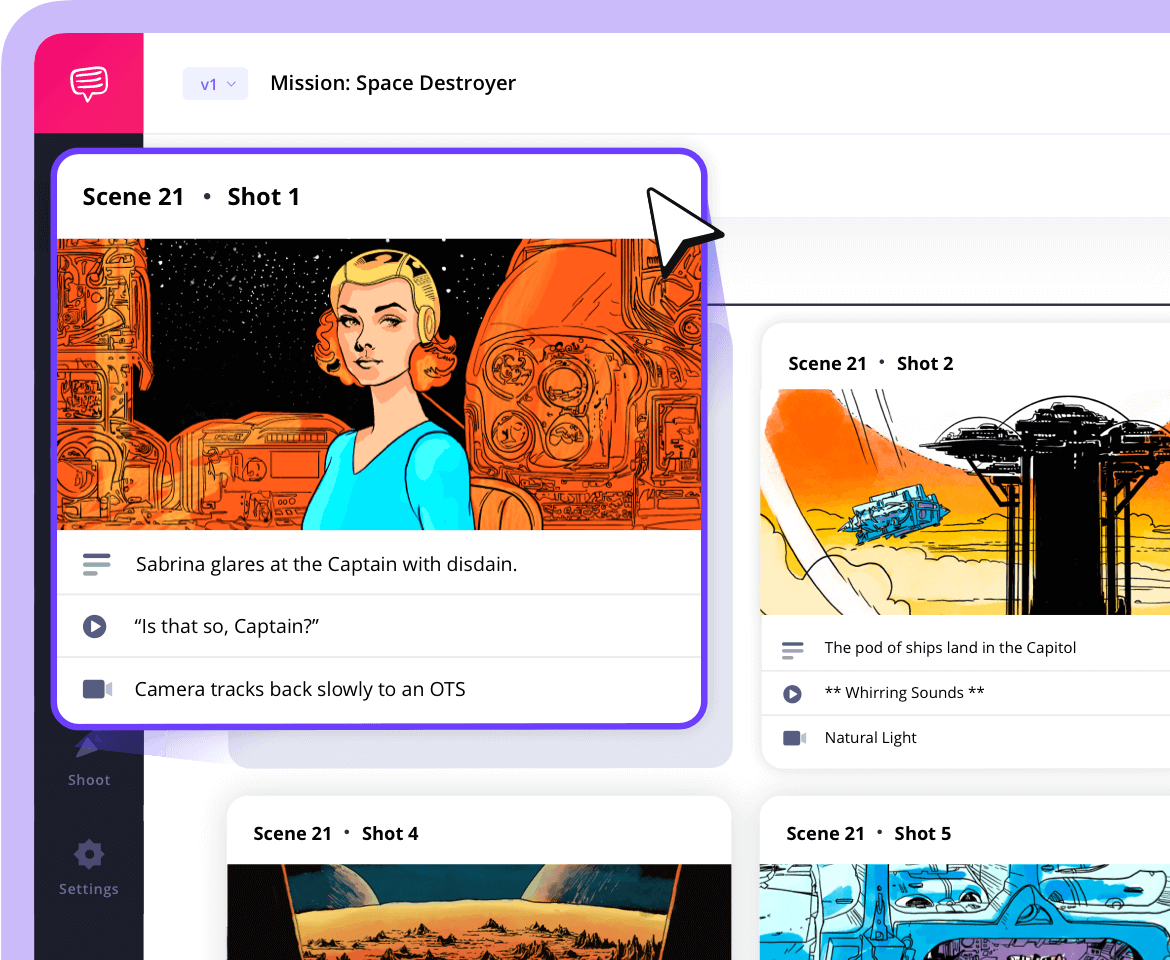
That's where a dedicated tool comes in. StudioBinder's storyboard feature lets you organize AI-generated frames (or hand-drawn, photographed, or stock images) into scene-by-scene sequences synced directly to your script. Each frame links to your shot list and schedule, so your visual plan stays connected to your production plan.
(caption) • AI filmmaking tools
You can annotate frames, reorder shots, and export the whole board as a PDF to share with your crew. Use AI to generate the raw visual ideas. Use StudioBinder to turn them into a plan your crew can actually shoot from.
Trusted by over 1M creatives
Storyboards that make vision visible
Turn scripts or ideas into storyboards, collaborate, and share with ease
AI Pre-Production Tools
AI shot listing and production planning
Pre-production planning is where all the creative decisions become logistics. Your script needs to become a breakdown, a shot list, a schedule, and a call sheet — and they all need to talk to each other.
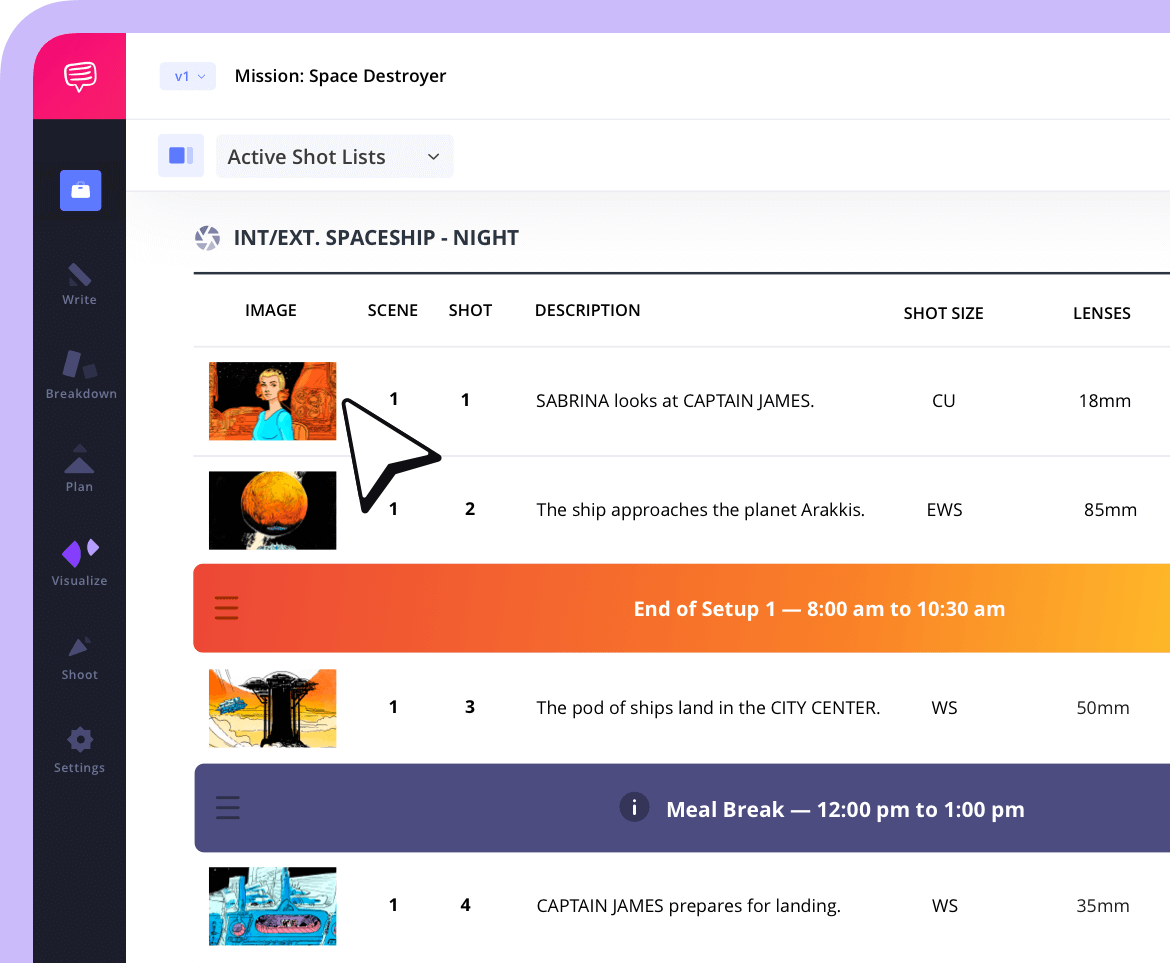
StudioBinder handles this full chain. Break down your script by tagging cast, props, wardrobe, locations, and VFX with industry-standard color coding. Build shot lists with detailed specs — size, angle, movement, lens, frame rate — and link each shot back to the script.
Generate storyboards from your shot list. Pull it all into a stripboard schedule, then auto-generate call sheets from that schedule. The key differentiator: everything stays connected. Change a scene in the script and it updates across your breakdown, schedule, and call sheets automatically. No AI tool on this list replicates that end-to-end workflow.
AI can speed up individual tasks — generating reference images, suggesting shot coverage, drafting breakdowns. But the production plan itself needs a single platform where all the pieces sync. That's what StudioBinder is built for.
StudioBinder Shot List feature • AI filmmaking tools
You can create shot lists directly from your script, turning script descriptions into shot list descriptions in just a few clicks. With your script and shot list all in one place, your workflow is upgraded to optimal speed.
Trusted by over 1M creatives
Shot lists that turn vision into action
From first draft to final take, plan, organize, and execute every shot with confidence.
AI Pre-Production Tools
AI scheduling and breakdown tools
AI-assisted script tagging is getting faster — AI can scan a script and auto-tag elements in seconds. StudioBinder's script breakdown feature gives you that same speed with the added benefit of syncing every tagged element directly to your schedule, call sheets, and reports.
AI Scheduling Tools
AI can take your breakdown and build a production schedule. The AI groups scenes by location to cut travel time. It checks when your actors are free. It shows you the fastest way to finish your film so you can stop guessing.
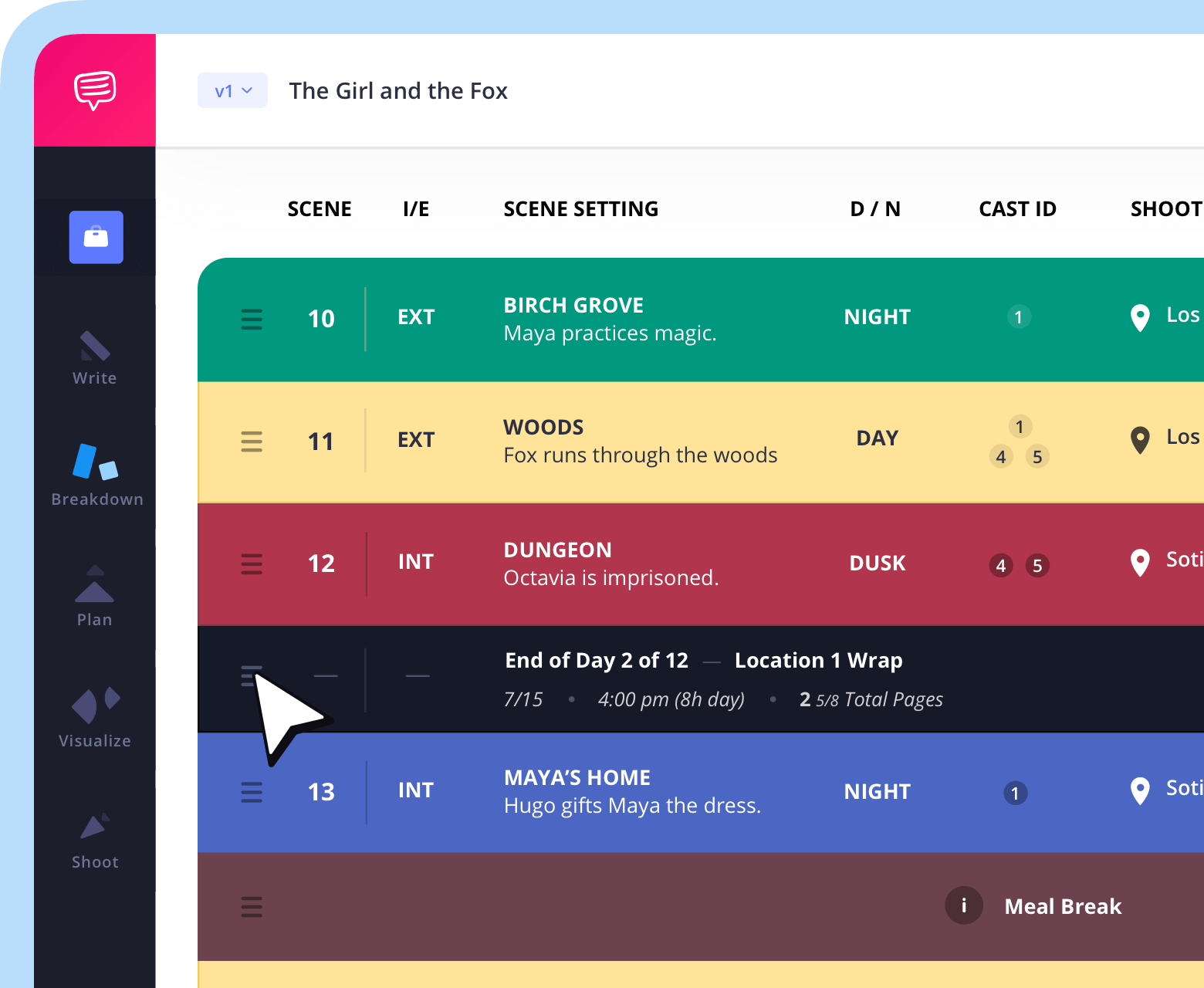
With StudioBinder's film scheduling software, you can go places even AI can't. With your entire production suite in one place, new script scenes are automatically added to your stripboard, where call sheets and more production scheduling needs can be quickly generated under one roof.
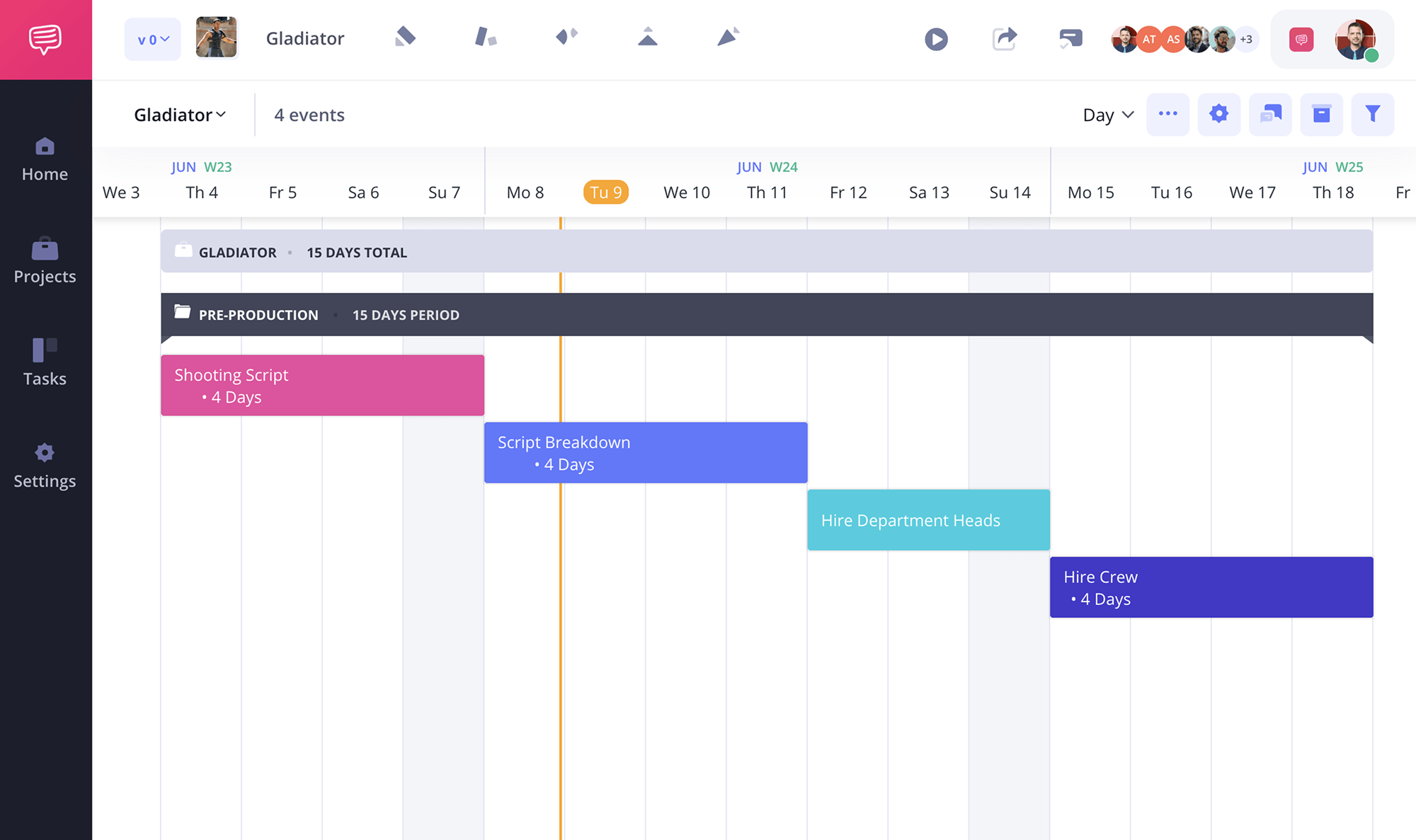
Shooting Schedule • AI filmmaking tools
With StudioBinder's video & film scheduling software, your shooting schedules, call sheets, and cast/crew lists are all securely backed up within a reliable cloud.
Trusted by over 1M creatives
Schedule your production, visually
Plan shoot days with a stripboard, and generate auto-filled call sheets.
AI Script Breakdown
You can use AI tools like ChatGPT to scan your script. It can tag your cast, props, and sets for you. It finds these items in seconds. You do not have to mark pages by hand. This gives you a clear list of what you need for each day.
However, AI can only tag items explicitly written in the script text. If a scene takes place in a dark alley, AI will miss the required lighting gear because it's not typed in the dialogue.
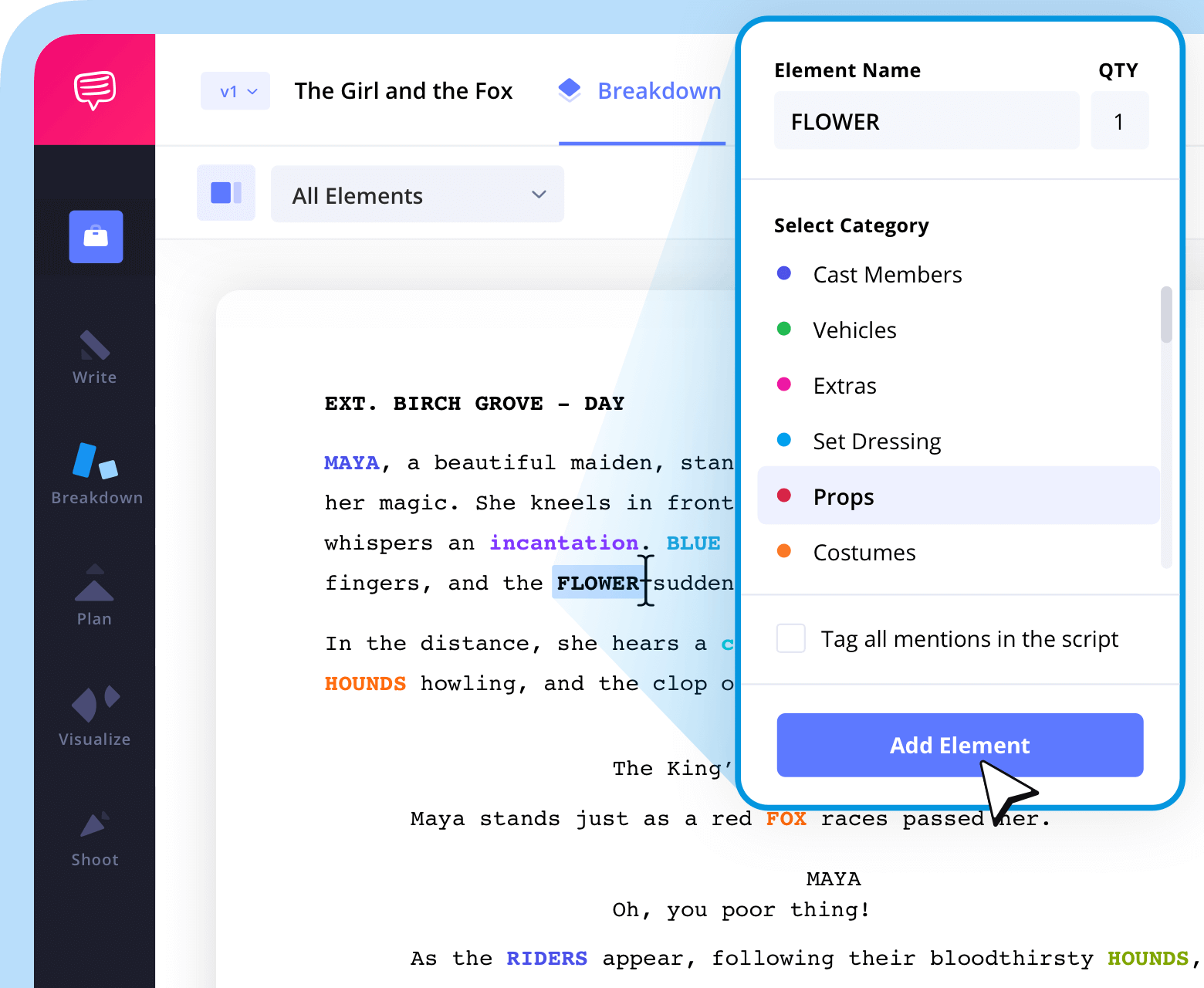
With StudioBinder's script breakdown software, every element can be highlighted in industry-standard script breakdown colors with customizable categories and script elements. This way, manually organizing set needs becomes a breeze.
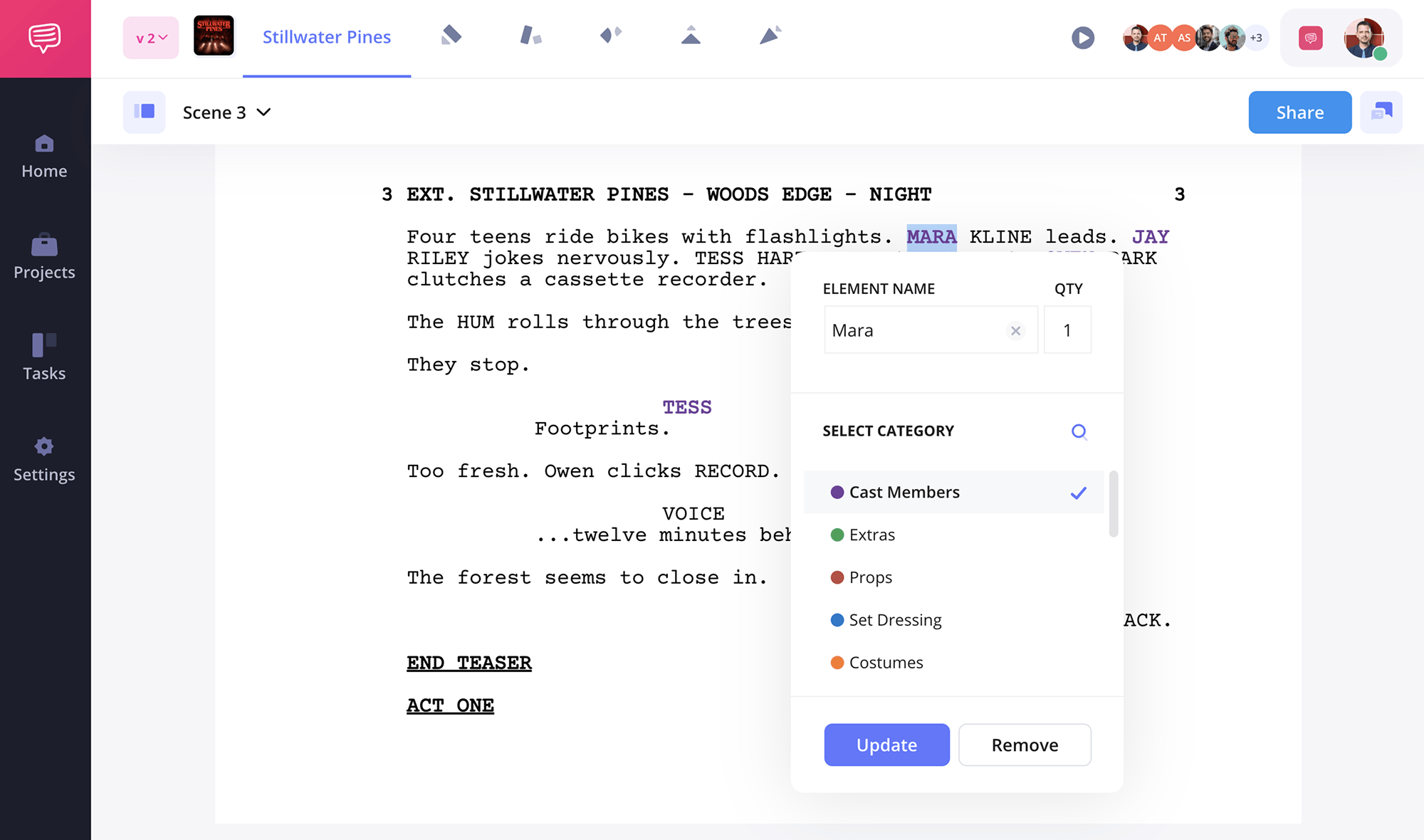
Script Breakdown • AI filmmaking tools
Script elements like props, wardrobe, cast and more are all brought together in one place, making production management more efficient than ever.
Trusted by over 1M creatives
Script breakdowns made easy
Tag script elements, organize by category, and share breakdown reports.
AI Pre-Production Tools
AI for lookbooks and moodboards
Before cameras roll, your creative team needs to agree on how the film should look. Lookbooks pull together lighting references, wardrobe ideas, color palettes, and location photos into a single visual presentation.
AI image generators (Midjourney, DALL-E, Flux) are useful here for mocking up reference frames — testing a lighting concept or camera angle before you commit to it. They're fast and cheap for internal concepting.
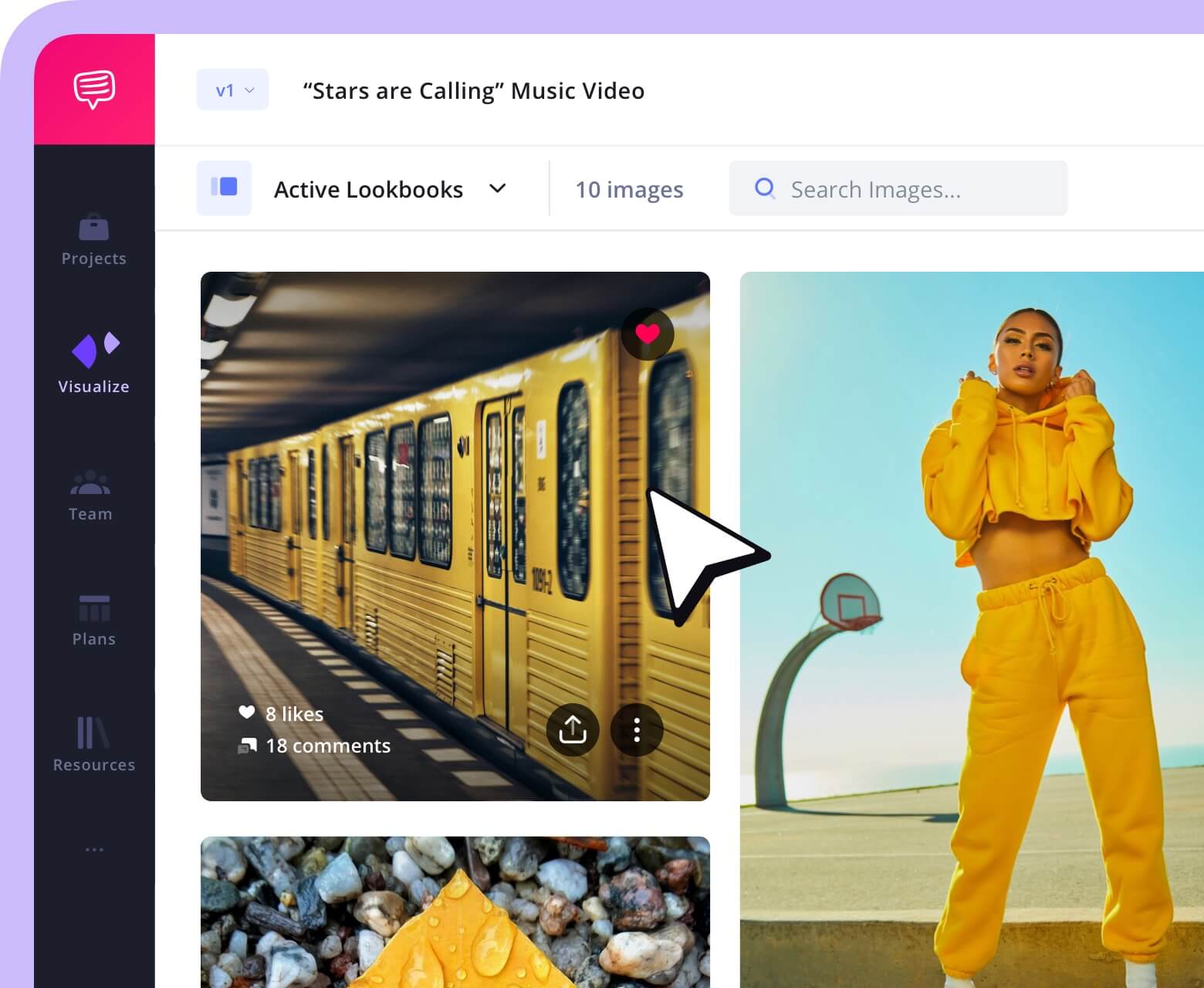
StudioBinder's Lookbook tool lets you organize those AI-generated references alongside real location photos, wardrobe shots, and production stills. Add text descriptions, group by department or scene, and share the whole board with your crew. Everyone sees the same visual target before day one.
StudioBinder Lookbook software • AI filmmaking tools
StudioBinder's lookbook feature is built for pre-production collaboration and production planning, not just visual inspiration.
Trusted by over 1M creatives
Lookbooks that bring ideas to life
Design lookbooks with images and text, collaborate, and present online.
AI Production Tools
Production AI Tools
Fewer AI filmmaking tools exist for AI video production. Most new tech in this phase is expensive. It is often built into high-end camera systems. These tools are best for you if you are a solo shooter, a doc filmmaker, or part of a small production crew.
What AI Can and Can't Do in Filmmaking • AI filmmaking tools
AI Production Tools
AI camera and on-set tools
We can't talk AI filmmaking tools without talking about the recent advancements in cameras and set tools. Below is a list of cameras and on-set tools that are being implemented into film production.
Sony and RED AI Autofocus
Sony and RED now build AI directly into their cameras. These tools track eyes and faces with great speed. This is perfect for you if you shoot alone and cannot hire a focus puller. You can move the camera freely and the tech will keep your subject sharp. For solo shooters, these are the most practical AI video production tools you can add to your on-set kit.
These tools are helpful, but they are very expensive. Most indie filmmakers use them as a goal for the future rather than a daily tool. You will likely need to rent a pro stage to use this tech.
StudioBinder Lookbook software • AI filmmaking tools
AI Production Tools
AI virtual production tools
VFX in filmmaking received a huge leveling up with the advent of AI. Green screen backgrounds used to be the go-to tool with many months of processing. But now AI filmmaking tools are changing the norm with lightning speed.
Virtual production lets you film actors in front of giant LED walls. These walls show digital worlds that react to your camera movement. AI is key here because it helps render these worlds in real time. This means you see the final background while you shoot, not months later in a lab.
Epic Games Unreal Engine: This is the top tool for building virtual sets. It uses AI to generate 3D trees, rocks, and buildings in seconds. This saves you from building every small detail by hand. It is very powerful, but you need a strong computer and high-end gear to make it work.
Related Posts
AI filmmaking tools
Post-production AI Tools
Post-production is where AI helps filmmakers most. Modern video editing software now ships with built-in AI to handle the slow parts so you can stay in your creative flow.
AI translation is not perfect. It can miss jokes or use the wrong words for local slang. It might also break the lines in a way that is hard to read on a screen. You should always have a person check the final text. Use the AI to do the fast work, but use a human to make sure it makes sense.AI Post-Production Tools
AI video editing tools
Recently, some of the top editing programs in the industry received upgrades with the latest AI filmmaking tools. Go through the list of editing programs below to keep yourself up to date on one of the most important steps in the post-production process.
Adobe Premiere Pro
You can use "Text-Based Editing" to cut your video. You just delete words in a transcript. It also uses "Auto Reframe" to keep your subject in the middle of the screen. This is best for you if you need to turn one long video into many short clips.

Premiere Pro Al Tools • AI filmmaking tools
DaVinci Resolve AI
This tool uses "IntelliTrack" to follow objects across the frame. You can also use "Smart Color Match" to make two cameras look the same. It is perfect for you if you want a pro look but do not have hours to fix the colors by hand.

DaVinci Resolve Al Tools • AI filmmaking tools
CapCut
You should use this app for your social media videos. It can match your cuts to the beat of your song. It also adds text to your video in seconds. It is a great choice if you want to edit on your phone and post to TikTok fast.

CapCut's new Al Video Maker • AI filmmaking tools
AI Post-Production Tools
AI color grading tools
Wondering what the newest AI filmmaking tools are bringing to the world of color grading? Let's jump into a couple of the current leading AI color grading features to learn more.
DaVinci Resolve AI Color
This tool uses "Magic Mask" to find a person in your shot. You click the person, and the AI tracks them. You can then change their skin tone without changing the background. You can also use "Shot Match" to make different clips look the same. This gets your work 80% done so you can show a fast draft to your team.

AI Visual Effects in DaVinci Resolve • AI filmmaking tools
Colourlab AI
You can use this to copy the look of a famous movie. You show the AI a photo you like, and it moves those colors to your video. It is a fast way to get a "vibe" for your film. It saves you hours of work because it fixes the whole timeline at once.
AI color is only a start. It does the math, but you make the art. You still need to check the final look to make sure it feels right. Use the AI to save time, but use your eyes to make the big choices. AI filmmaking tools are just, well, tools after all.

ColourLab Basics • AI filmmaking tools
AI Post-Production Tools
AI visual effects and compositing
Some of the most time saving features around modern AI filmmaking tools can be found within the world of visual effects and compositing. Below are a few visual effects platforms that have upgraded their abilities with AI.
Runway ML
You can use this to wipe out items you do not want in your shot. It can erase a boom mic operator's shadow in seconds. It also has a tool to swap your background without using a green screen. The AI tracks the motion for you so you do not have to fix it frame by frame.

Runway ML Overview • AI filmmaking tools
After Effects AI
This tool uses a "Roto Brush" to cut out moving people fast. You just draw a line on the actor and the AI does the rest. You can also use "Content-Aware Fill" to fix a bad sky or remove a stain on a wall. It is a huge help for cleaning up your footage.

Useful Al Tools for After Effects • AI filmmaking tools
Adobe Firefly
You can use this to add things to your scene that were not there. If you need a new tree or a sign, you just type it in. The AI builds the item and makes it match your light. This lets you fix a set or add detail without a big VFX crew.

What Is Adobe Firefly? • AI filmmaking tools
AI Post-Production Tools
AI audio and sound design tools
How can AI help influence audio and sound design? The newest incorporated features are pretty amazing. Best of all, these AI filmmaking tools shorten the technical work so you can spend more time being creative.
Adobe Podcast
You can use this to fix bad audio from a noisy set. Its "Enhance Speech" tool wipes out background hum and echo in one click. It makes a cheap mic sound like a pro studio mic. This is perfect for you if you record in loud rooms or outside.

Adobe Al Audio Editing Tool • AI filmmaking tools
Descript
This tool lets you edit your sound by looking at a transcript. If you delete a word from the text, the sound for that word is cut. It also has a "Studio Sound" feature to clean up your tracks. You save time because you do not have to hunt for clips in a timeline.

Descript Al Video Editor • AI filmmaking tools
ElevenLabs
You can use this for quick voiceovers or to fix a line of talk. You type the text and the AI speaks it in a natural voice. This is great for "temp" tracks while you edit. You can test how a scene feels before you bring in your real actors.
Using AI voices for your final film is tricky. There are big questions about rights and rules for actors. You should use these tools for notes and drafts. Check the latest laws before you use an AI voice in a project you want to sell.

What Is Eleven Labs Al • AI filmmaking tools
AI Post-Production Tools
AI subtitles, transcriptions and localization
The world of subtitles and transcriptions may be the most suited for the advent of AI filmmaking tools. Let's get into the nitty gritty of the platform upgrades on this side of post-production.
Descript
Descript makes subtitles part of the editing process instead of a separate task. Upload your footage and the platform automatically creates a transcript that can be turned into captions in seconds. You can customize styles, export SRT or VTT files, and even translate subtitles into multiple languages without leaving the editor. This helps filmmakers create accessible, professional-looking videos while saving hours of manual caption work.

How to Make Animated Captions • AI filmmaking tools
Otter
These tools have changed how fast you can work. In the past, you had to wait days for a pro to type out your film's dialogue. Now, you can get a full transcript in minutes. You just upload your video and the AI writes the text as you watch. This lets you find the best take or a specific quote without listening to hours of raw tape.

How To Use Otter Al To Transcribe Audio • AI filmmaking tools
Rev AI
You can use AI to translate your film for the whole world. Tools like Rev AI can build subtitles in many languages in seconds. This helps you get your movie onto global sites fast. It is a great way to find a bigger audience without a huge cost.

Rev's Transcript Editor • AI filmmaking tools
Related Posts
Frequently Asked Questions
FAQs about AI filmmaking tools
The right ai filmmaking tools depend on your stage of production. For pre-production, StudioBinder is best for planning and shot lists. For editing, use Adobe Premiere Pro for fast workflows or DaVinci Resolve for color. For VFX, Runway ML is great for generating new visuals, while After Effects is best for fixing shots.
No. AI only handles the mechanical tasks like typing out transcripts, matching colors, or making rough cuts. It cannot make the creative choices that give a film heart. AI just shrinks the time between your idea and the final clip so you can focus on the story decisions.
They use it to help write scripts and check for plot holes. They also use AI to make fast storyboards and mood boards to show their vision. StudioBinder handles scheduling, script breakdowns, and call sheets in one place. It is one of the top ai for filmmakers for pre-production. AI can even help find the right spots for filming by sorting through location photos.
Not really. There are short generative ai film experiments made with tools like Runway or LTX Studio, but they are not feature films. A real film depends on creative judgment AI cannot replicate. Story, character, and pacing all require choices that come from lived experience.
UP NEXT
The best filmmaking and screenwriting podcasts
Now that you have your workflow with AI filmmaking tools set up, you should check out how AI can build video for you. Our next post looks at the best AI video tools for social clips and new ideas.

Share your vision with elegant shot lists and storyboards.
Create robust and customizable shot lists. Upload images to make storyboards and slideshows.