Astrong corporate video starts before the camera rolls. The script decides whether it succeeds or fails. Without a great script, you waste time and money. Learning how to write a corporate video script — and choosing the right corporate video script format — gives your video the best chance of landing the way you intended.
Corporate Video Script Defined
What is a Corporate Video Script?
A corporate video script is the master blueprint for your project. It is not just a list of lines for an actor to say. It is an audio-visual (AV) document. You’ll have all the text, notes, and visuals aligned in columns. This format organizes every shot, every piece of music, and every word of narration in sequential order. It's your map that keeps your project on track from start to finish.
Why scripting matters for corporate video
Writing a script gives you full control over your brand’s message. When you map out the words and visuals first, you make sure the message is clear from the start. It also helps confirm your overall strategy is solid.
From a production view, preparation prevents costly reshoots. A clear script keeps the shoot organized and efficient. Your crew knows what to film and when.
It also saves time and money. Once the script is finished, you can build a realistic budget around it.
Finally, it lets stakeholders approve the creative direction early. This agreement reduces last-minute changes that can slow down the project or increase costs.The below video provides a general breakdown on how to write a corporate video script before we dive further.

Videos Made Simple • How to write a corporate video script
Related Posts
Scripted Video Types
Types of corporate videos
While every project is different, the process of how to write a corporate video script is the same. Match your tone and structure to your business goal each time.
Brand videos
A brand video script focuses on emotion and high-level identity. These are usually 60 to 90 seconds long. The tone depends on the brand — some go cinematic, others intimate. Either way, balance strong visuals with a narrative that tells the world who the company is and what it stands for.
Training and onboarding videos
These scripts focus on clarity and teaching. The tone should be calm and helpful, with ideas broken into small steps. You can keep them simple or make them more creative, depending on your brand. The goal is to inform, so the visuals must match the text.
Product explainers
An explainer video script targets a pain point for the viewer. It uses a "problem and solution" structure. Show the pain point first, then position your product or service as the answer. A tight explainer video script usually runs under two minutes — long enough to make the case, short enough to hold attention.
Internal communications and executive messages
These scripts spread company news. You can also share messages from upper management. They must feel personal and honest. Include all required legal and professional details. The style must be formal and clear. Everyone must be able to understand the message.
Now let's watch Jenn Jager explain a basic corporate video script structure that can be applied to all these different projects.

Corporate video script format • How to write a corporate video script
Script Formatting: AV vs. Column
Corporate video script format
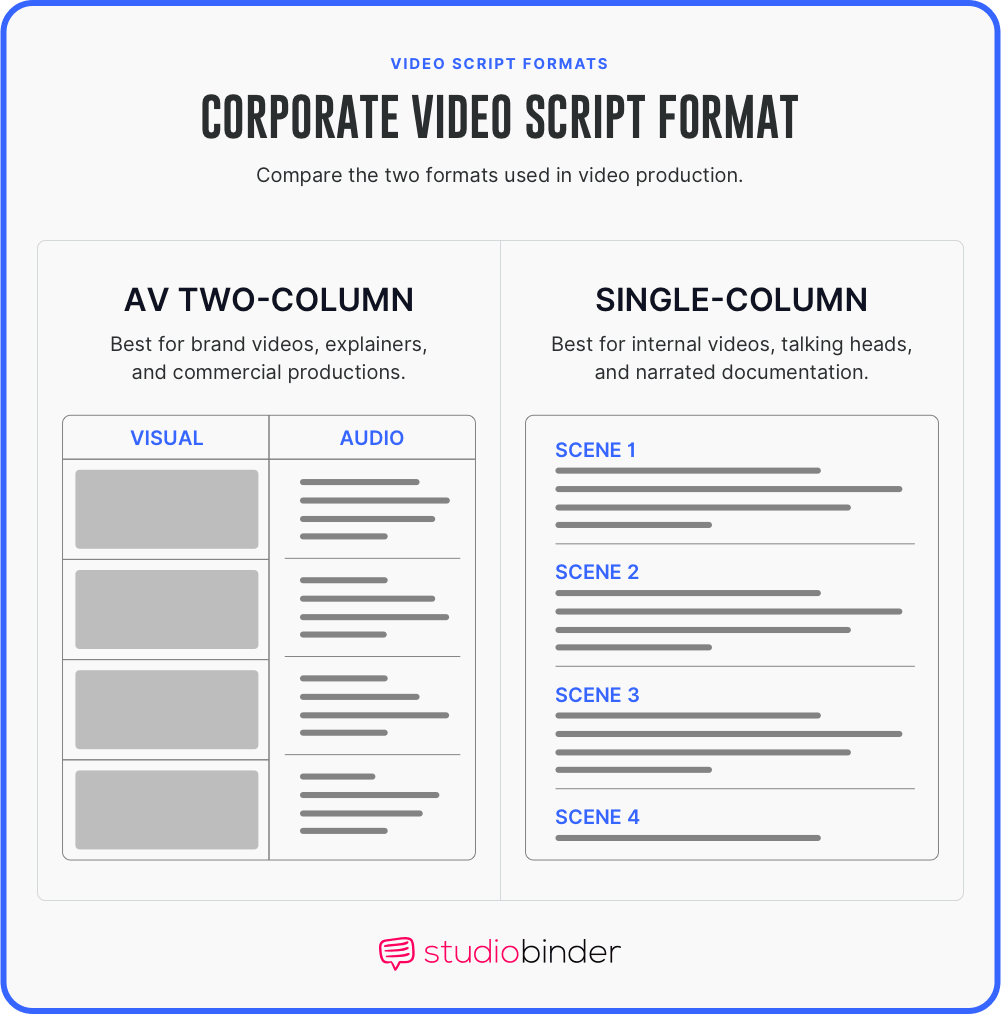
Before you write, choose your corporate video script format. The right layout makes it easy for your production team to follow. If you choose wrong, your shoot will suffer. The differences between the two matter a lot.
The audio/visual (AV) two-column format
The AV script format is the standard for corporate videos. You split the categories of each element into columns. One headings shows the audio, or what we hear. Another heading shows the visuals, or what we see. This helps you match each voiceover line with a shot or graphic.
Comparing Professional Video Script Formats • How to write a corporate video script
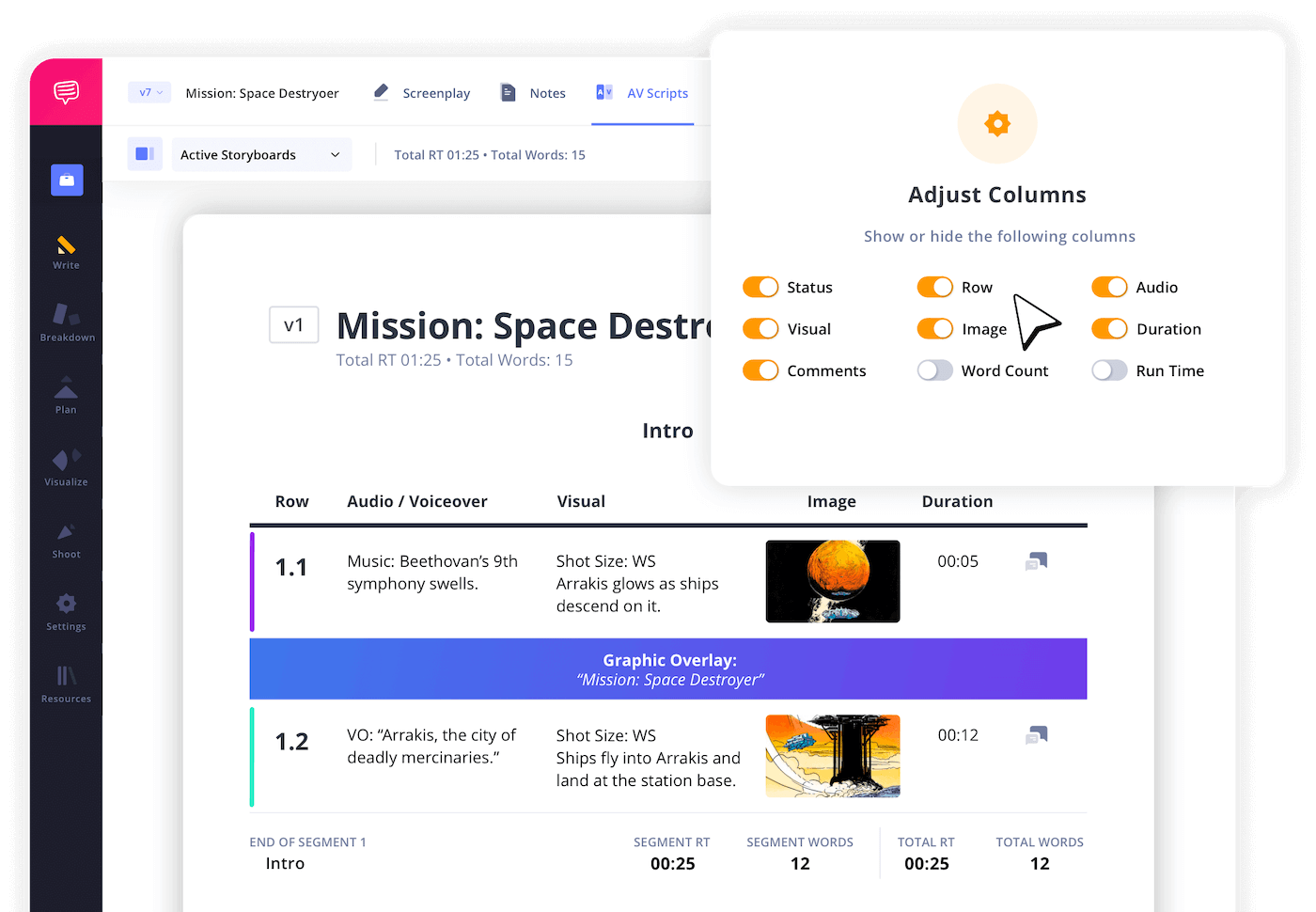
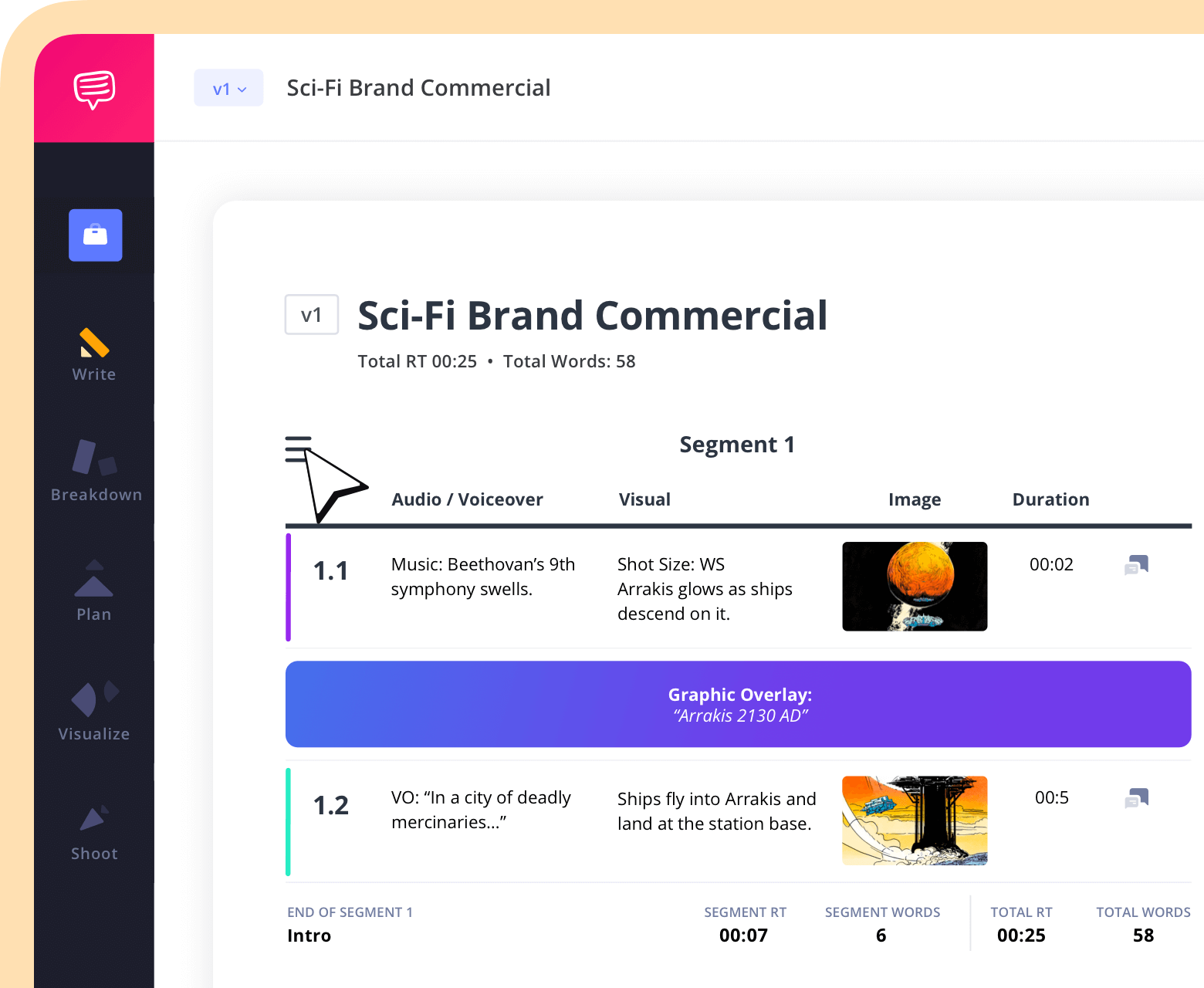
StudioBinder takes things to the next level. With StudioBinder's AV script software, you can also label each row. You can easily embed images or videos into the visual column. There is an additional column for adding larger images. The last column you enter the duration of the shot. Having these options lets you create the best script possible.
Add duration to each audio video script line • StudioBinder AV Script Writing Software
Single-column format for simpler productions
A single-column format looks more like a traditional movie or show script. This focuses on visual descriptions and action. Dialogue is the other key element.
You can use it for "talking head" videos. These might be straightforward interviews. You can also share raw internal messages where there aren't many complex visuals. While it is faster to write, it provides less detail for the editor later on. It might also leave questions during the shoot.
See it in StudioBinder
The fastest way to understand the difference between these two formats is to build one. StudioBinder's AV script editor puts both columns on screen at once, auto-calculates runtime as you type, and keeps your script synced to your shot list and call sheet.
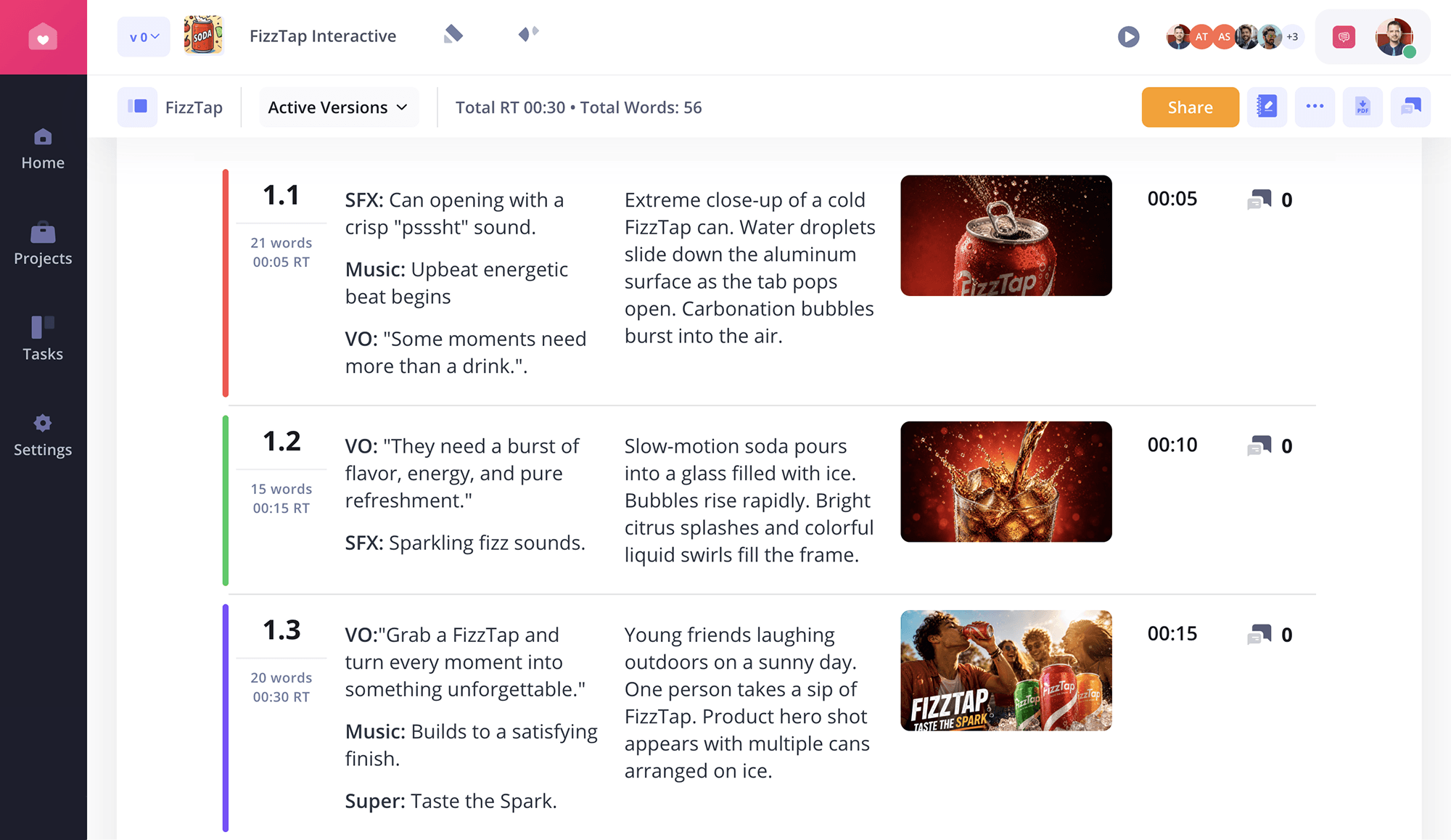
AV Script Sample • StudioBinder AV Script Writing Software
With your AV script synced with all your production needs, nothing gets lost, so you can focus on bringing the best narrative to life with your team.
Related Posts
6-Step Scriptwriting Guide
How to write a corporate video script
Follow this proven process to learn how to write a corporate video script from a blank page to a production-ready final draft. Start with your concept and goal, then build step by step. Each stage brings you closer to something your crew can actually use on set.
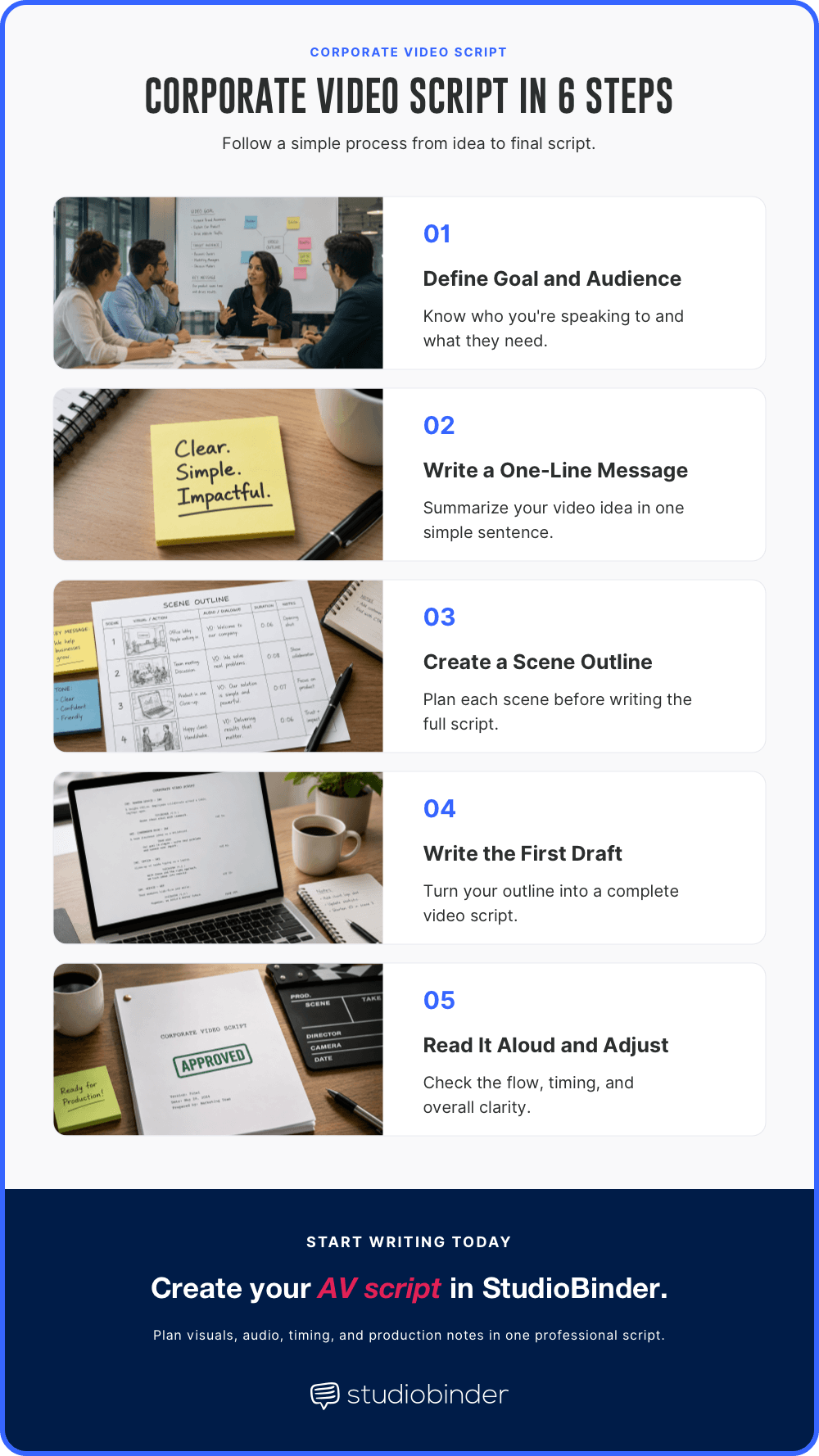
Simplified Process from Idea to Final Script • How to write a corporate video script
Step 1 — Define the goal and audience
You must know who you are talking to and what you want them to do. A script for a new hire looks very different from one for a CEO. A brand film is also different from an explainer video, and so on.
Step 2 — Write a one-line message
Shorten your entire video down to one sentence. If you cannot explain the goal in ten words or less, your script might be too complex. One you master this, you'll create effective scripts.
Step 3 — Build a scene-by-scene outline
You always need to map out the main points of your story. When you start, decide what happens in the beginning, middle, and end. Once you finish this, then you can write the dialogue in-between. You'll also be able to add the visuals after.
Step 4 — Write the first draft
Open your video script template. At the foundation, they all work the same. Fill in the columns in order as much as possible. Focus on the flow between the visuals and the narration. Make sure to keep the story moving.
Step 5 — Read it aloud and time it
People generally speak slower than they read. Knowing this, you can read your script at a conversational pace. This helps you time your video. The speed you read should be about 125 to 150 words per minute. This ensures your script fits your target length.
Step 6 — Revise and lock for production
Once you're done writing your draft, you have one more step. Reread it and edit it. Keep it as streamlined as possible. Cut every word that does not need to be there. After that, you can lock your final script. At this point, you do not make any more changes. You'll give copies of the script to the rest of the production team. Now, all you have to do is prepare for your shooting day. Then you can shoot your video.
Trusted by over 1M creatives
AV scripts with built-in timing
Write in two-column format, track runtime, and share with version control
Annotated Script Example
Annotated corporate video scripts
Below is a complete corporate video script example written in standard AV format. Study how each scene pairs a visual description with VO copy, how the structure moves from problem to solution to CTA, and how brief annotation notes keep the crew aligned without cluttering the document.
Hypothetical Brand Video: "GreenNode Tech"
GreenNode Tech Brand Video | Format: AV Two-Column | Runtime Target: 90 seconds
This annotated example shows how to write a corporate video script that works, not just one that fills a template. Read each scene, then read the annotation below it.
SCENE 1 — OPENING [0:00–0:12]
Visual: [WIDE] Aerial drone shot of the GreenNode server campus at golden hour. Camera pushes slowly toward the facility entrance. No brand logo visible yet.
Audio (VO): "For two decades, running enterprise infrastructure meant accepting one unavoidable cost: the energy bill that never went away."
Annotation: Open on environment, not product. The aerial establishes scale before the brand appears. VO introduces the problem only. Do not name the brand in Scene 1.
SCENE 2 — PROBLEM [0:12–0:30]
Visual: [INT, MED] Server room with older hardware. Heat haze visible above the racks. Cooling units running at capacity. On-screen graphic: average enterprise cooling cost $2.4M per year.
Audio (VO): "Legacy cooling. Aging hardware. Unpredictable outages. For IT directors, these aren't edge cases. They're Tuesday."
Annotation: The problem section should feel like the viewer's world. "Tuesday" is a short punch — deliver it after a natural pause, not rushed. The cost graphic gives the problem a concrete number. Vague problems do not move people.
SCENE 3 — SOLUTION [0:30–0:55]
Visual: [INT, MED] Engineer at GreenNode console, modern interface, calm environment. Cut to infrastructure graphic showing 40% cost reduction. GreenNode logo bug appears lower right.
Audio (VO): "GreenNode redesigned data center cooling from the ground up. Liquid-cooled racks. Predictive load balancing. Energy consumption down 40 percent. On day one."
Annotation: Introduce the brand here, not in Scene 1. Lead with the benefit (40% cost reduction), then the feature (liquid-cooled racks). The graphic should visualize the stat, not decorate it. This is the first time the brand logo appears.
SCENE 4 — SOCIAL PROOF [0:55–1:15]
Visual: [INT, MED] Client CTO in a professional setting, clean background. Lower third: "Sarah Kim, CTO, Veriton Group."
Audio (SYNC): "We had three outages in the year before GreenNode. Zero in the eighteen months since. The energy savings covered the full migration cost in eight months."
Annotation: SYNC means the speaker is on camera with live recorded audio, not voiceover. Real clients outperform actors in testimonial segments. Always use a lower third with name, title, and company. Specific numbers (three outages, eighteen months, eight months) make the testimonial credible. Generic praise does not convert.
SCENE 5 — CTA [1:15–1:30]
Visual: [GFX] GreenNode logo dissolves in on a clean dark background. URL greennode.com/demo animates in beneath the logo. Hold for three full seconds after the VO ends.
Audio (VO + SFX): "GreenNode. Infrastructure built for what's next." SFX: Soft ambient tone fades up under the logo hold.
Annotation: The CTA scene is not the place for new information. One message, one URL. The three-second hold gives viewers time to register the URL. SFX here means a soft audio bed under the logo hold, not a new music cue.
Structural Note: This script follows the Problem to Solution to Proof to CTA arc. Notice what is absent from this example: no feature list, no pricing, no competitive claims. Brand videos build affinity. The conversion happens elsewhere. Each scene hands off cleanly to the next.
Notation Key: [WIDE] = wide establishing shot | [INT] = interior location | [MED] = medium shot, chest up | [GFX] = motion graphics or animated lower thirds | VO = voiceover, recorded separately | SYNC = on-camera live recorded audio | SFX = sound effect
Scene | Visual (Video) | Audio (Voiceover & Sound) |
|---|---|---|
1 | [EXT. CITY SUNRISE - TIMELAPSE] Golden light hits glass buildings. | [SFX]: Soft, pulsing synth music begins. |
2 | [CU] A hand plugs a glowing green cable into a server rack. | VO: Data is the new lifeline of the world. |
3 | [MED] A woman in a lab coat looks at a digital tablet. She smiles. | VO: But your data needs a home that doesn't cost the Earth. |
4 | [GFX] Text pops up on screen: 99.9% RENEWABLE. | [SFX]: Low "ding" as the text appears. |
5 | [WIDE] Drone shot of a data center covered in solar panels. | VO: At GreenCircuitz, we power the future with clean energy. |
6 | [CU] Rapid shots of a spinning cooling fan and blue light. | [SFX]: Subtle whirring of a fan. |
7 | [MED] Two engineers talk and point at a large monitor. | VO: Fast. Secure. Built for the next century. |
8 | [LOGO] The GreenNode logo fades in on a white background. | VO: GreenNode. Powering progress, naturally. |
The best part is that this industry-standard audio video script format is already built into StudioBinder's AV Scripting Software. Add custom banners separating your segments for even more clarity.
Add custom banners on AV scripts • StudioBinder AV Script Writing Software
Banners are the perfect way to color code your corporate video script and indicate critical production context for you and your team.
Common Scripting Mistakes
Corporate video script mistakes
Here are common mistakes to avoid when writing your video script. These issues can make your message weak. You might lose your audience if you don't pay attention.
Writing for reading instead of listening: You should avoid long, complex sentences. Your script should sound like a person talking. It should not sound like a long report. Balance the information with a natural conversation.
Skipping the visual side: If you only write words, you miss out on the video. You should describe what the audience sees. This makes sure the words and the pictures match. Don't forget to describe any sounds or other important details.
Leaving out the goal: Your video fails if you do not tell viewers what to do next. You should give a clear step after they finish watching. Tell them to visit your website, buy something, or sign up for a demo.
Running too long: You lose viewers if the video goes on for too long. Remove any filler and keep things short. This ensures your message is to the point and fun to watch.
Using too much technical talk: Large business words can sound off-putting. You should use simple, human words. This helps people trust you and keeps them watching.
Knowing how to write a corporate video script means spotting these patterns before they appear. A strong script avoids all of them and keeps the message clear from the first frame to the last.
Related Posts
Corporate Script Template
Corporate video script template
You can use this simple text template for any video project. It keeps your visuals and audio in sync so your team stays on the same page.
Professional AV Script Template
Project Name: [Insert Title]
Date: May 7, 2026
Version: 1.0
Duration: Approx.
Scene 1
Visual: [WIDE] Describe the opening shot here. Example: A person walks into a bright office.
Audio: VO: Write your opening line here. [SFX]: Describe background music or sounds.
Scene 2
Visual: [CU] Show a specific detail. Example: A close-up of a product on a desk.
Audio: VO: Explain the benefit or feature shown in this shot.
Scene 3
Visual: [GFX] Add text or a logo. Example: Website URL appears at the bottom.
Audio: [SFX]: Add a "whoosh" or "pop" sound for the graphic.
Scene 4
Visual: [MED] Show a person talking to the camera.
Audio: VO: Wrap up your message with a strong call to action.
Working from a real corporate video script example first makes your own draft much faster. Writing a great corporate video script is easier when you have the right tools to stay organized. From brand video scripts to internal communications, StudioBinder helps your team build professional AV scripts and keep everyone on the same page.
Frequently Asked Questions
Corporate video script FAQs
The length of your script depends on your final video. Most people use 125 to 150 words per minute. This keeps the pace slow enough for people to understand. A 60-second video needs about 125 to 150 words. A 2-minute video should be 250 to 300 words. If you make a 5-minute video, aim for 625 to 750 words. Read your script out loud to check the time. Keep your lines short and clear.
The professional corporate video script format is the AV (audio/visual) two-column layout. This style puts the pictures on the left and the sounds on the right. It helps the crew see how the story moves. You can see how this works in our AV format template above. This layout is the best way to keep your team in sync. It makes the filming process much faster. Use this format to stay organized and save time.
Yes, you can write a great script without any past experience. Our six-step process above gives you all the tools a first-timer needs. Using the AV template will help you look like a pro and keep your ideas in order. It is a good idea to show your draft to a producer before you start filming. They can spot small issues before you spend any money. This step ensures your video hits your goals.
UP NEXT
Ultimate AV script template
Now that you understand the fundamentals of a corporate video script and AV scripting, it's time to put them into practice. In the next guide, you'll get a complete AV script template and learn how to structure visuals, dialogue, and timing to create professional, effective ads.
Start Your AV Script
Start planning your next video with a structured AV script. Whether for commercials, corporate videos, or social media, our templates provide the perfect framework.