Every event has moments worth keeping. A keynote that lands. A first dance. A crowd reacting in real time. Blink and they’re gone – unless someone’s there to capture them. Demand for event video has never been higher. According to Wyzowl, 91% of businesses now use video as a marketing tool.
Couples budget thousands for wedding films. Brands expect a highlight reel within days of a product launch. Event videography sits at the intersection of skill, speed, and preparation. It is not film production. It is not a photoshoot. It is live, uncontrolled, and unforgiving, and the people who do it well make it look effortless. This guide covers everything you need to know.
Whether you are hiring a videographer or becoming one. The practical answers are all here – from gear and planning to cost and workflow.
Event Videography Meaning
First, let's define event videography
Before we dive into our ultimate guide, it's important to identify what event videography actually is. Read below the a basic definition.
Event Videography defined
What is event videography?
Event videography is the filming of live events as they happen. It captures live action. It includes weddings, conferences, concerts, product launches, and sports competitions. If it happens in real time and needs a camera, that is event videography. The definition sounds simple. The job is not however.
Unlike commercial or narrative video production, there is no script. No second take. No controlled lighting setup or rehearsed talent. The event starts when it starts. Your job is to be ready.
Key characteristics of event videography:
How It Differs from Film and Commercial Production
A TV commercial gets planned down to the minute. Lighting is built. Talent is directed. Scenes are shot multiple times until they are right or workable for post.
Event videography works the opposite way. You show up, read the room, and adapt. The shot list is a guide. It's never a guarantee. Good event videographers think on their feet and solve problems fast.
What Event Videographers Actually Do
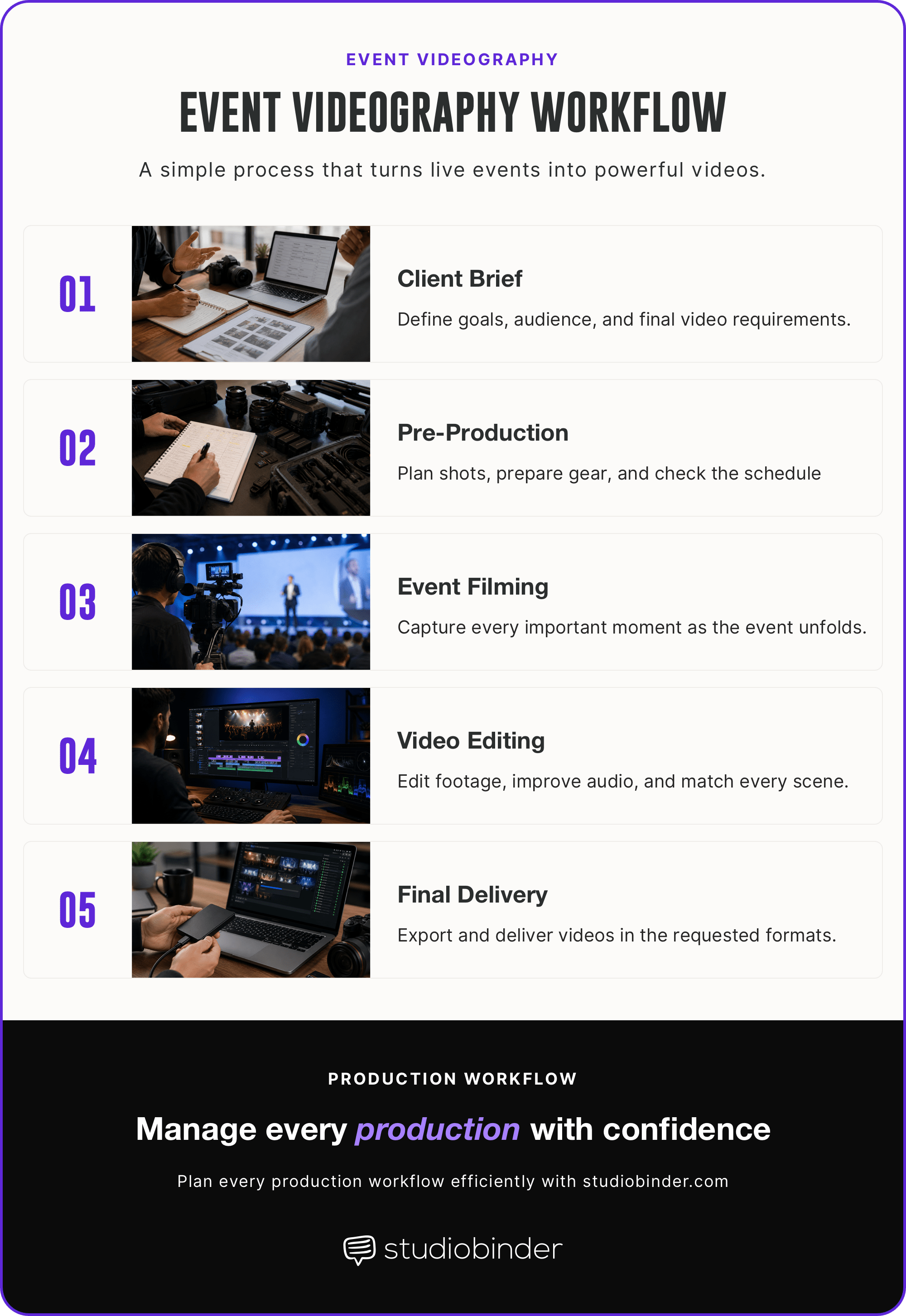
The job has four phases. Plan the coverage before the event. Execute the shot list on the day. Edit the footage into deliverables. Hand off to the client. On shoot day, videographers manage a multitude of tasks. They run audio and operate cameras in crowded spaces. Most importantly, they capture everything while staying invisible.
Related Posts
Event Videography
What are the types of event videography?
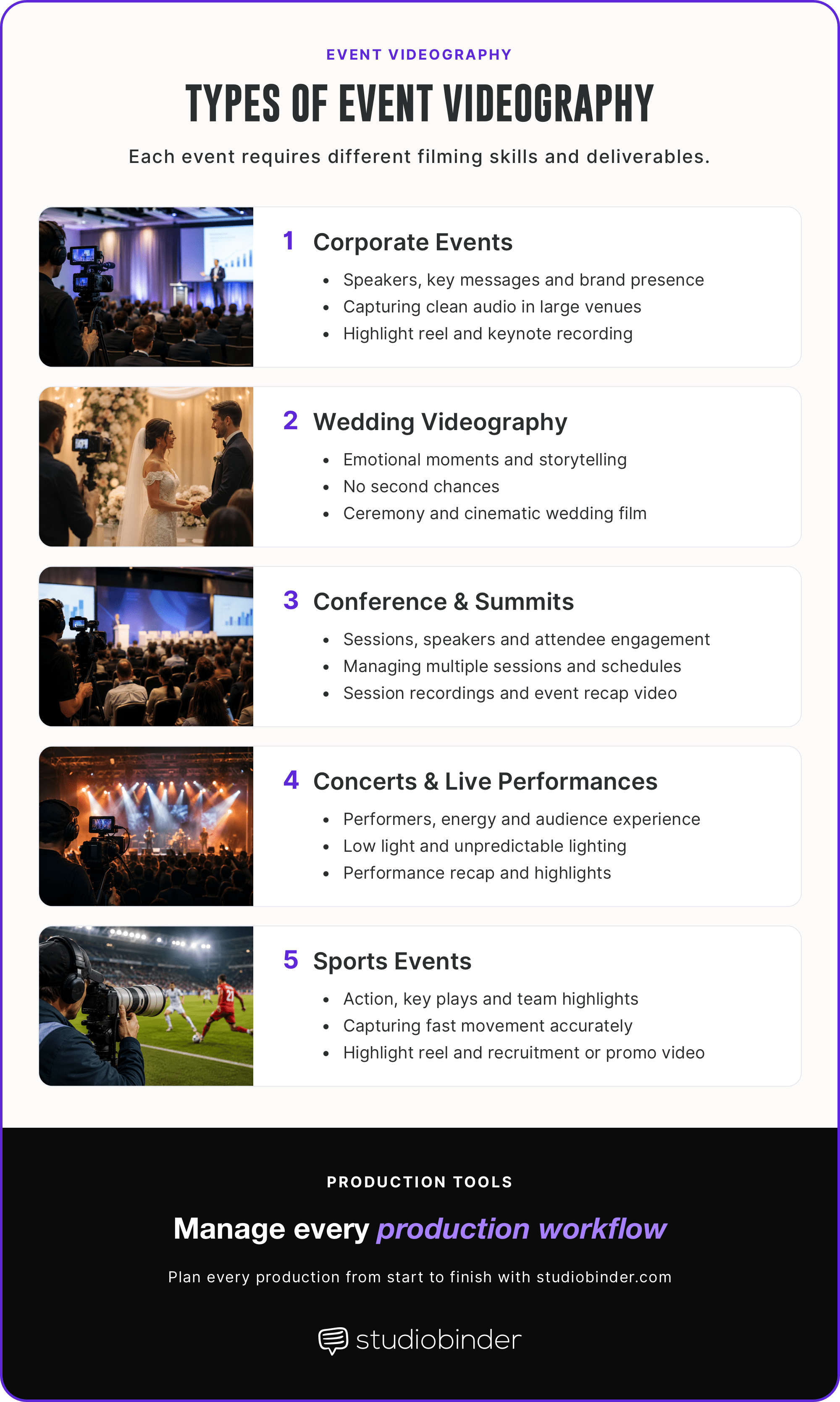
Not all events are filmed the same way. Each category comes with its own pace, deliverables, and technical demands. Knowing which type you are dealing with, before you show up, changes everything.
Common types and event categories • Event videography
Event Videography
1. Corporate event videos
Corporate event videography covers conferences, product launches, town halls, and internal communications. The tone is professional. The stakes are reputational. Typical deliverables include a highlight reel.
Usually also a full keynote recording, and a short sizzle reel for marketing use. Clean audio is non-negotiable. If the speaker cannot be heard clearly, the video is unusable. A wireless lavalier on the presenter is standard practice, not an upgrade.
Think of Apple's product launch events. Even at that scale, the fundamentals are the same. Capture the speaker, capture the crowd, deliver something the brand can use.
Related Posts
Event Videography
2. Wedding videography
Wedding videography is emotionally high-stakes, technically unforgiving, and completely unrepeatable. The ceremony starts once. The first dance happens once. You do not get a second shot.
Deliverables typically include a ceremony film, reception highlights, and a short cinematic edit. This edit is often set to music the couple has chosen. Average cost in the US runs between $1,800 and $2,500.
Though full-day coverage with two shooters can push well beyond that. Audio makes or breaks a wedding film. Have a wireless lav on the officiant, and ideally on the groom. Those capture vows cleanly even in large or outdoor venues.
Event Videography
3. Conference and summit filming
Large conferences and summits are logistical challenges as much as creative ones. Multiple stages, overlapping sessions, and two or three shooting days are common. Deliverables usually include individual session recordings.
A multi-day highlight reel, and sometimes a live stream component for remote attendees is also typical. A detailed run-of-show document is essential — without it, you will be in the wrong room at the wrong time.
Multi-camera setups are standard here. One locked-off camera on the stage. One roaming for audience reaction and B-roll. Coordinate with event staff before the doors open.
Event Videography
4. Concert and live performance
Concert filming rewards preparation and punishes rigidity. Lighting changes every thirty seconds. The crowd moves. The energy is the story. Audio is the first technical decision.
Pull the feed directly from the soundboard. That will give you clean, mixed audio without fighting room acoustics. Camera operators need to work fast in low light. That means lenses with wide apertures and cameras with strong high-ISO performance.
Dynamic lighting can be a creative asset if you expose for it correctly, or a blown-out mess if you do not.
Event Videography
5. Sports event videography
Sports videography is about speed — both on the field and behind the camera. Subjects move fast and do not wait for focus. High shutter speeds freeze motion cleanly.
Long telephoto lenses get you close without being in the way. High frame rate shooting — 60fps or 120fps — gives you usable slow motion in the edit.
The most common deliverables are highlight reels and athlete recruitment tapes. Both require tight, well-paced editing as much as strong footage.
Related Posts
Event Videography
Event videography equipment
Event videography does not reward the best gear. It rewards the right gear, used by someone who prepared. Here is what that looks like in practice.
Camera Systems for Events
The best event camera is one you can operate fast, in bad light, without stopping to adjust settings. Mirrorless cameras dominate event work for good reason.
Bodies like the Sony A7S III or Canon R5 C handle high ISO exceptionally well. Meaning they perform in dim ballrooms and backlit stages without falling apart. Dual card slots are not a luxury. They are insurance. If one card fails mid-event, the second keeps rolling.
A two-camera setup is the practical standard. One camera locked off on a tripod covers the stage or speaker continuously. That frees the second operator to roam. They can capture crowd reactions and candid moments. A second camera can also capture B-roll without interrupting the main recording.
Standard production workflow process • Event videography
Event Videography
How to plan your event video shoot
Most event videos fail before the camera rolls. Bad footage is rarely the problem. Bad preparation almost always is. Here is how to plan a shoot that holds up when the day gets chaotic — and it will get chaotic.
Pre-Production Checklist
Every good production starts with a solid pre-production checklist. Begin with a venue walkthrough. Walk the space before the event. Locate the stage, the lighting sources, the power outlets, and the spots where audio will be a problem.
A ballroom with hard floors and high ceilings will fight you on sound. Know that before you show up with gear. Get the run-of-show as early as possible. This is the event's minute-by-minute schedule — and it is the foundation of your shot list. Map every moment you need to capture directly to it.
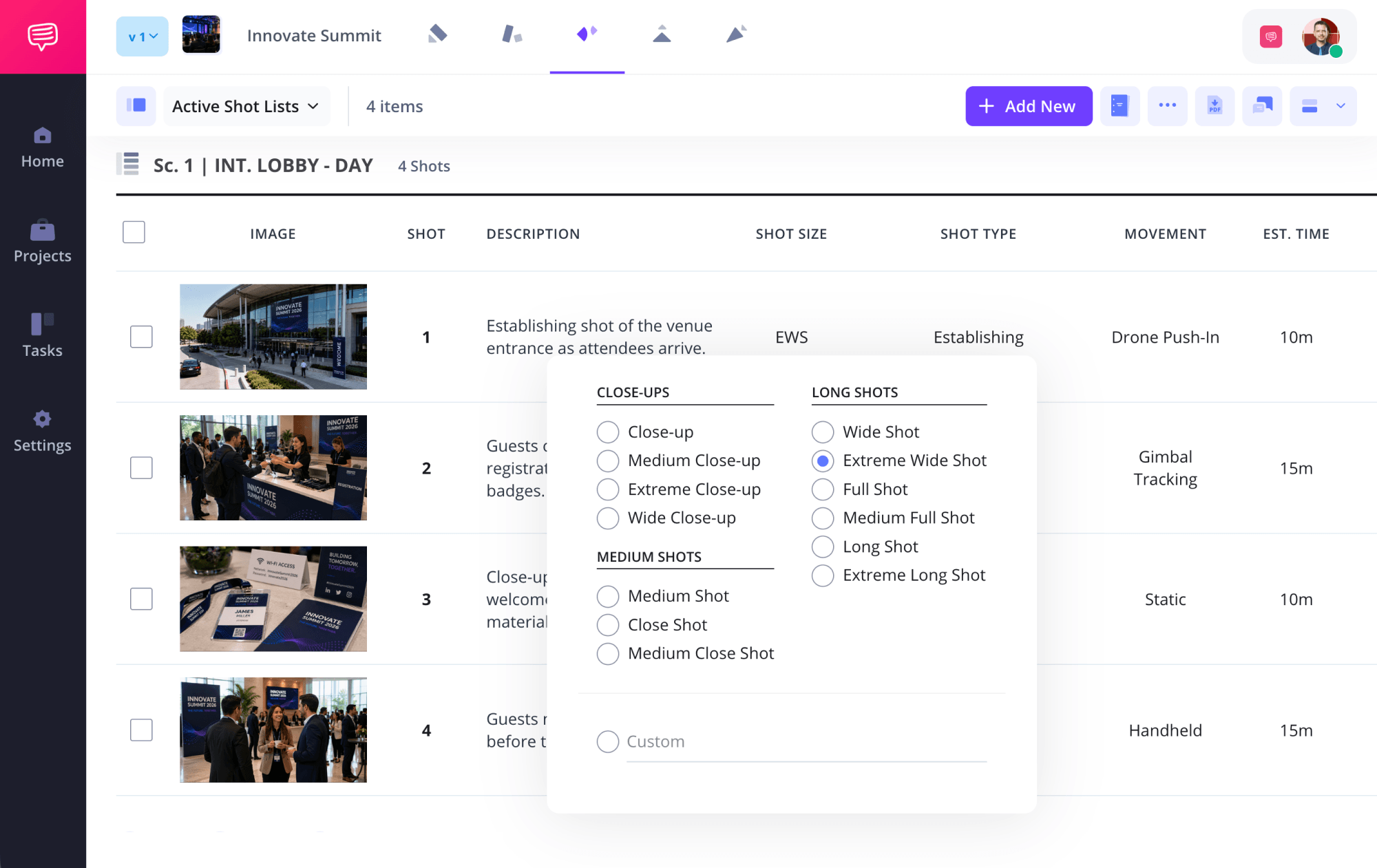
StudioBinder's Shot List Creator allows you to build a comprehensive shot list so you can make sure that everyone is on the same page in terms of what shots are needed.
Plan out your event videography shots • StudioBinder's Free Shot List Software
Best of all, StudioBinder connects your whole team, allowing them to leave comments and get updated with any changes made to your shot list. And believe us, changes will be made up until the day the shoot starts.
Next, go through your equipment. Charge every battery. Format every card. Pack doubles of both. Confirm deliverables in writing with your client. Include what they expect to receive, in what format, and by when.

Canon R5C vs Sony A7siii Video • Event videography
Audio Capture for Live Events
If the video looks great but sounds bad, the video is bad. Full stop. Audio gear is a must-have. Audio fails more event videos than anything else. The fix is redundancy. A wireless lavalier on the speaker gives you a clean, isolated vocal track.
A boom mic captures ambient sound and room tone. For concerts and panel events, you want a direct feed from the soundboard. That will give you a professionally mixed signal without fighting the room.
Never rely on a single audio source at a live event. Run at least two simultaneously. If one fails — and eventually one will — you have a backup that saves the edit.
Lighting in Unpredictable Venues
You cannot control venue lighting. You can prepare for it. Most event spaces mix tungsten, fluorescent, and LED sources. Sometimes all in the same room.
A bi-color LED panel gives you a fill light you can dial to match whatever the venue is throwing at you. Small, battery-powered panels are practical for run-and-gun work. That's where rigging a light stand is not an option.
That said, your camera's ISO performance is your primary tool. Learn its limits before the event. Know exactly where your footage starts to fall apart, and expose accordingly. Added light helps — but leaning on it too heavily in a live setting creates its own problems.
Stabilization on the Move
Shaky footage is distracting. At an event, you are almost always moving — which means stabilization is not optional. In-body image stabilization (IBIS) is the baseline. Most modern mirrorless cameras include it to handle minor movement well.
Need to shoot longer walking shots or crowd navigation? A 3-axis gimbal smooths out the footage significantly. If you need fast repositioning, stage movement, or crowd navigation? A monopod will give you stability without the bulk.
Choose based on how much you need to move. A locked-off conference keynote needs none of this. A wedding reception where you are weaving between tables needs all of it.
Day-Of Shot List
Break the event into sequences and work through them in order. Arrival and setup. Keynotes or ceremonies. Candid coverage. Key moments and closes. Prioritize ruthlessly. You will miss something — that is not a failure, it is a reality of live event work.
The job is knowing what you cannot miss versus what you can live without. The vows at a wedding. The keynote opener at a conference. The winning goal. These are non-negotiable. Everything else is gravy.
Build two tiers into your shot list before the day starts. Tier one is a must-have. Tier two is get-if-possible. When things run late or overlap, and they will, you make decisions from that framework. That way you won't be panicking. Stay flexible.
With StudioBinder, you have an array of shot sizes, types, and movements to choose from. As well as the option to enter in custom information. Your whole team and all other connected documents get updated as soon as you make any changes.
Plan out the shots on your event videography shoot • StudioBinder's Shot List Software
The run-of-show is a guide, not a contract. Speakers run long. Ceremonies start late. The best event videographers adapt without losing the thread.
Trusted by over 1M creatives
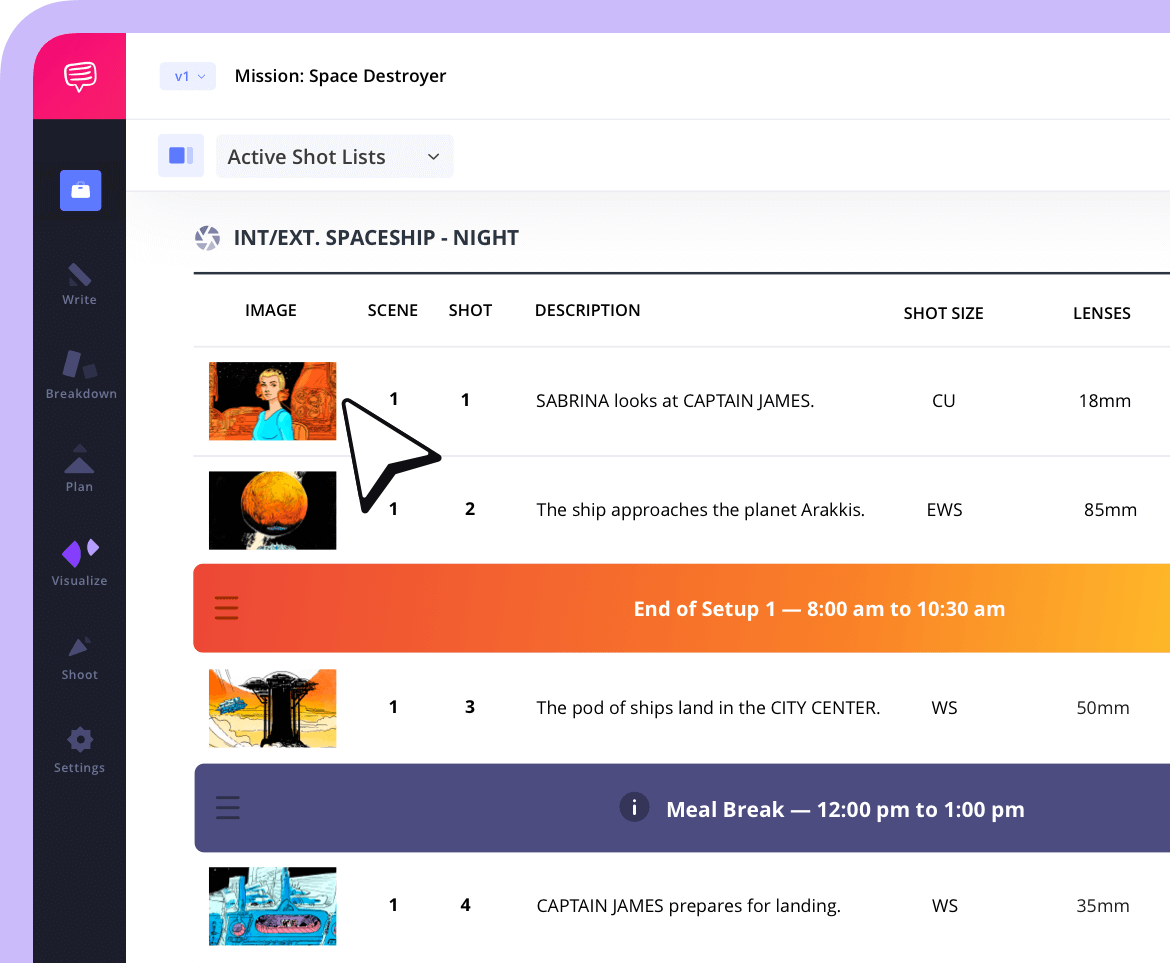
Shot lists that turn vision into action
From first draft to final take, plan, organize, and execute every shot with confidence.
Post-Production Workflow
Ingest everything as soon as you are back. In post-production, you organize footage by sequence - not by camera or card. You want to find the ceremony footage fast, not dig through three cards looking for it.
Cut the highlight reel first. This sounds counterintuitive but it works. Finding the best thirty seconds of each footage hour early lets you identify your strongest material. And all before fatigue sets in. The highlight reel also tends to be the deliverable the client wants fastest.
Then build the full-length cuts from your selects. Color grade for consistency across cameras and lighting conditions. Mix the audio tracks — board feed, lavs, ambient — into a clean final mix. Add lower thirds and titles last. Deliver in the format you confirmed during pre-production. No surprises.
Event Videography
How much does event videography cost?
Event video pricing varies widely. But it is not arbitrary. Every number ties back to crew size, time, and complexity. Here is what you are actually paying for.
Budget Tiers Explained
Entry level: $500–$1,500. One shooter, one camera, a basic edit. Works for small internal events, community gatherings, or low-stakes social content. Do not expect multicam coverage or a polished cinematic cut at this tier.
Mid range: $2,000–$5,000. Two shooters, multicam setup, a longer edit with proper color and audio mixing. This is the standard range for corporate events, mid-size conferences, and wedding videography. Most professional event videographers operate here.
Professional: $5,000–$15,000+. Full crew, multiple cameras, multi-day coverage, live stream capability, and broadcast-quality delivery. This is the tier for large conferences and major product launches. Anything with a live or hybrid audience component falls into this tier as well.
DIY vs. Hiring a Professional
DIY event video makes sense in one scenario. These are small, internal events. The deliverable expectations are modest and the footage is for internal use only. Anywhere else, hire a professional.
A bad event video is not just a creative disappointment. For a brand, it is a public-facing asset that reflects poorly on the organization. For a couple, it is an irreplaceable memory gone wrong.
For a conference, it is the recording that speakers and attendees will reference for years. The cost of doing it badly is reputational, not just financial. A professional videographer at the mid-range tier costs less than most people assume. And far less than reshoots are even possible.
What Drives Price Up or Down
These are the variables that move the number:
Crew size. Every additional operator adds day rate cost. A two-person crew costs roughly double a solo shooter.
Event duration. Full-day and multi-day shoots cost more than half-day coverage. Simple math, but often underestimated.
Turnaround time. This is the biggest price multiplier. A 48-hour turnaround on a highlight reel can double the post-production cost. Especially when compared to a standard one-week delivery window.
Deliverable count matters. A highlight reel, a full-length cut, and three social edits? Those all create a massive post-production scope. This requires far more work than a single deliverable. Each cut costs time
Live stream component. Adding a live stream requires dedicated equipment. You'll need a streaming operator, and technical setup. Those sit entirely outside standard event coverage.
Know what you need before you request a quote. The clearer your brief, the more accurate the number you get back.
Related Posts
Frequently Asked Questions
Event videography FAQs
A typical event videography setup includes a mirrorless camera, fast lenses, wireless microphones, a tripod or gimbal, extra batteries, memory cards, and portable lighting. The exact gear depends on the event type, venue, and lighting conditions.
Event videography costs vary based on the event size, crew, equipment, and deliverables. Small events may cost a few hundred dollars, while large corporate events, weddings, and conferences often require a larger budget due to additional cameras, editing, and production time.
Event videography records motion, sound, and live moments to create a video, while event photography captures individual still images. Many events hire both services because they serve different purposes and create different types of memories.
Editing time depends on the amount of footage and the final deliverables. A short highlight reel may take several days, while multi-camera event coverage or full-length recordings can require a week or more to organize, edit, color grade, and deliver.
Planning ensures the videographer knows the schedule, key moments, camera positions, audio setup, and client expectations before the event begins. Good preparation reduces missed shots and helps deliver a polished final video.
UP NEXT
Videography Contracts
You now have a full picture of event videography. What it is, what it costs, and how to plan a shoot that holds up under pressure.
The next practical step is protecting yourself on the job. A solid videography contract sets clear expectations before the event starts. It covers deliverables, timelines, usage rights, and payment terms. It is the difference between a smooth client relationship and an expensive dispute after the fact.

Create production calendars with a drag-and-drop timeline
Create customizable production calendars for your next video or photoshoot. Add events, tasks, and dependencies. Invite your team and share calendars with clients.