No matter if you’re an aspiring filmmaker or passionate about visual storytelling, having a plan to bring your story to life is crucial. Filmmaker Spike Lee said “I ain’t Martin Luther King. I don’t need a dream. I have a plan.” One of the most important planning a director can do is to create a shot list to translate their vision from their mind’s eye to the camera’s.
So, what is a shot list? And more specifically, what is a shot list for film? We’re going to define the term, why it’s essential for filmmakers, and how to create one that will set your production up for success.

How to make a shot list in StudioBinder
What is a shot list film?
The basics of shot listing
Whenever you’re shooting something - whether it’s a television series, feature film, or even a brief commercial spot, there’s quite a bit to consider. Lighting, sound, actors, sets…the list goes on. In fact, poor scheduling affects budget and delays production for 93% of independent filmmakers. Having a shot list is an integral part of staying on schedule as a director.
But what is a shot list in film? Let’s break down the definition:
SHOT LIST DEFINITION
What is a shot list?
A shot list is a document that maps out everything that will happen in a scene of a film, or video, by describing each shot within that film or video. It serves as a kind of checklist, providing the project with a sense of direction and preparedness for the film crew.
It is typically made in collaboration with the director, cinematographer, and even first assistant director. Shot lists are especially critical in managing and preparing for film scenes. Making a movie demands knowledge of shot type, camera movement, lighting, actor staging, and much more. Putting this information down in a shot list helps filmmakers keep track of what is needed, and how to capture it on the day of the shoot.
With so many moving parts, having a concrete document stating which shots demand what equipment, and how long shot setups will take, determine so much of the schedule and budget.
What goes on a Shot List?
- Brief description of shot- action, characters
- Scene number and shot number
- Shot type (close-up, wide shot, etc.)
- Camera angle
- Camera movement
- Camera equipment
- Framing (aspect ratio)
- Location (INT./EXT.)
- Setup times
- Sometimes audio notes, or prop mentions
Because the schedule, and even budget, are dependent upon what’s happening in the shot list, it’s important to share your shot lists with key crew members, especially your assistant directors who are building the shooting schedule.
Producers need quick access to the decisions directors make as their collaboration is integral to making the movie. Learn more about how the producer and director work together.
Which is why older shot lists, like the one below, aren’t as helpful as shareable shot list templates and may leave them thinking "what is a shot list for film?"

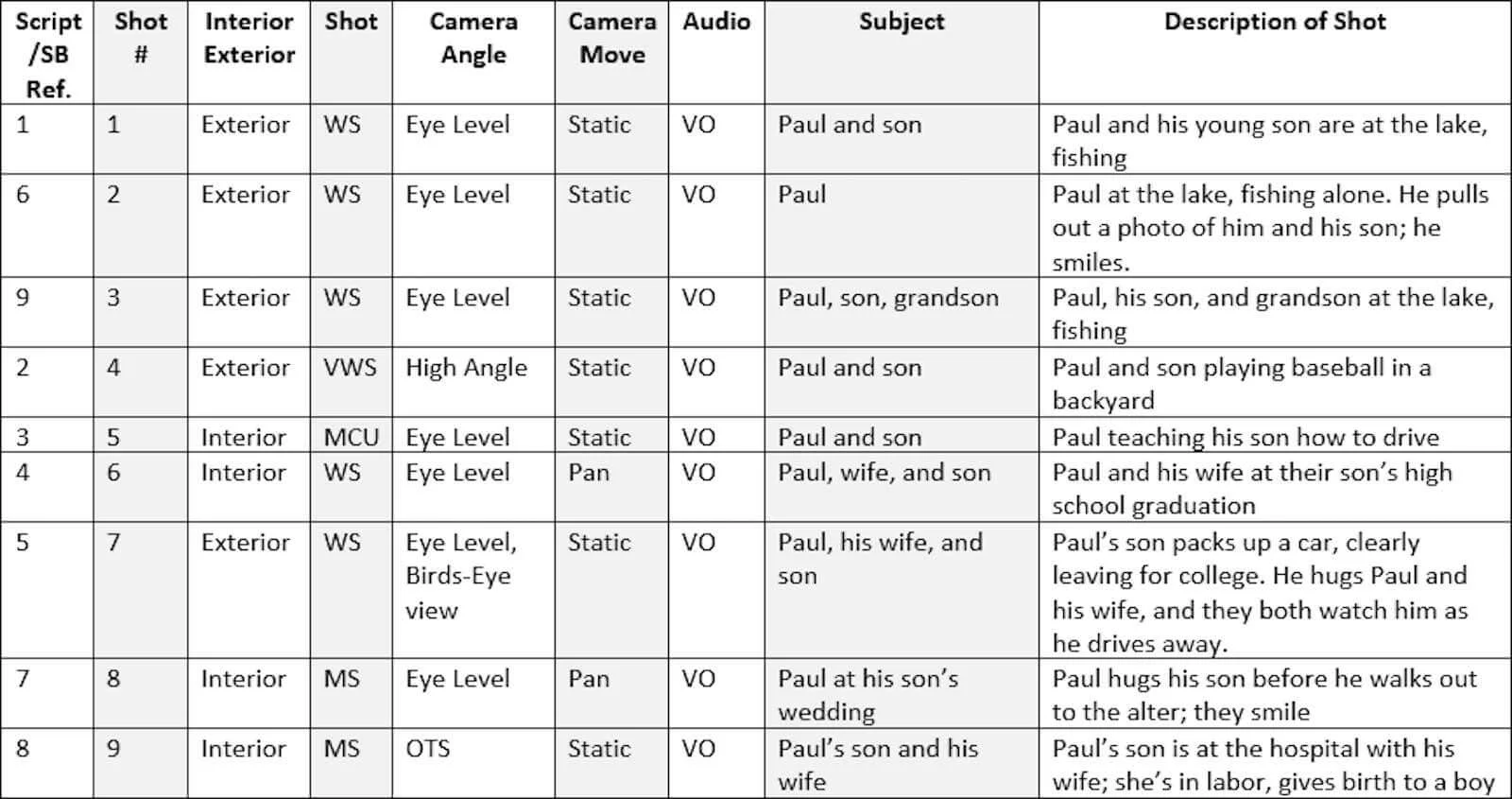
Antiquated shot list example
Now, while there’s no question that this information is incredibly helpful before shoot day, it’s hard to make quick changes, and when you do, “sharing” really means emailing back and forth, which isn’t a helpful, visual way to exchange ideas. You also risk important changes to the shot list getting lost on endless message threads.
More helpful maps have come onto the scene that are both visually insightful and easily shareable. Instead of static documents buried in email threads, modern shot list templates allow you to update, organize, and share your shot list with your crew in real time.
Let’s take a look at StudioBinder’s shot list below.
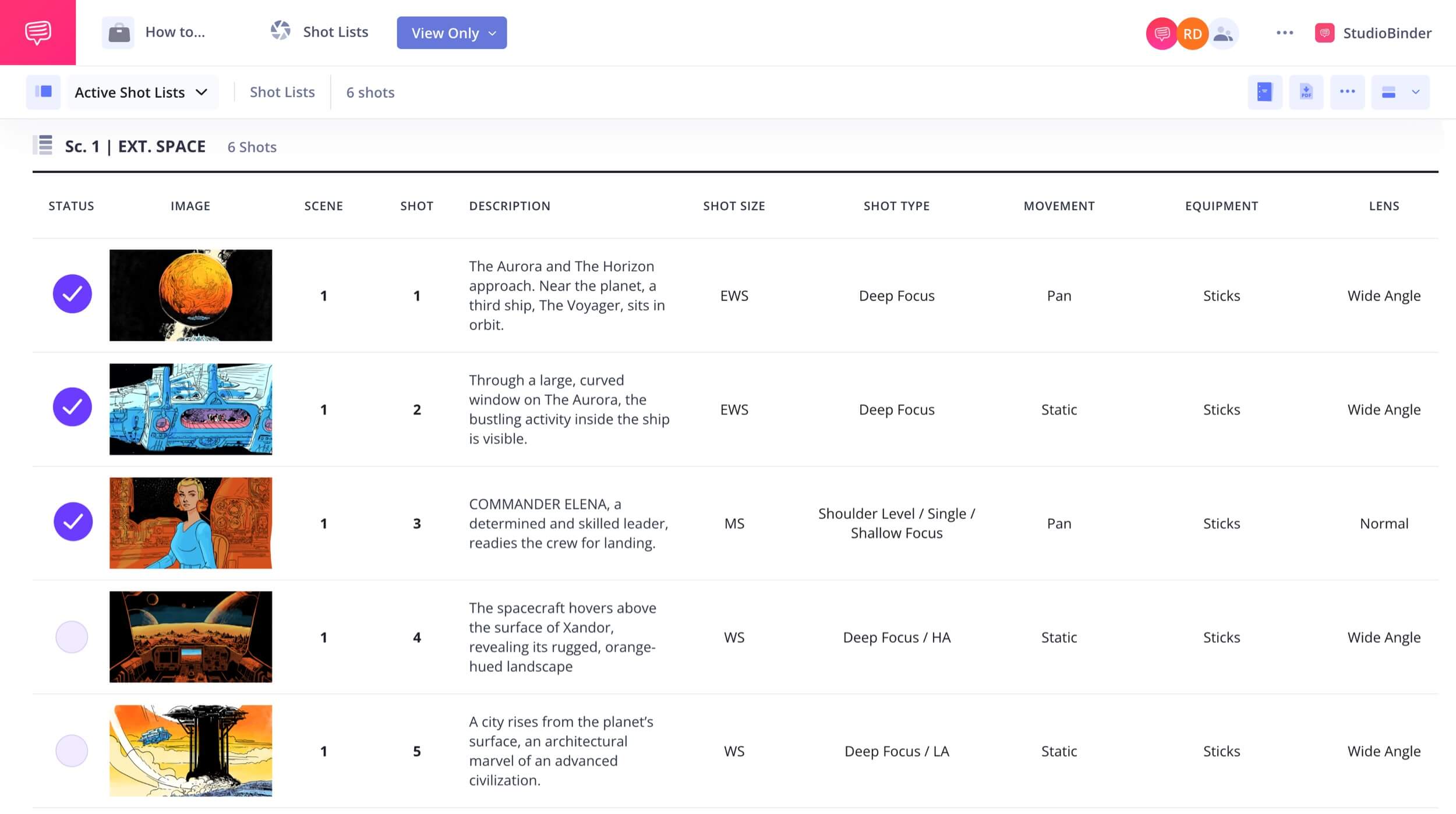
Notice all of the options you have. They’re in line with the shot list definition above and clearly show what goes into a shot list.
You can add a shot description, shot number, shot type, camera angle, movement, and equipment. You can also determine framing or aspect ratio you plan to shoot in.
Selecting a shot size | StudioBinder Shotlist Software
The same applies for adding camera movement...
Adds dolly as camera movement | StudioBinder Shot List Software
...and Lens details. Don't know which camera lens? StudioBinder makes it convenient by laying out the most common lens options (mm).
Selecting a camera lens | StudioBinder Shot List Software
A shotlist may have different columns depending on the type of production, and its requirements. Below are the various shot list columns that can be considered. In this case, you can toggle them as needed.

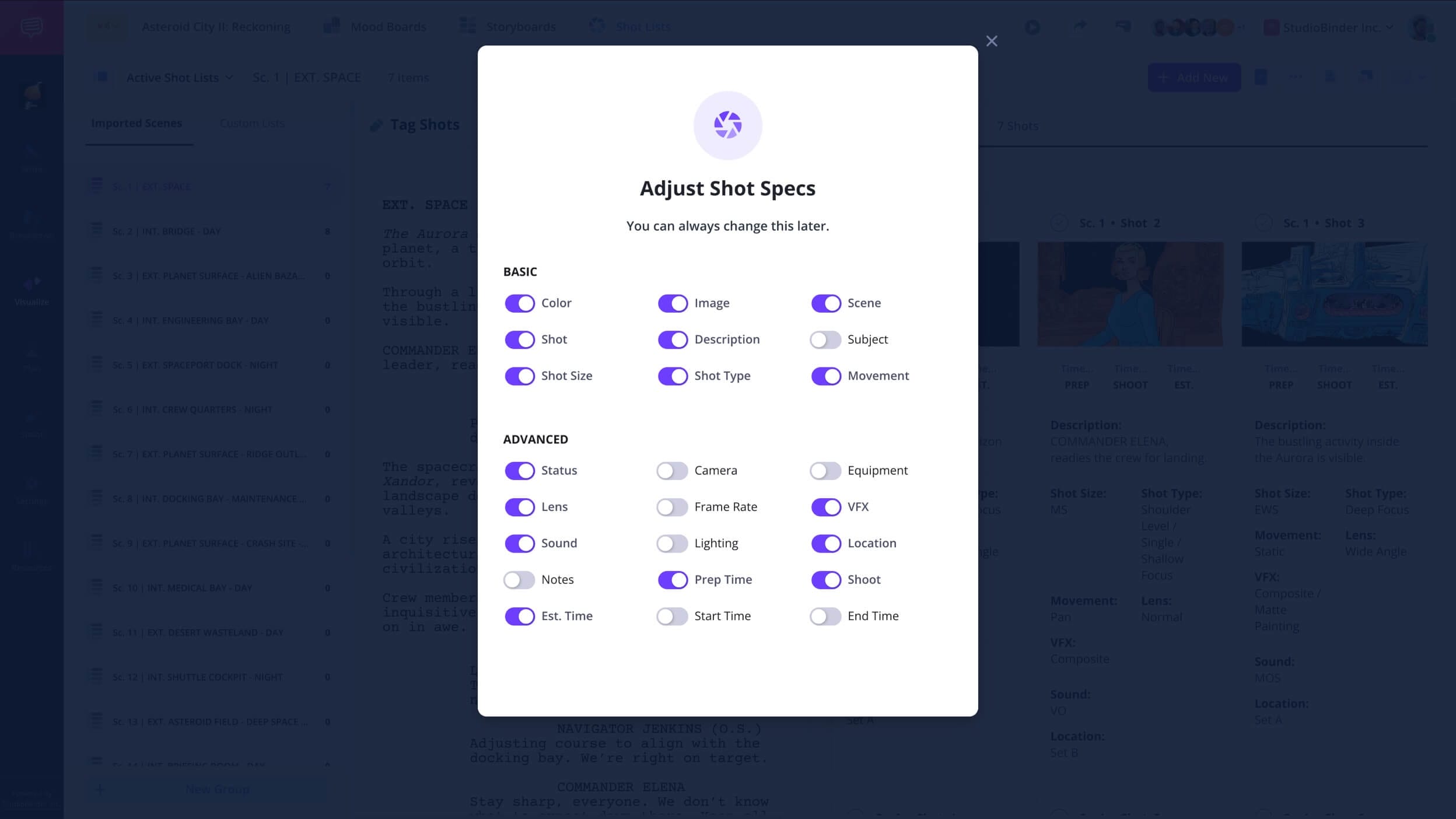
Adjust columns like camera movement, lighting, etc | View sample shot list
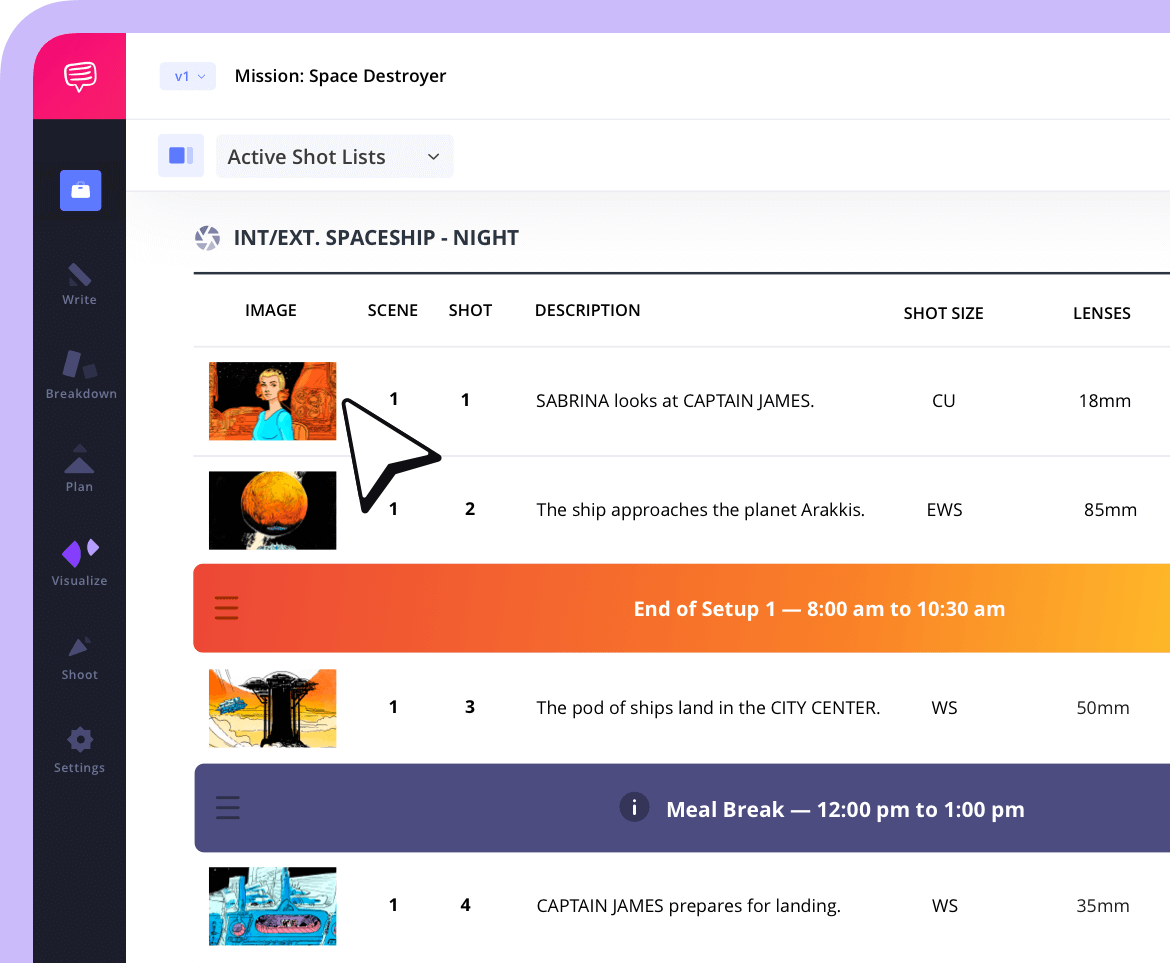
Don’t forget about setup and prep times. Banners for meal breaks can also let your team know what is coming up next in the schedule
The storyboards you draw can be easily dropped into the shot list. So now you have more of an understanding of what the shot needs to actually look like and what is a shot list in film.
In StudioBinder’s shot list, you can also add the real shots in as you go. You can then use the shot list to determine if you need any reshoots.
What would that look like?

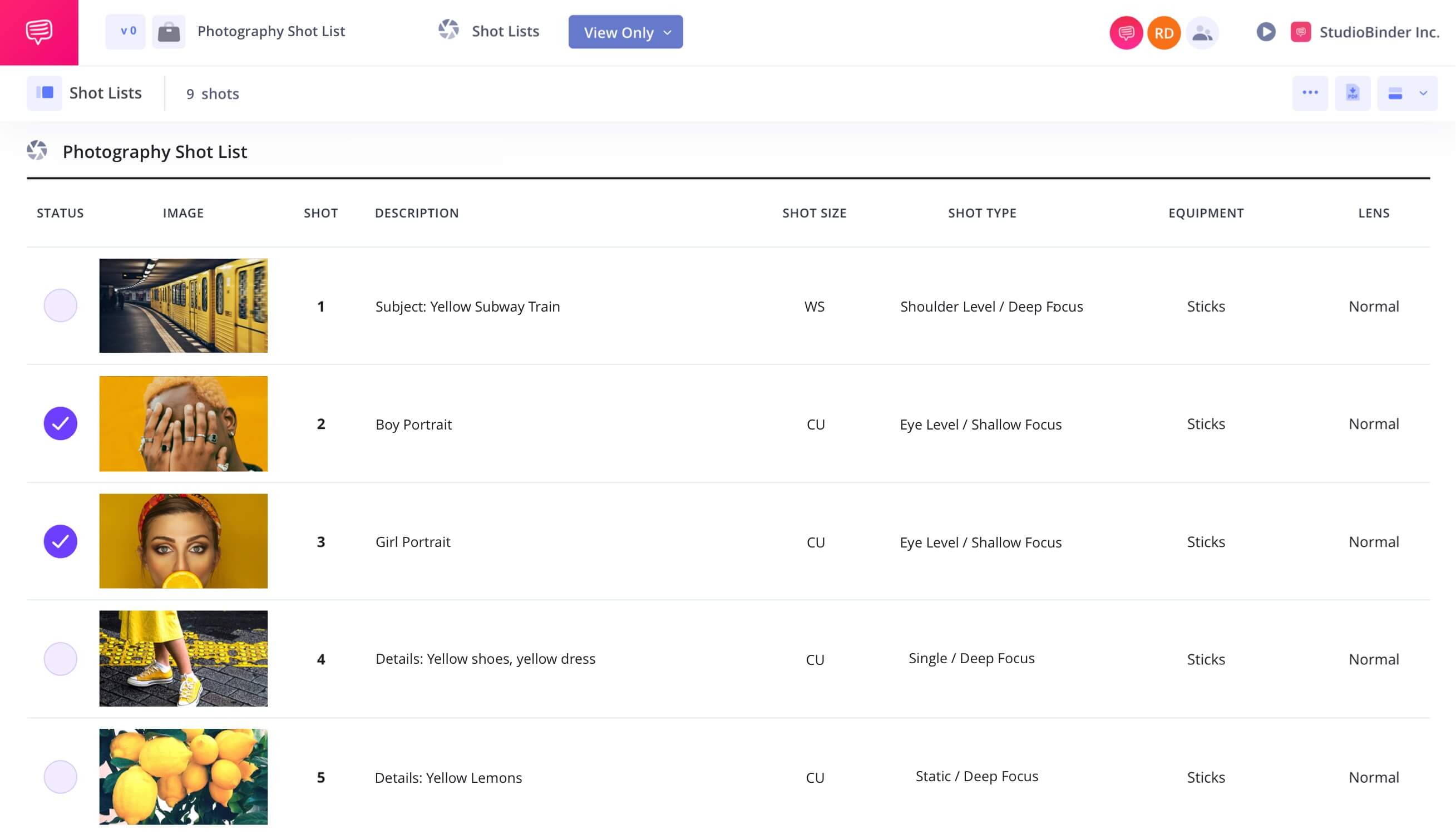
What’s equally powerful is that you can share all of this with one click.
Your team can leave comments in real time, keeping producers, assistant directors, and department heads aligned without the confusion of endless email chains.
When you circulate a shot list during pre-production, collaborators can build upon it in specific, practical ways:
Director of Photography (DP): Refines the visual strategy by selecting lenses, designing lighting setups, planning camera movement, and identifying equipment needs.
1st Assistant Director (1st AD): Evaluates shot complexity and estimates setup times to build a realistic shooting schedule.
Film Producer: Anticipate location demands, prep requirements, crew needs, and budget implications.
Can shots change on set? Absolutely.
A shot list is not set in stone. However, having a structured, shareable shot list ensures alignment. It gives your crew a clear game plan for the day, even if adjustments are necessary. When changes happen, they happen from a place of preparation rather than confusion.
A shot list does not limit creativity. It gives it structure.
Trusted by over 1M creatives
Shot lists that turn vision into action
From first draft to final take, plan, organize, and execute every shot with confidence.
Anatomy of a shotlist
What does a shot list look like?
With so many elements to keep track of, it’s easy to get overwhelmed by all of the moving parts a shot list is supposed to help you track.
Here's a table provides exactly what goes on a shot list for a film project:
Shot # | Description | Shot Type | Movement | Equipment | Time |
|---|---|---|---|---|---|
12A | Character enters the room | Wide Shot | Dolly In | Tripod + Dolly | 20 min |
12B | Reaction | Close-Up | Static | 50mm Lens | 10 min |
12C | Two characters converse | Medium Shot | Handheld | DSLR + Gimbal | 15 min |
13A | Character looks out the window | Wide Shot | Static | 35mm Lens | 10 min |
If you’re confused by any terminology or what type of shots to include, check out the video below that breaks down every type of camera shot:
![Ultimate Guide to Camera Shots: Every Shot Size Explained [The Shot List, Ep 1]](https://i.ytimg.com/vi/AyML8xuKfoc/hqdefault.jpg)
What is a shot list film? • Subscribe on YouTube
Knowing what you want to shoot and how you want to shoot it on your shot list makes for a smooth, enjoyable filmmaking process.
Related Posts
What is a Shot List in Film
How to make a shot list in 5 steps
There’s plenty of filmmaking software and tools to help a director make their shot list, but the process of compiling a shot list is the same for all filmmakers. It consists of five major steps: breaking down the script, selecting shot types, organizing scenes in shooting order, budgeting in equipment and timing, then sharing and amending the list as needed.
For an in-depth walkthrough of the shotlisting process, you can watch the video below, and then follow along to the steps below:

Learn how to make a shot list in StudioBinder
The following tutorial will break down all of your questions regarding what is a shot list in filmmaking:
1. Create your script breakdown
While you may have read the script several times already for dramatic potential, themes, and characters, now it’s time to read to break it down for technical purposes.
First, identify key moments in the story that require specific shots. For instance, where is a close up necessary? Where do you need wider, establishing shots?
Next, go scene-by-scene and make notes on the action, emotional tone, and what needs to be captured visually.
This step can be an arduous, tedious process, but StudioBinder script breakdown software can help you create script breakdowns easily.

Learn how to break down scripts in StudioBinder
Filmmaker Christopher Nolan has said, “the screen is the same size for every story. A shot of a teacup is the same size as an army coming over the hill. It’s all storytelling.” What shots do you need to tell your story effectively and compellingly?
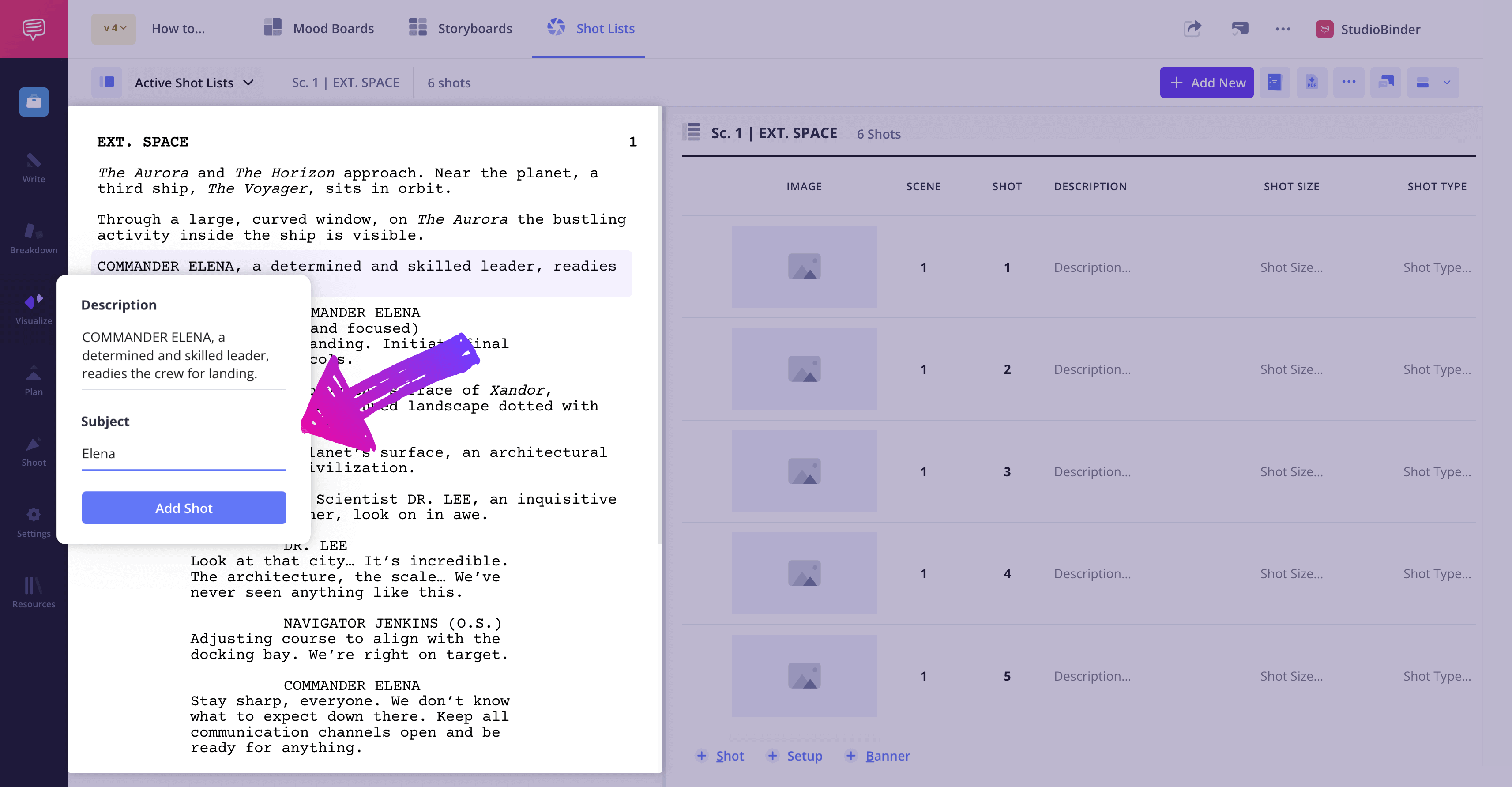
Next, visit the Shot List page and use the Shot Tagger feature to highlight other key camera movements or shots needed. Simply highlight the script line, and click Add Shot.
2. Pick your shot sizes and shot types
Now that you know what needs to be captured on camera in your scene breakdowns, it’s time to decide how to shoot it. For every scene on your shot list, decide what type of shot fits each moment.
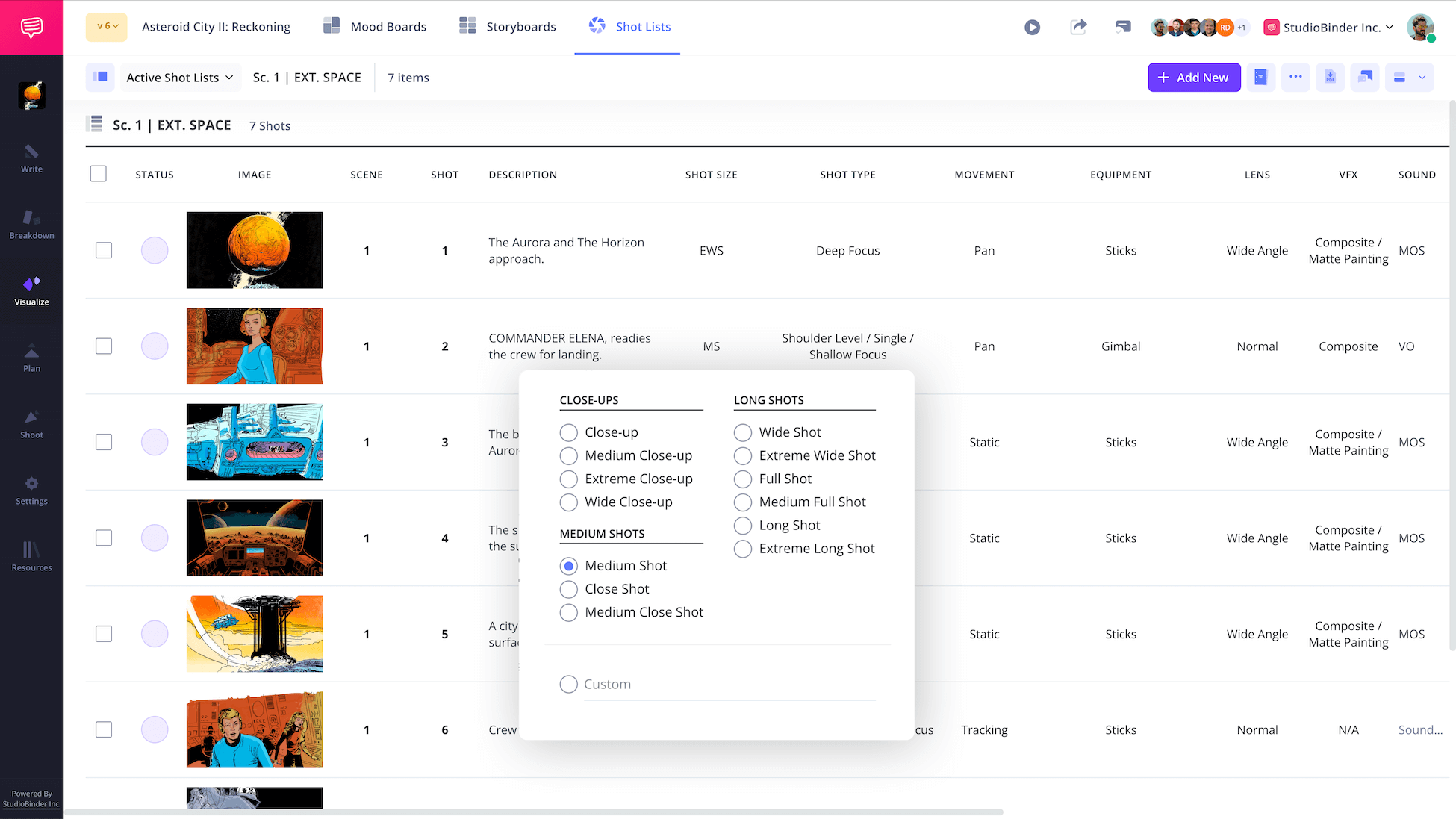
Common shot types include:
- Wide Shot (WS): Wide Shot establishes the scene, showing the environment.
- Medium Shot (MS): Medium Shot shows characters from the waist up, often used for dialogue.
- Close-Up (CU): Close Up focuses on a character or an object, highlighting emotional moments.
- Over-the-Shoulder (OTS): Over the Shoulder often used in conversations to show the perspective of one character.
Follow along in the tutorial below to learn how to add, edit, and organize custom shot types inside StudioBinder.

3. Organize scenes in shooting order
Knowing when you’re shooting each scene is just as important as knowing what and how you’re shooting it. That’s why when making a shot list, it’s imperative to organize the scenes on your shot list in shooting order, not narrative order.
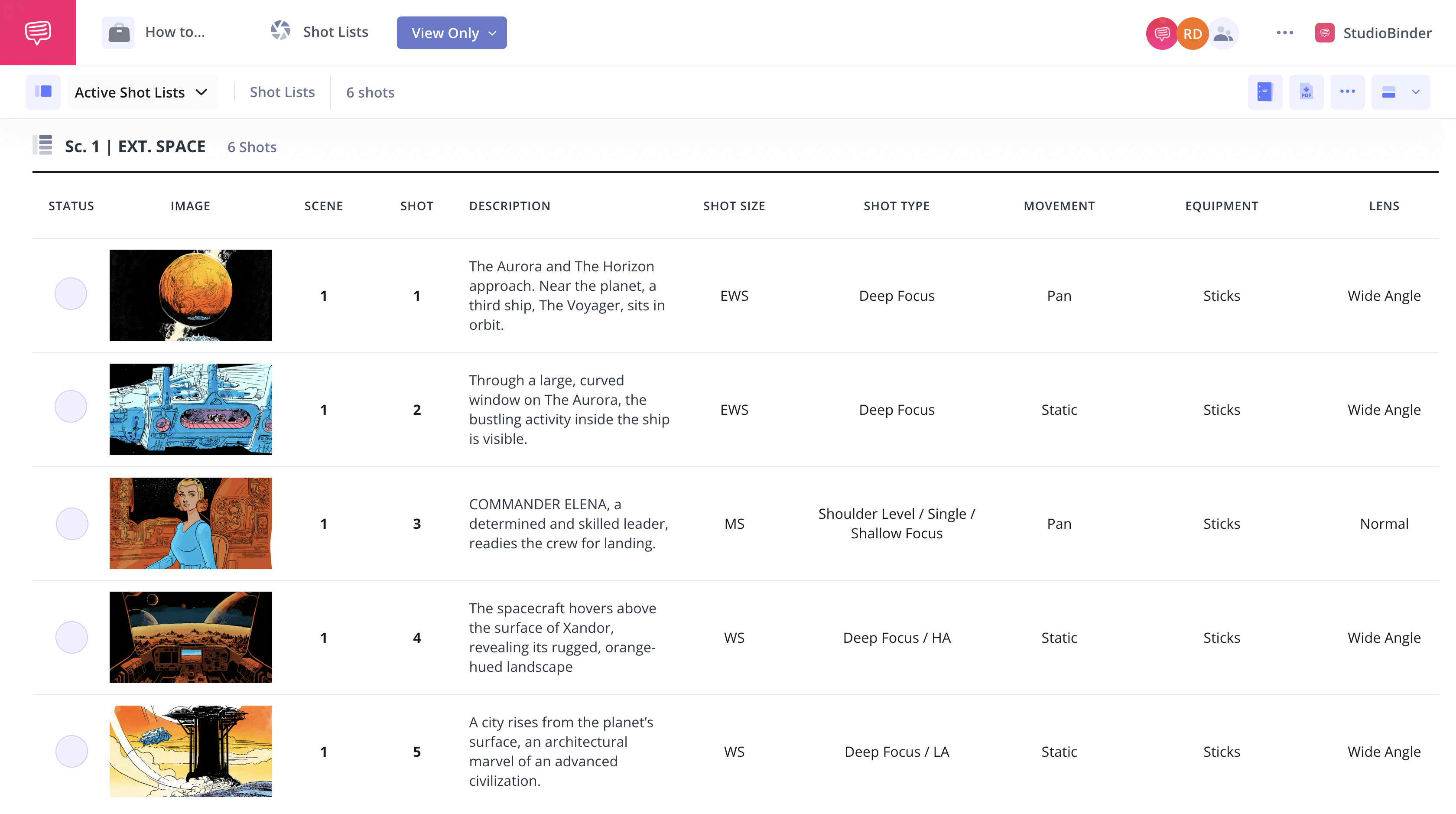
Organizing your shots in shooting order on your list allows you to streamline the shooting schedule, minimizes unnecessary setups, and makes the most of your locations and actors.
4. Add equipment and camera setups
Time is literally money on a film set, and staying on budget is harder than it seems. For instance, over the past fifteen years, only 1 out of 51 Disney films came in under budget, and only half of those films stayed in line with their budgets. So it’s important to not only know what is a shot list, film producers and financiers will also expect you to adhere to it.
Therefore, adding in the duration of setups for each shot, along with budgeting extra time for any special requirements like props or special effects is crucial to include on your shot list. This step allows you and your crew to gauge if your vision for the scene is feasible within your shooting schedule and budget.
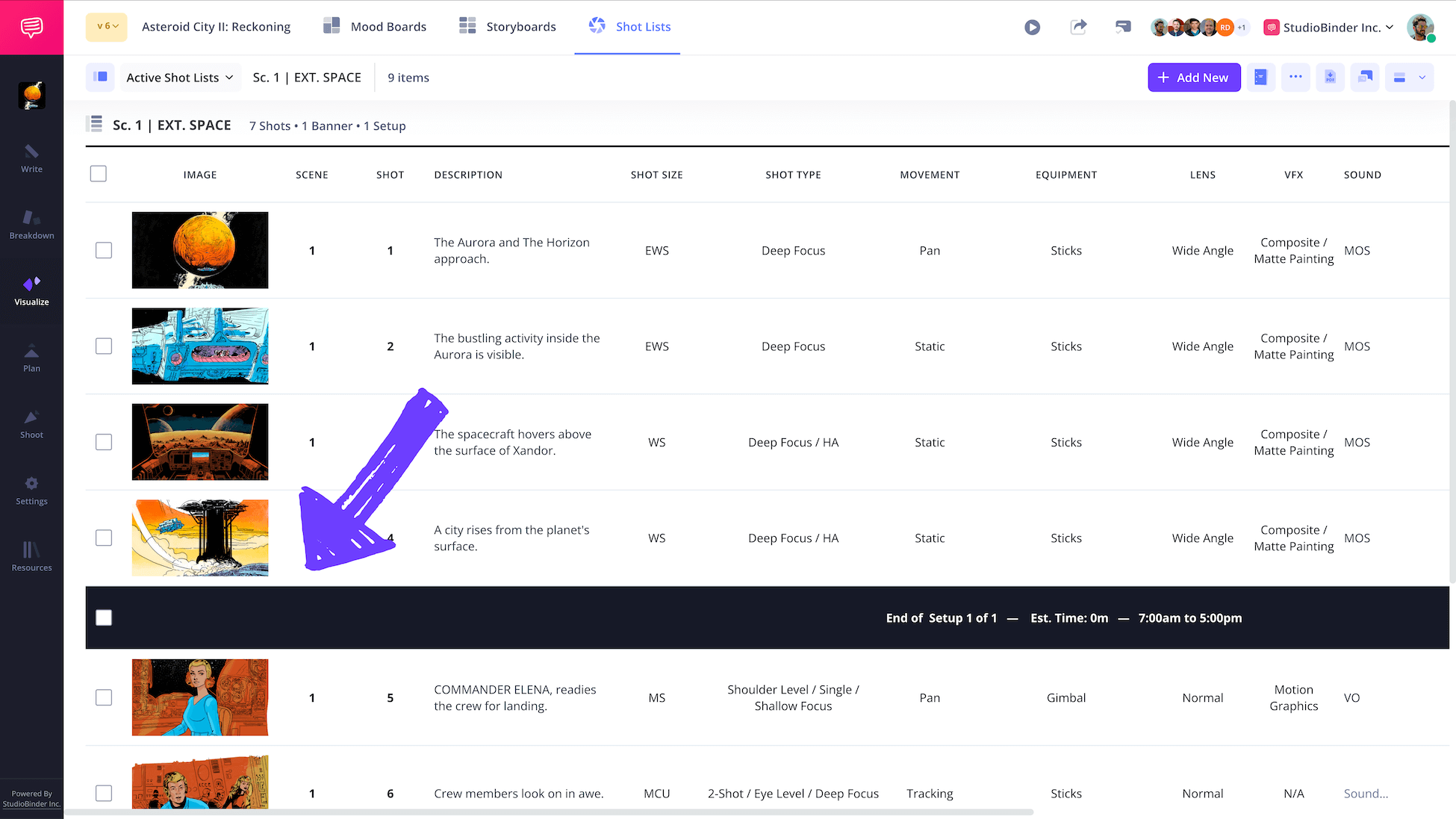
Adding in the camera equipment you’ll need for each setup should also be in your shot list. This way the crew has the time to acquire any special lenses or cameras, and nothing gets left behind on the day of.
5. Share and collaborate with your team
Filmmaking is a collaborative art. So once your shotlist is made, review it in advance with your crew, especially the producer, cinematographer, and assistant director.
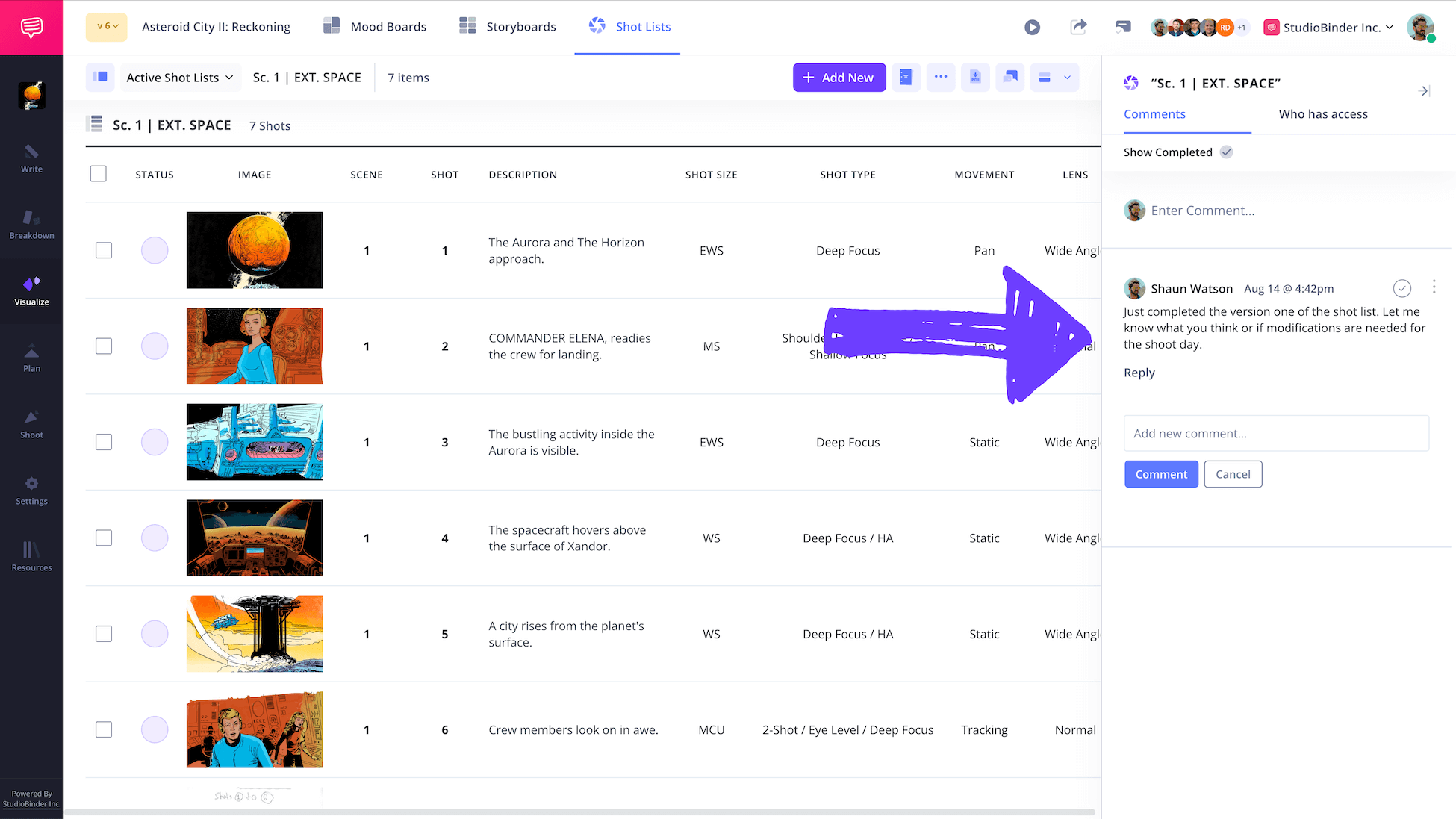
Having key players look over the shot list will help you catch any mistakes and allow for adjustments to be made if necessary.
After you've collaborated to finalize your shot list, watch the video below to learn how to export, print, and share your shot list inside StudioBinder.

Related Posts
Effective shot listing
5 tips for creating effective shot lists
A strong shot list does more than organize your day. It helps translate story into execution. Use these tips to make sure your shot list is both creative and practical.
- Start with the script, not the camera. Break down the scene for emotional beats and story purpose before deciding on shot types.
- Think in coverage, not just hero shots. Make sure you have enough angles and inserts to protect the edit.
- Organize by shooting order. Build your shot list around location, lighting setups, and actor availability to save time on set.
- Be specific with technical details. Include lens choices, movement, equipment, and estimated setup time so your crew can prepare properly.
- Leave room for flexibility. Plan thoroughly, but allow space for adjustments once you are on set.
Trusted by over 1M creatives
Shot lists that turn vision into action
From first draft to final take, plan, organize, and execute every shot with confidence.
Common mistakes with shot lists
5 common shot listing mistakes to avoid
Even experienced filmmakers can misuse a shot list. Avoid these common mistakes to keep your production efficient and aligned.
- Being too vague. Writing “medium shot” without context can create confusion about framing, movement, or purpose.
- Overshooting unnecessary coverage. Adding too many shots can slow down production and inflate your schedule.
- Ignoring setup time. Failing to account for lighting changes, camera builds, or location resets can derail your day.
- Forgetting collaboration. Not reviewing your shot list with the DP, 1st AD, or producer can lead to logistical surprises.
- Treating it as static. A shot list should evolve as production evolves. Update it and share changes with your team.
What is a Shot List in Film?
What’s the difference between a shot list and storyboard?
While a shot list and storyboarding serve similar purposes for a filmmaker, they’re different tools. Understanding their differences and how they can work together will optimize your pre-production planning.
If you’re still asking what is a shot list for film, a shot list organizes both the technical and creative details of every shot in a table or list format, and is used for day-to-day planning of your shoot.
On the other hand, a storyboard’s chief purpose is to visualize the shots in each scene to plan framing and composition. They’re a series of illustrations or images roughly depicting each shot for camera angles and blocking actors.
Basically, a shot list is more about logistics, a storyboard helps you visualize how the shots will actually look. But incorporating storyboards into your shotlists is a handy way to enhance clarity and optimize efficiency on set.
Related Posts
Frequently Asked Questions
Common questions about shot lists
A shot list is a document that outlines every shot in a film or video project to provide a roadmap for shooting. It details the technical aspects—like camera angles, movements, and equipment—alongside the creative elements such as character actions and scene setups to ensure a clear, timely, and cost-efficient production process.
If you’re curious what is a shot list in photography, it’s very similar, but without the emphasis on camera movement.
To create a shot list, go scene by scene and select the shot types, angles, and other technical aspects you want each scene to include. Then organize the scenes in shooting order, not the order they appear in the script. From there, make a list of the equipment and timing needed to execute the shots in each scene.
A shot list can look like a table, spreadsheet, or digital tool showing shot numbers, storyboards, descriptions, camera details, and timing.
A 5-second shot refers to a shot with a planned duration of five seconds on screen, often used in pacing and editing decisions.
Shot lists are important because they reduce the chance of mistakes, save shooting time, improve communication on set, and protect the production budget during filming.
Up Next
How to make a shot list in StudioBinder
You know what a shot list is, the purpose of making one, and its importance, so now it’s time to make one for yourself. Our next post gets into the nitty gritty of each consideration and how to use the list efficiently in our template.
Up Next: How to Make a Shot List →

Share your vision with elegant shot lists and storyboards.
Create robust and customizable shot lists. Upload images to make storyboards and slideshows.